Installation Guide for Uplogix Local Managers 16
DB-9 option card for external modem
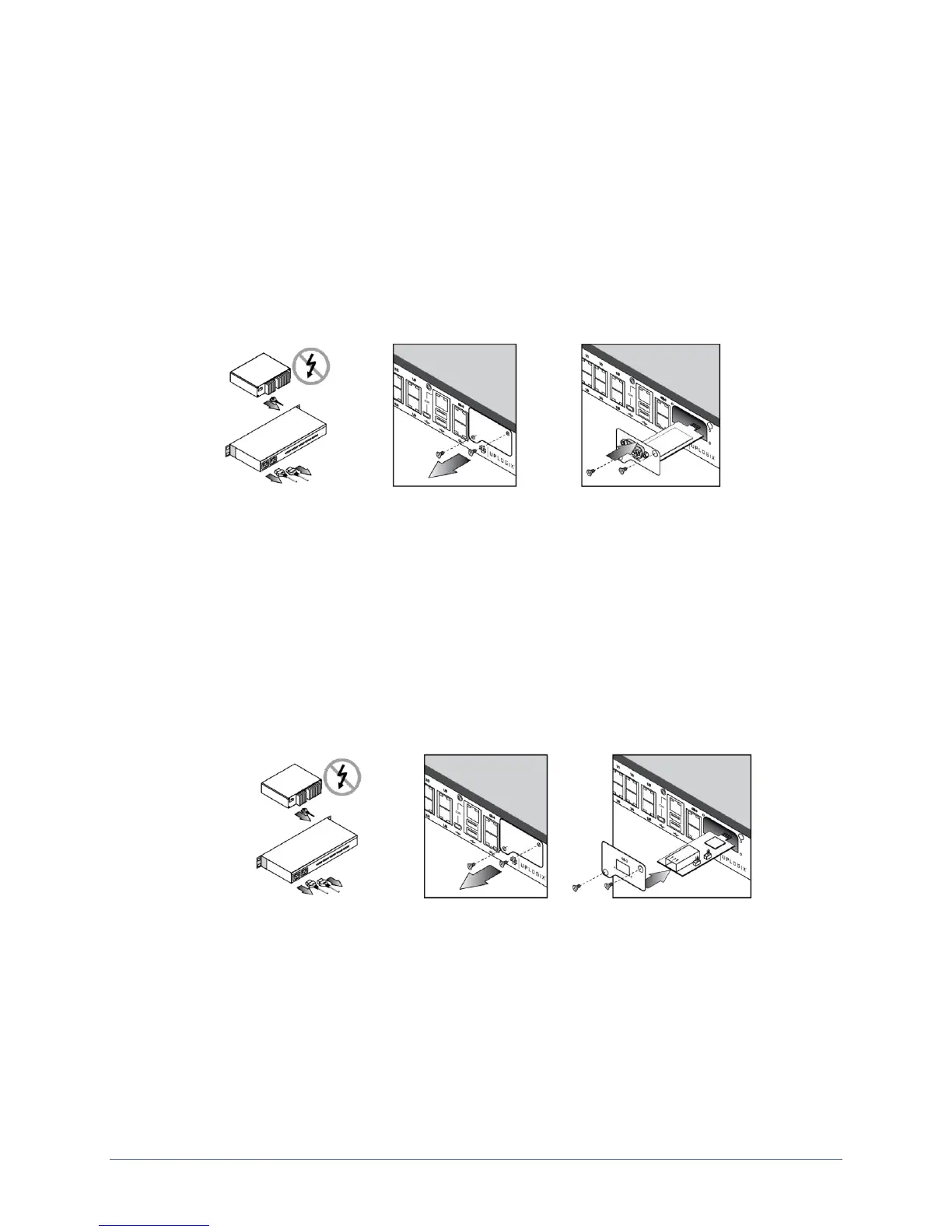
The DB-9 option card may already be installed in the option slot. However, follow these steps
if the DB-9 option card is not already installed:
1. Power off the Local Manager.
2. Remove the option slot cover, align the modem carrier card with the internal rails, and
slide the modem into place.
3. Replace the screws.
4. Connect an external modem to the Local Manager using a serial DB-9 cable and power
on the Local Manager.
Installing an SFP module
Follow these steps to install the SFP module in the chassis option slot of the Local Manager:
1. Power off the Local Manager
2. Remove the option slot cover, align the carrier card with the internal rails, and slide
the module into place.
3. Replace the screws.
4. Install either a 1000Base SX (GLC-SX-MM) SFP or the 1000Base LX/LH (GLC-LH-SM)
SFP for fiber connectivity. Both the 1000Base SX (GLC-SX-MM) and the 1000Base
LX/LH (GLC-LH-SM) are customer provided equipment.
Note: SFP modules are hot swappable, but the SFP carrier option card is not hot
swappable.


 To Next Page