EasyManua.ls Logo

URC MX-450 - Page 10

URC MX-450
33 pages
Print Icon
To Next Page IconTo Next Page
To Previous Page IconTo Previous Page
Loading...
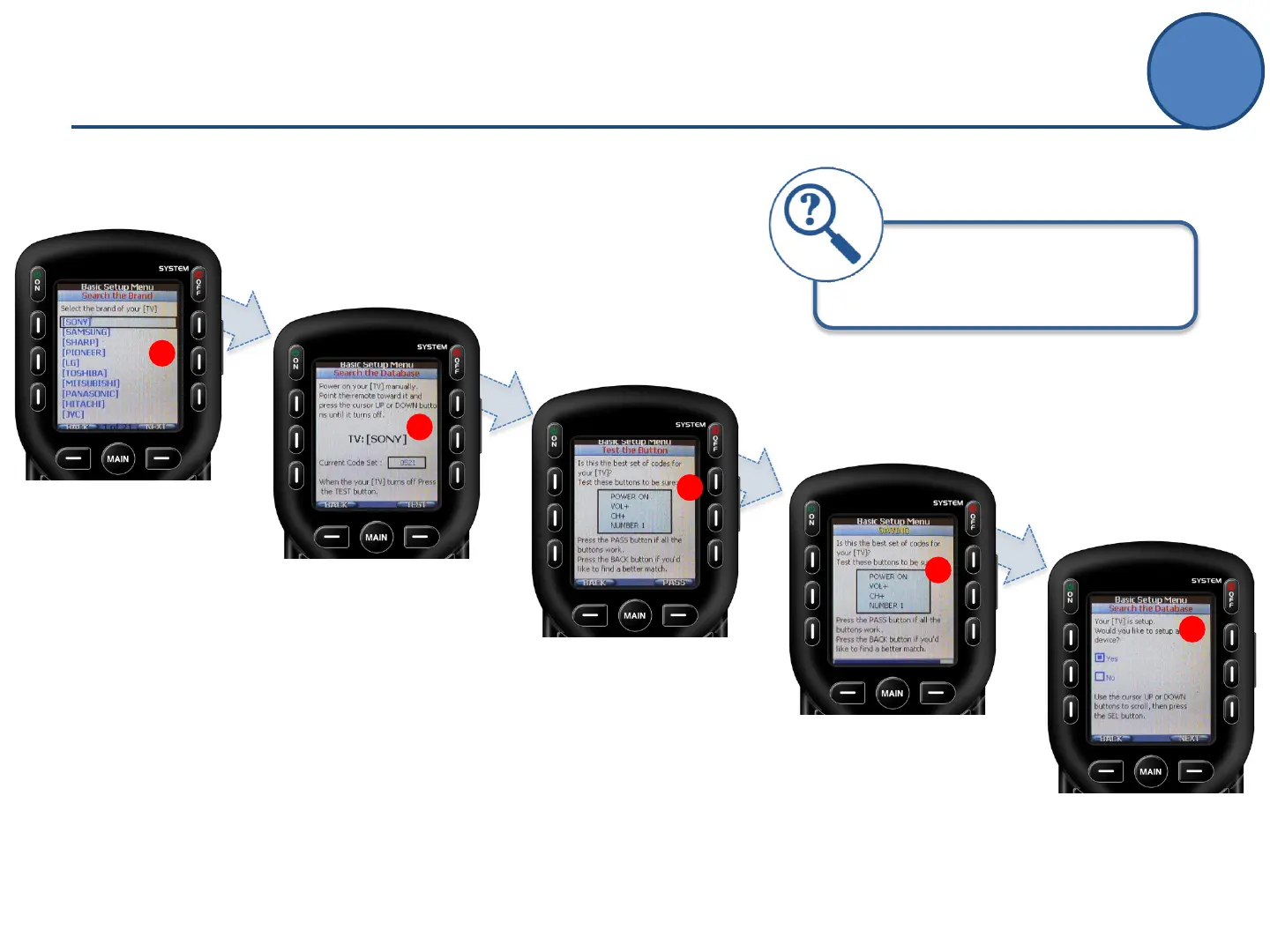
F.
Select the Brand of
your device by
pressing the UP and
DOWN buttons.
F
G
H
I
J
G.
Turn ON your device
and point the remote
toward it.
Press the UP or
DOWN buttons until
the device turns OFF.
H.
Test the code by
pressing the
Power On, Vol+ & Ch+
If the device responds
to this code, press Pass.
If not, press Back to
find a better match.
(repeat step G.)
I.
When a device is
Pass-ed the MX-450
will save the device
(blue progress bar
at the bottom of the
screen)
J.
Repeat this process
to add more devices
by selecting Yes
then Next.
When FINISHED adding devices,
select NO then NEXT when asked to
setup another device.
1
1
Adding Devices
Basic Setup

Other manuals for URC MX-450

Related product manuals