EasyManua.ls Logo

URC MX-450 - Basic Setup; Adding Devices

URC MX-450
33 pages
Print Icon
To Next Page IconTo Next Page
To Previous Page IconTo Previous Page
Loading...
1
A.
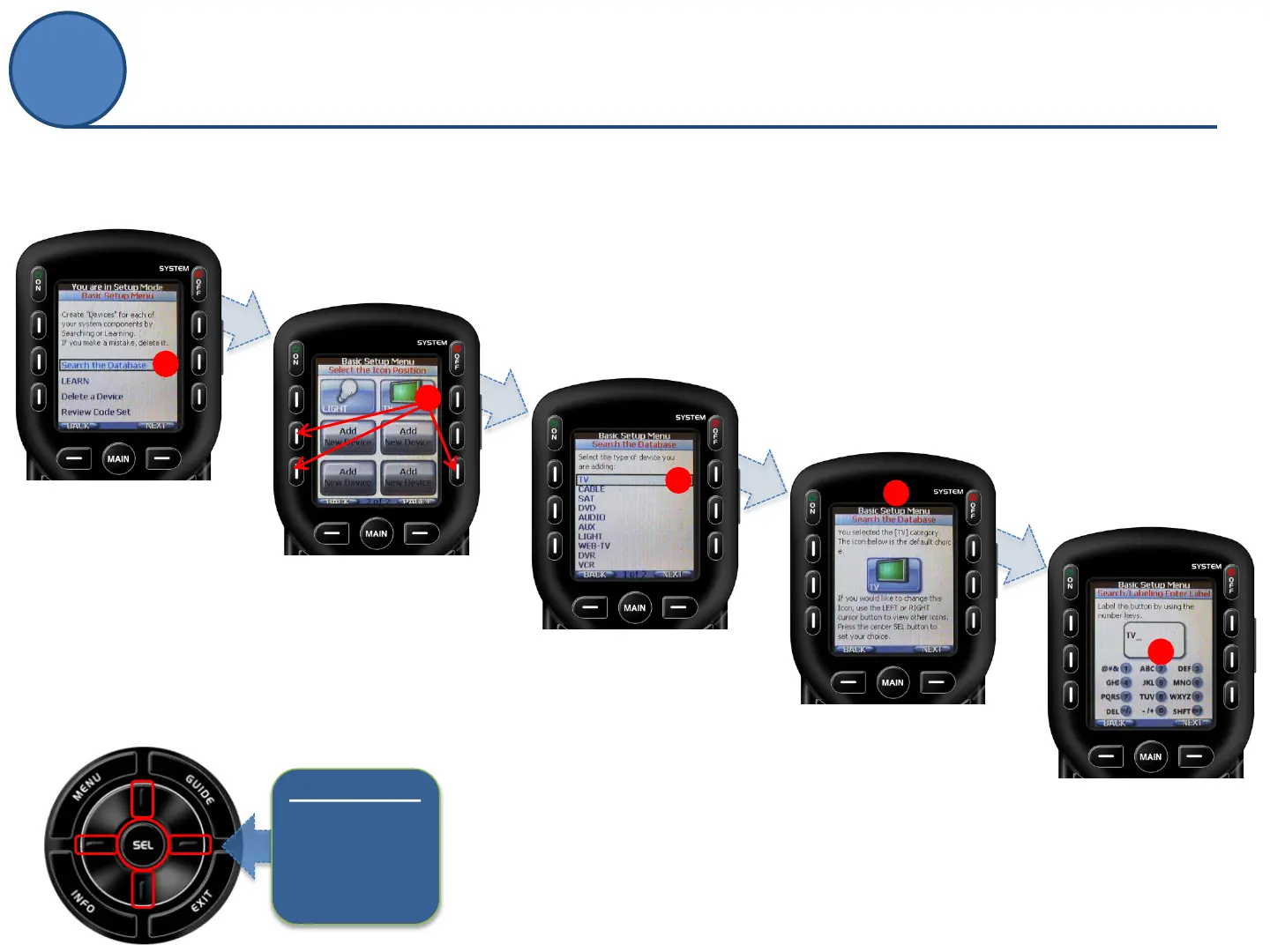
Select Search the
Database to search
for device codes.
Within the Search the Database section of Basic
Setup, we will add each of your devices or
components to the MX-450.
A
C
D
E
B.
Select an Icon
Position to save your
device by pressing a
screen button to
make your choice.
C.
Select the
type of device by
pressing the UP or
DOWN buttons on
the remote’s
5-way cursor.
D.
Choose a device
icon by pressing
the LEFT or RIGHT
buttons to see
other icons.
Press select when
finished.
E.
Type in a name for
the device using the
number keys
alphanumeric
equivalent
B
5-way cursor
Use
Arrows
and
Select (SEL)
to navigate.
Adding Devices
Basic Setup

Other manuals for URC MX-450

Related product manuals