Part III – Programming the System5
Page 11
Programming the System5
Step 1: Entering the Program Mode and
Changing the Access Level
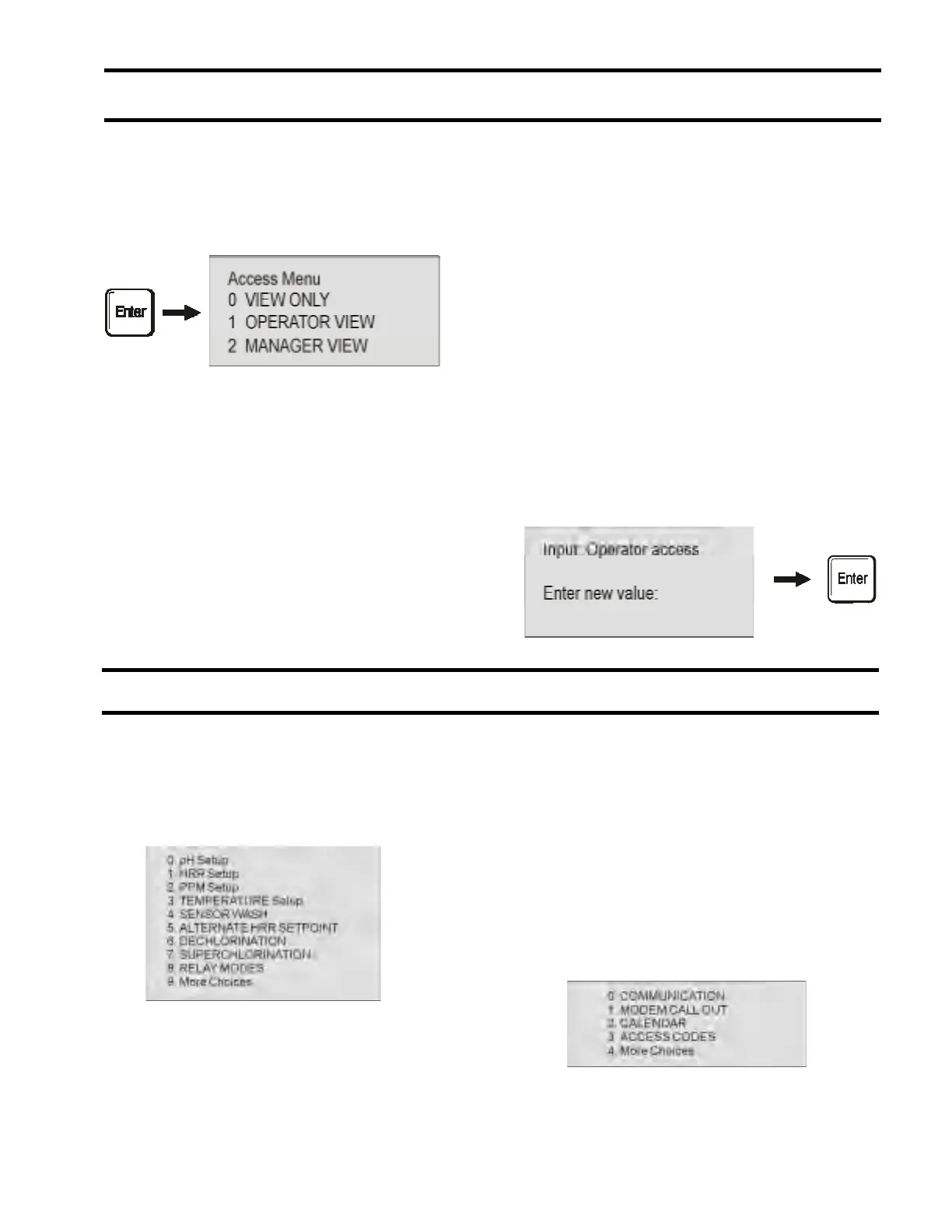
To enter the program mode, simply press Enter.
The screen displays the following:
There are four levels of access to the System5 --
view only, operator view, manager view and rep
view*. Each level provides a different set of
programming controls for the unit. View Only
provides only viewing with no ability to change
programming parameters. Operator View
provides some programming ability with specific
controls chosen by the manager (there are six
access codes available within this level with all the
same parameters). Manager View provides
complete programming capability (there are two
access codes available within this level with all the
same parameters).
*NOTE: Rep View is only for use by authorized
USFilter Stranco Products Representatives and is
not visible on the System5 programming screen.
Choose your level of access by typing in the
corresponding number and pressing enter.
Step 2: Entering the Access Code
The screen then asks you to Enter New Value.
You must enter a three digit numerical code. All
units are shipped with a code of 000. Note: You
may customize this code to any three digits
through the programming mode, but you will
need to enter 000 to gain access to that mode.
Type 000 now.
Section 1: Manager and Operator View Access
1. Main Menu
Once you have selected the access level the screen
will display the Main Menu which contains the
following choices.
NOTE: The choices available for Operator View
Access may be reduced and are determined by
the Manager through the Access Codes section
of the Manager View Access menu (see page 23).
Enter the number of the area you would like to
program.
* If you have requested your USFilter Stranco
Products representative to include Cal. LSI
SETUP, Ryznar Stability Index (read only value),
and Dosage Calculated (refer to LSI calculation
document) as part of your programming options
they would appear here, between Temperature
SETUP and SENSOR WASH SETUP.
2. Main Menu More Choices
Selecting More Choices from the Main Menu will
display three more choices for programming.
Type in the number of the area you would like to
program. Selecting (4) More Choices will return
you to the previous list of Programming Choices
in the Main Menu.


 To Next Page