Default Setting (System Menu)
OPERATION GUIDE 8-47
8
Border Line
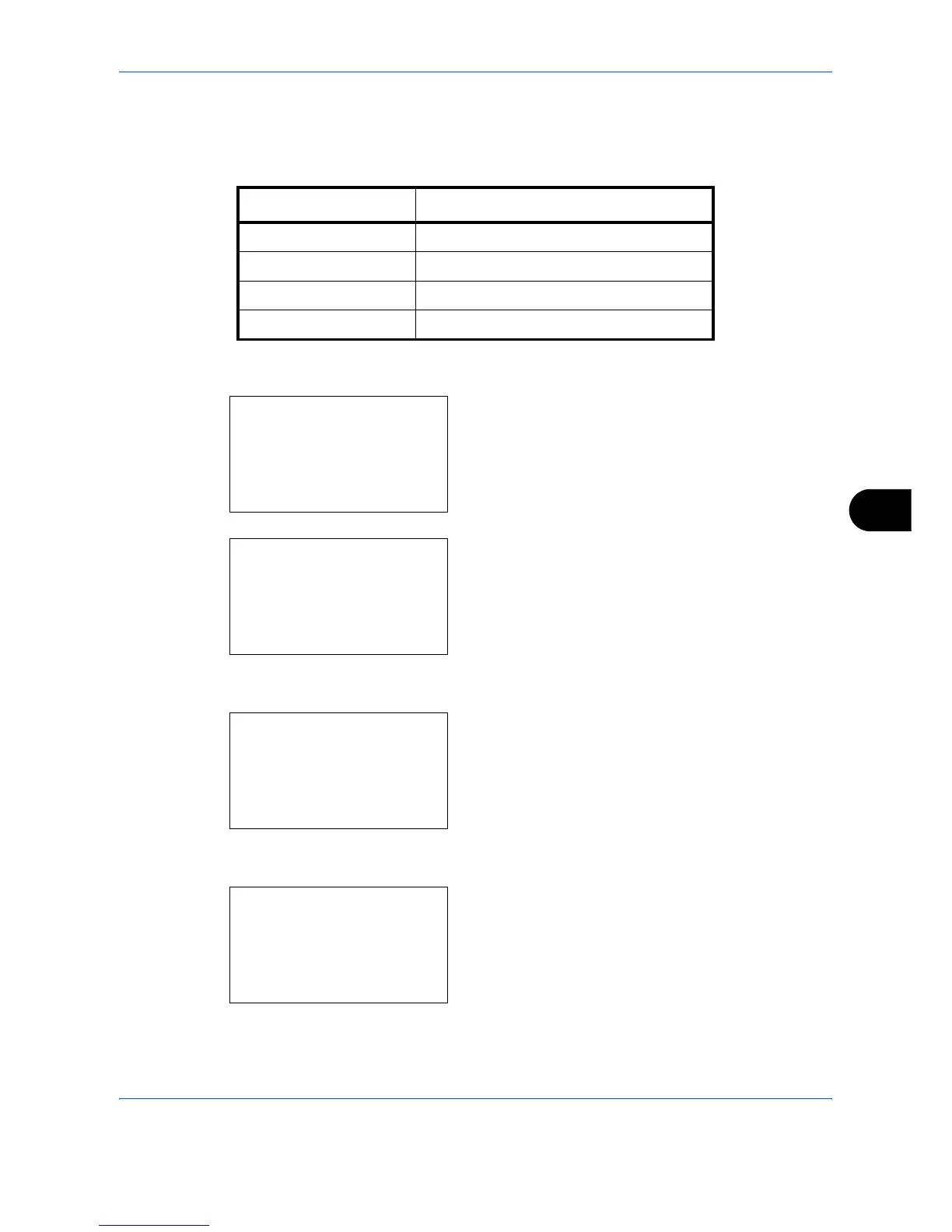
Select the default value for border line when [2 in 1] is selected for Combine. Items available for the default value
are as follows:
Use the procedure below to select the default value for border line.
1 In the Sys. Menu/Count. menu, press the U or V
key to select [Common Settings].
2 Press the OK key. The Common Settings menu
appears.
3 Press the U or V key to select [Function Default].
4 Press the OK key. The Function Default menu
appears.
5 Press the U or V key to select [Detail Setting].
6 Press the OK key. The Detail Setting menu
appears.
7 Press the U or V key to select [Border Line].
Item Description
None No border line.
l Solid Line Draws solid border lines.
m Dotted Line Draws dotted border lines.
n Positioning Mark Puts a mark on the border line position.
Sys. Menu/Count.:
a
b
4
User/Job Account
5
User Property
*********************
[ Exit ]
Common Settings:
a
b
*********************
2
Default Screen
3
Sound
[ Exit ]
Function Default:
a
b
*********************
2
Scan Resolution
3
FAX Resolution
[ Exit ]
Detail Setting:
a
b
*********************
2
4 in 1 Layout
3
Border Line
[ Exit ]


 To Next Page