19
First you need to make one online payment, see page 18. When you get to the payment page, make sure you
tick the 'SMS' box, then enter your mobile phone number in order to register your details.
Once you have registered your details:
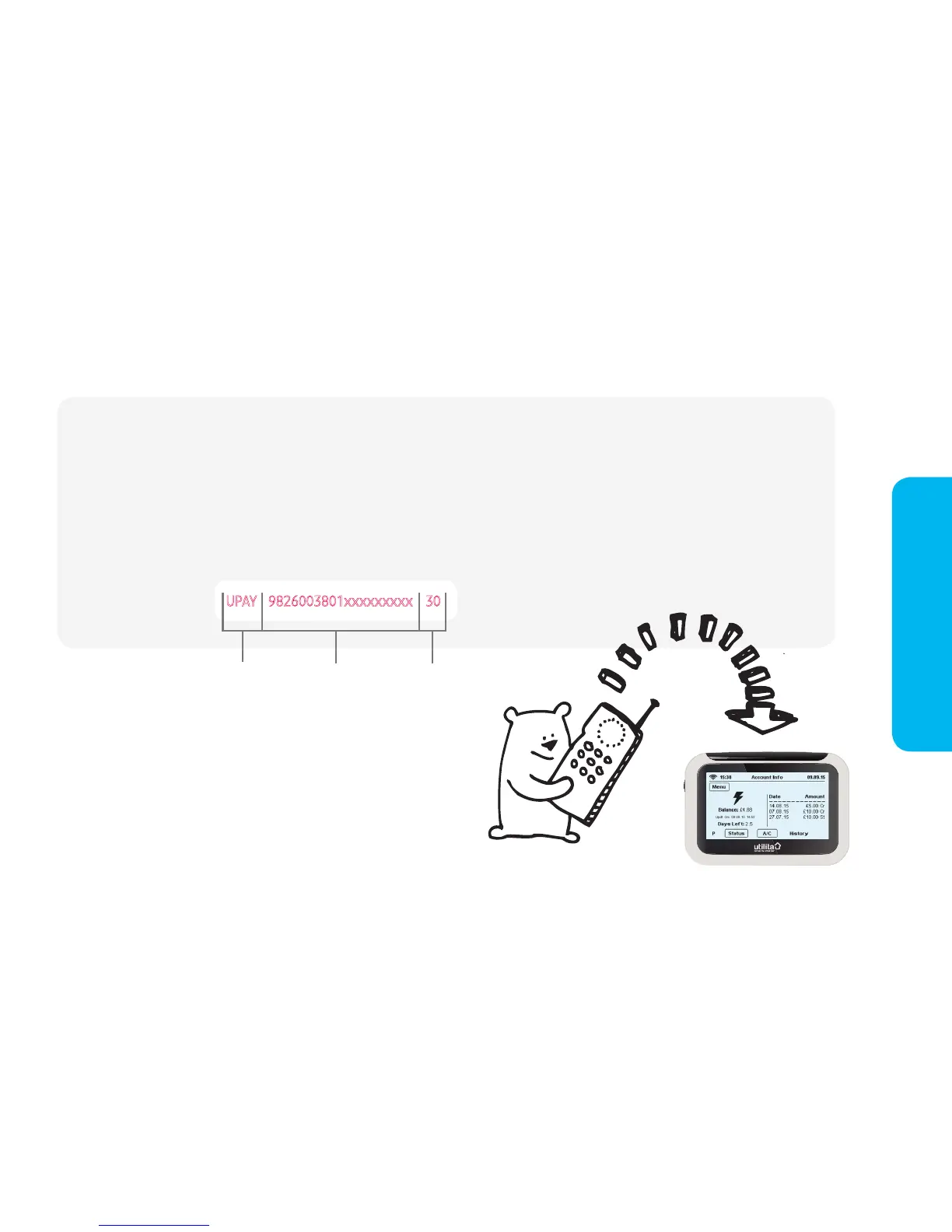
text* UPAY followed by your top-up card number then the top-up amount to: 88010
N.B. please ensure you do NOT include a '£' sign. Ensure there is one space between each section of
information.
Example for £30:
Top-up via text message
The amount you have chosen to top-up by will be
automatically sent to your meter and you will receive a
text message receipt. The receipt will include a 20, 40 or
60 digit ‘Top-up Code‘, in case the top-up does not arrive
automatically; this will enable you to top-up manually - see
page 20 for more information.
UPAY 9826003801xxxxxxxxx 30
Type UPAY
(in capitals)
19 digit top-up
card number
Amount you
wish to top-up
(no £ sign)
15:38 Usage Now 26.11.14
Electricity Dual Gas
HistoryMessage Tariff Payment Settings
15:38
Elect


 To Next Page