kWh
CO2Kg
~/h
Menu
Settings
i
On
On
Min
1Min
Info
Target
Sound
LEDs
Credit Alert Erase
Conrast
Network
Backlight
- - -
!
Balance: ~25.00
Days Left: 2.5
22.09.12 ~10.00
14.09.12
~15.00
05.09.12
~30.00
23.08.12
~10.00
Date Amount
----------------------
History
Account Info
!
SUPPLY OFF
Emergency Credit
~0.00
Minimum top-up
~0.00
Restore
Electricity
Tariff
Menu
~20.05 for first 10 kWh
~0.10 thereafter
~0.05 for first 15kWh
~0.10 thereafter
~0.15 for the first 10kWh
Smart Energy - NORWEB
- - - - - - - - - - - - - - - - - - - - - - - - - - - - 17:00
- - - - - - - - - - - - - - - - - - - - - - - - - - - - 18:00
Type in your vend
code. Press ‘delete’
to correct. Press
‘Enter’ to send.
E-Credit
Debt Payments
Debt Type: Payment Based
Outstanding owed: £54.00
Repayment Rate: 40% per top-up
Debt
Debt Type: Payment Based
Outstanding Owed:
~54.00
Repayment Rate: 40
%
per top-up
Week
Month
Day
Menu
Updt On: 29.09.12 10:59
The In-Home Display
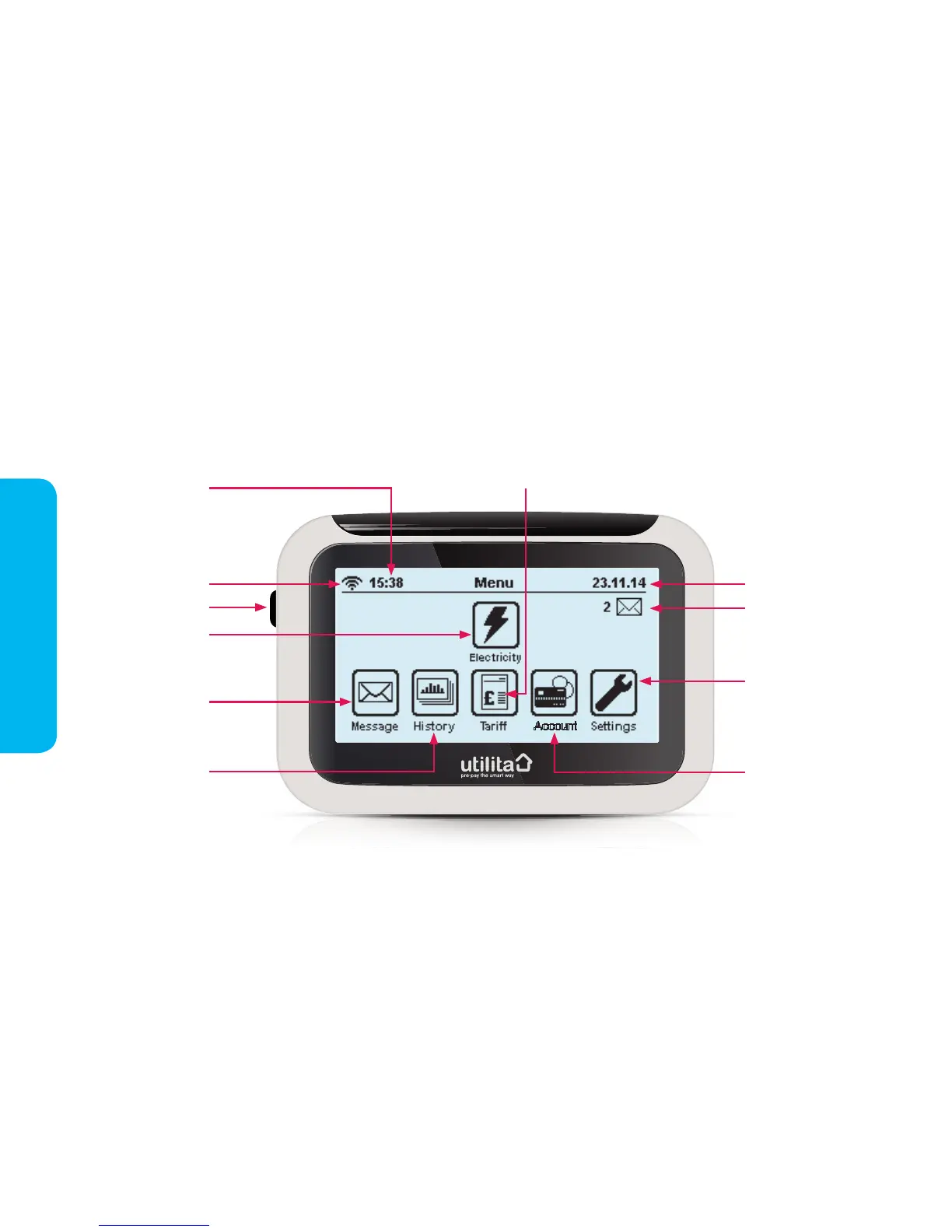
The in-home display has a touchscreen display and gives you quick access to your electricity account information and
smart meter features. Below is the 'Main Menu' screen which can be accessed by pressing the 'Menu' button in the top
left-hand corner of most screens. Your in-home display should be plugged into the mains and switched on at all times.
Electricity – view
your credit balance and
days left ('Account Info')
Signal strength
Current date
Current time
Message – view
your read and
unread messages
History – view
and compare
your usage
Settings – here you can
adjust different aspects
of your in-home display
Account – manually
top-up your account,
and activate Emergency
Credit
Tariff – view your tariff and rates
On/Off button
Message notications
In-Home Display
4


 To Next Page