23
MANUAL CONTROL
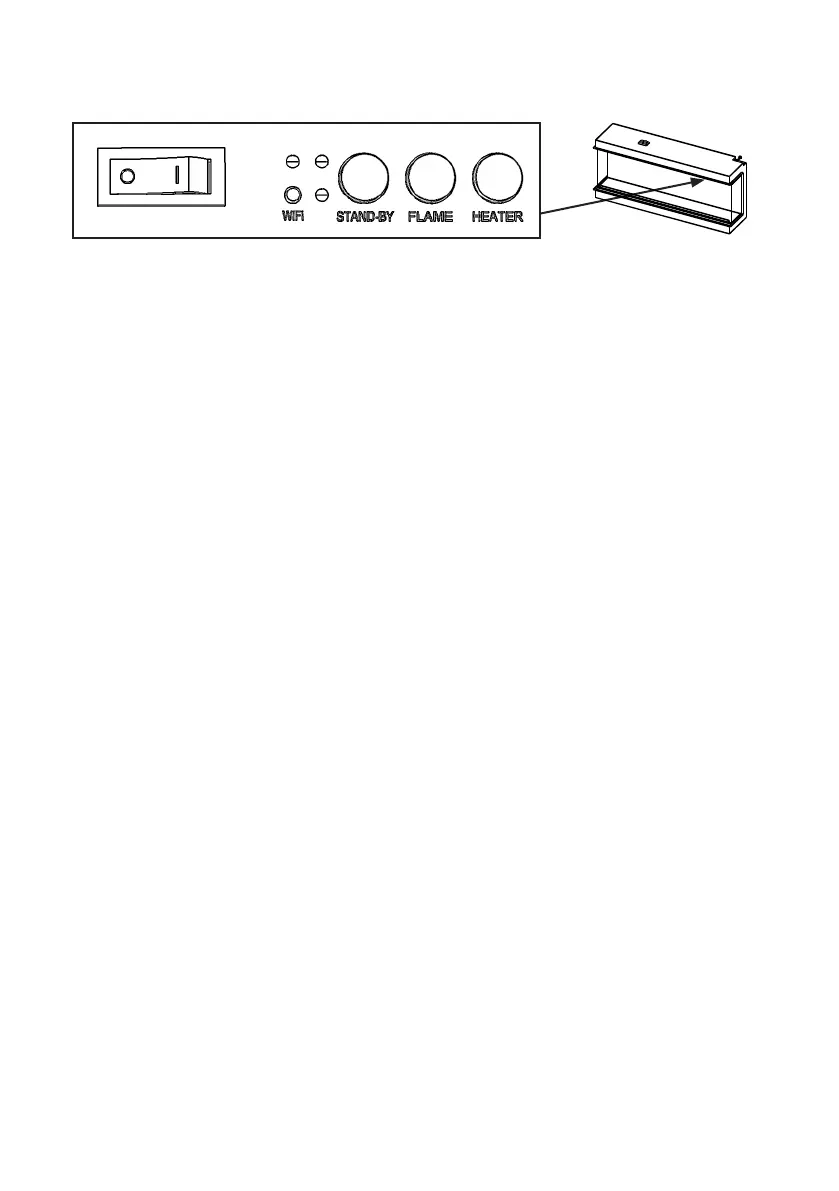
MANUAL SWITCH
Press “I” to turn on the appliance; press “O” to turn it off.
STAND-BY
Press to turn on the appliance with the last used settings without any heat.
Places the appliance into standby mode with all features turned off.
FLAME
Press repeatedly to cycle through 6 fire preset modes and 3 user defined
presets if programmed.
HEATER
Press to cycle through the heat output options. ON-OFF-AUTO.
WIFI
Press to turn WiFi on or off. An illuminated LED on the button indicates that
WiFi is turned on. Hold button for 3 seconds to enter device pairing mode.
Each time a button is pressed on the appliance or on the remote control, an
audible beep is emitted. To turn off this feature, keep pressing the button
FLAME for 3 seconds until you hear two beeps.


 To Next Page