12 Kienzle MTCO 1324
Driver change
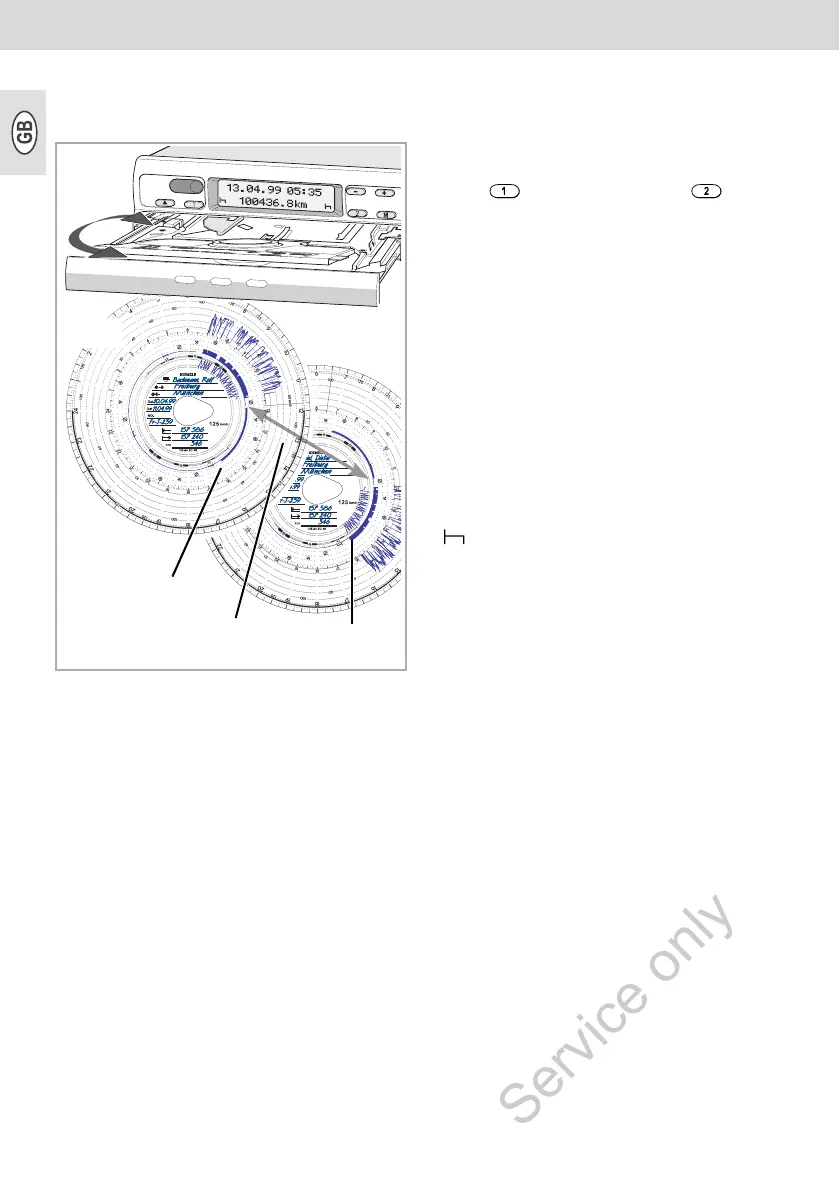
In case the driver changes the vehicle
during his daily working time, he has to take
the chart with him and note the vehicle
change on the rear of the chart.
Case 1:
The crew changes among themselves,
driver 2 becomes driver 1:
1. Exchange the charts.
¾ Driver 1 (now driver 2) places his
chart below the separating plate and
driver 2 (now driver 1) on the sepa-
rating plate.
2. Select the desired time groups.
¾ The new driver 1 presses the key
, the driver 2 the key .
Case 2:
Driver 1 or driver 2 leaves the vehicle:
1. The respective driver takes his chart
with him.
2. The new driver 2 places his chart below
the separating plate.
or:
The new driver 1 places his chart on the
separating plate.
Comment
In case there is no new driver 2, the time
group has to be switched to break time
" ", otherwise an error message will be
displayed.
Case 3:
Driver 1 and driver 2 both leave the
vehicle:
1. Both drivers remove their charts from
the device.
2. The new crew inserts the chart
according to their respective functions
(driver 1 or driver 2) in the device.
Driver change
Record as
driver 2
Record as
driver 1
Chart
driver 1
Chart
driver 2



 To Next Page