© Continental Automotive GmbH 13
Adjusting the time
• The function TIME ADJUSTMENT may
only be selected if the vehicle is sta-
tionary.
• For an automatic synchronisation of
the chart carrier and the time, the
ignition has to be switched on and
there must not be any chart inserted
in the MTCO.
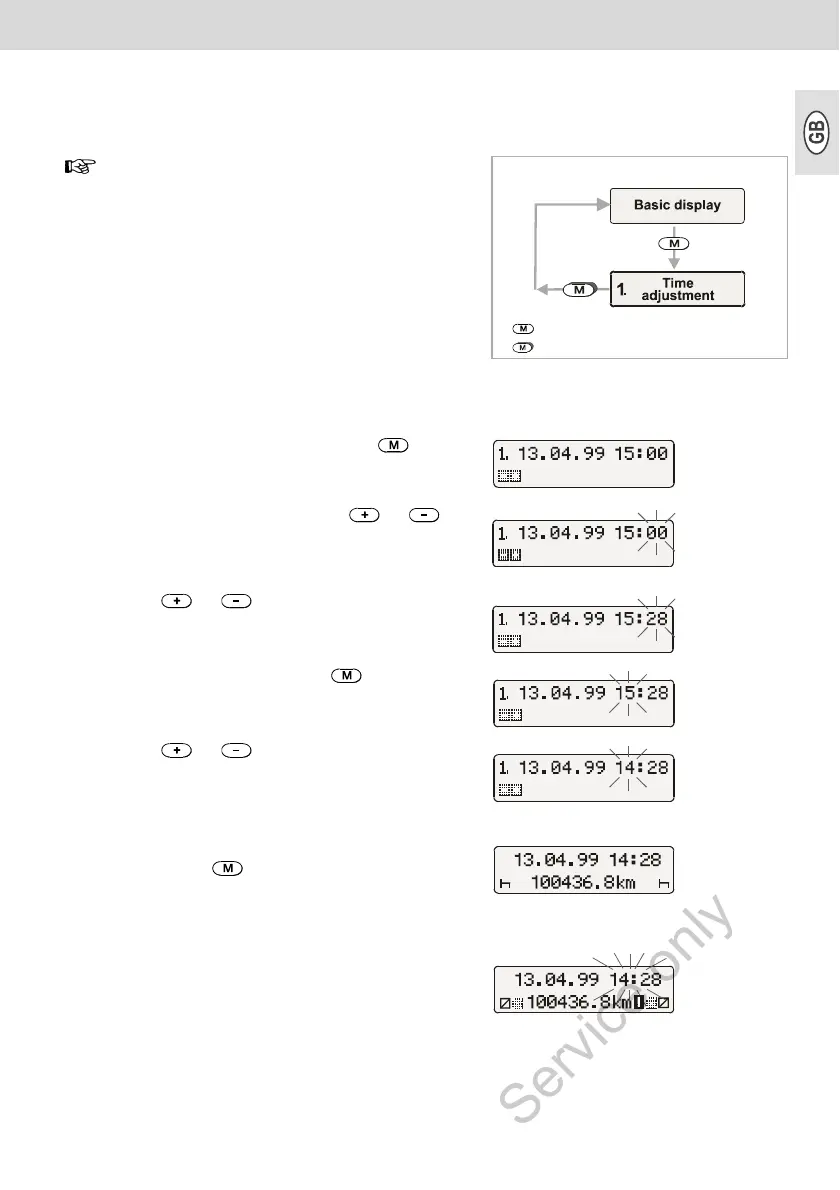
= Depress key shortly
= Depress key for a longer interval
1. Select the TIME ADJUSTMENT via .
2. Activate the minutes counter via or ,
the minutes start to flash.
3. Depress or key until the desired
value is being displayed.
4. Activate the hours counter via , the hours
start to flash.
5. Depress or key until the desired
value is being displayed.
¾ When exceeding or undershooting 12 p.m.,
the date will be adjusted automatically.
6. Acknowledge the time adjustment by
depressing the key for more than 2
seconds. The basic display will then be shown
again.
Comment
If you adjust the time while a chart is inserted, the
error symbol will be shown in the display and the
time will be flashing. The MTCO will remind you to
update the chart carrier settings; ➥ see page 16.



 To Next Page