EasyManua.ls Logo

VeriFone DOC435-003-EN-B - User Manual

VeriFone DOC435-003-EN-B
42 pages
Print Icon
To Next Page IconTo Next Page
Loading...
Verifone Part Number DOC435-003-EN-B, Revision B
P400/P400 Plus
Installation Guide
Question and Answer IconNeed help?

Do you have a question about the VeriFone DOC435-003-EN-B and is the answer not in the manual?

Summary

Chapter 1 Overview

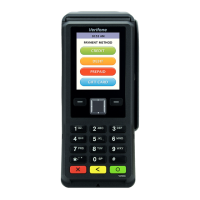
Front Functions

Details the features of the P400's front, including the LCD display and keypad.

Features and Benefits

Highlights key features like ergonomic design, intuitive interface, and rugged build.

Critical Security Protection

Outlines security features such as key management methods, PIN encryption, and PCI compliance.

Chapter 2 Setup

Selecting Location

Provides guidelines for choosing the best location for the P400 device, considering convenience and environment.

PIN Protection Measures

Details techniques for screening PIN-entry devices to protect user privacy during PIN entry.

Chapter 3 Specifications

Unit Power Requirements

P400 and P400 Plus devices have the following power requirements: Full capabilities: 7-12 V DC, 1 A; Reduced capabilities (USB powered): 5 V DC, 500 mA.

Processor

ARM Cortex A9 32-bit processor.

Display

3.5" portrait mode transmissive TFT 320 (RGB) x 480 (HVGA).

Magnetic Card Reader

Triple track (tracks 1, 2, 3), high coercivity, bi-directional.

Primary Smart Card

ISO 7816-3, 1.8 V, 3V, 5V; Synchronous and Asynchronous cards; EMV Approved.

Security

3DES encryption, Master/Session and DUKPT key management; VeriShield file authentication; PCI PED 4.0 approved.

Chapter 4 Troubleshooting Guidelines

Display Panel Does Not Work

Use the following steps to check the display panel: Check all cable connections, check controlling device's AC outlet, check application program.

Transactions Fail To Process

There are several possible reasons why the unit may not be processing transactions. Use the following steps to troubleshoot failures.

Chapter 5 Service and Support

Maintenance and Cleaning

The P400 device has no user-serviceable parts. To clean the unit, use a clean cloth, slightly dampened with water and a drop or two of mild soap.

Service Returns

For P400 equipment failures that cannot be resolved by your help desk or service department, contact Verifone hotlines for service and repair information.

Appendix A Caution and Warning Messages

Summary

Chapter 1 Overview

Front Functions

Details the features of the P400's front, including the LCD display and keypad.

Features and Benefits

Highlights key features like ergonomic design, intuitive interface, and rugged build.

Critical Security Protection

Outlines security features such as key management methods, PIN encryption, and PCI compliance.

Chapter 2 Setup

Selecting Location

Provides guidelines for choosing the best location for the P400 device, considering convenience and environment.

PIN Protection Measures

Details techniques for screening PIN-entry devices to protect user privacy during PIN entry.

Chapter 3 Specifications

Unit Power Requirements

P400 and P400 Plus devices have the following power requirements: Full capabilities: 7-12 V DC, 1 A; Reduced capabilities (USB powered): 5 V DC, 500 mA.

Processor

ARM Cortex A9 32-bit processor.

Display

3.5" portrait mode transmissive TFT 320 (RGB) x 480 (HVGA).

Magnetic Card Reader

Triple track (tracks 1, 2, 3), high coercivity, bi-directional.

Primary Smart Card

ISO 7816-3, 1.8 V, 3V, 5V; Synchronous and Asynchronous cards; EMV Approved.

Security

3DES encryption, Master/Session and DUKPT key management; VeriShield file authentication; PCI PED 4.0 approved.

Chapter 4 Troubleshooting Guidelines

Display Panel Does Not Work

Use the following steps to check the display panel: Check all cable connections, check controlling device's AC outlet, check application program.

Transactions Fail To Process

There are several possible reasons why the unit may not be processing transactions. Use the following steps to troubleshoot failures.

Chapter 5 Service and Support

Maintenance and Cleaning

The P400 device has no user-serviceable parts. To clean the unit, use a clean cloth, slightly dampened with water and a drop or two of mild soap.

Service Returns

For P400 equipment failures that cannot be resolved by your help desk or service department, contact Verifone hotlines for service and repair information.

Appendix A Caution and Warning Messages

VeriFone DOC435-003-EN-B Specifications

General IconGeneral
ModelDOC435-003-EN-B
CategoryTouch terminals
ConnectivityEthernet, USB
Card ReaderContactless
Operating SystemVerix
ProcessorARM-based processor
Memory128 MB Flash
Weight330g
Display4.3" color LCD touchscreen

Related product manuals