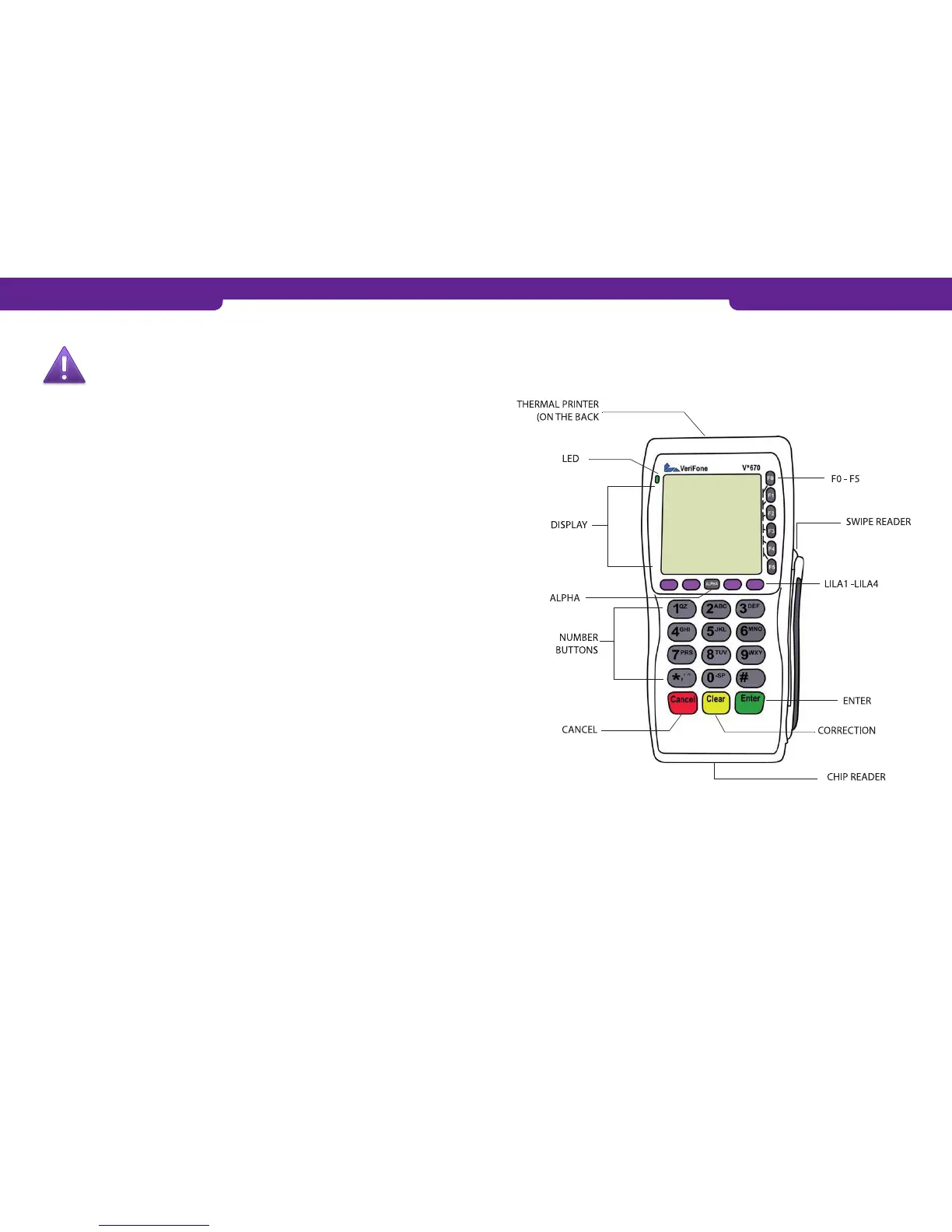
1. GETTING STARTED
1. GETTING STARTED
1.2 The structure of the payment terminal1.1 Important
NOTE: IF THESE INSTRUCTIONS ARE NOT FOLLOWED AND THE
PAYMENT TERMINAL IS THEREFORE DAMAGED, THE WARRANTY
DOES NOT APPLY.
• Protect the power cord and transformer from dust, moisture and other contaminants.
If they are damaged, they must not be used.
• The payment terminal must not be connected to the same socket as a device without
a transformer or to a transformer whose voltage is too high.
• Use only the original power supply with the payment terminal.
• The payment terminal is neither waterproof nor dustproof. It is intended for indoor
use only.
• Do not use the terminal near water or in moist conditions.
• Do not use the terminal in temperatures below zero.
• Do not insert any foreign objects in the payment terminal’s reader slots or cable
ports. This might seriously damage the terminal.
• Use only paper designed for use with the payment terminal so as to avoid paper jams
and damage to the printer. Low-quality paper may cause paper jams or generate
harmful paper dust.
• Do not use thinner, trichloroethylene or ketone-based solvents to cleaning the terminal.
These substances may damage the payment terminal’s plastic or rubber components.
• Never spray cleaners or other solutions directly onto the display or keypad. Instead,
use a cleaning cloth or the like.
• Always switch off the terminal before removing the battery.
• Do not remove the power cord when a payment transaction is being processed,
since this might prevent the transaction from being saved in the payment terminal’s
memory.
• To activate GPRS, press F2 when the terminal is in the start display.
• To switch on the payment terminal, press the green button for about five seconds.
• To switch off the terminal, press the red button for about five seconds. (Note that
the payment terminal keeps beeping for as long as the button is pressed.)
• Please note that the payment terminal’s Li-ion battery is hazardous waste. Do not
dispose of the battery with combustible waste. The battery must be taken to a haz-
ardous waste collection area or sent to the manufacturer for appropriate disposal.
• If the payment terminal is damaged, please contact maintenance. You must not try
and repair the payment terminal by yourself.
!
4 5



 To Next Page