1. GETTING STARTED
1. GETTING STARTED
1.6 SIM card
For data transfer, the VX670 payment terminal uses a GPRS connection in
Sonera’s mobile network. The SIM card in the payment terminal is ready for use.
Note: If you suspect or have noticed there is something wrong with
the SIM card, please contact Sonera Customer Service.
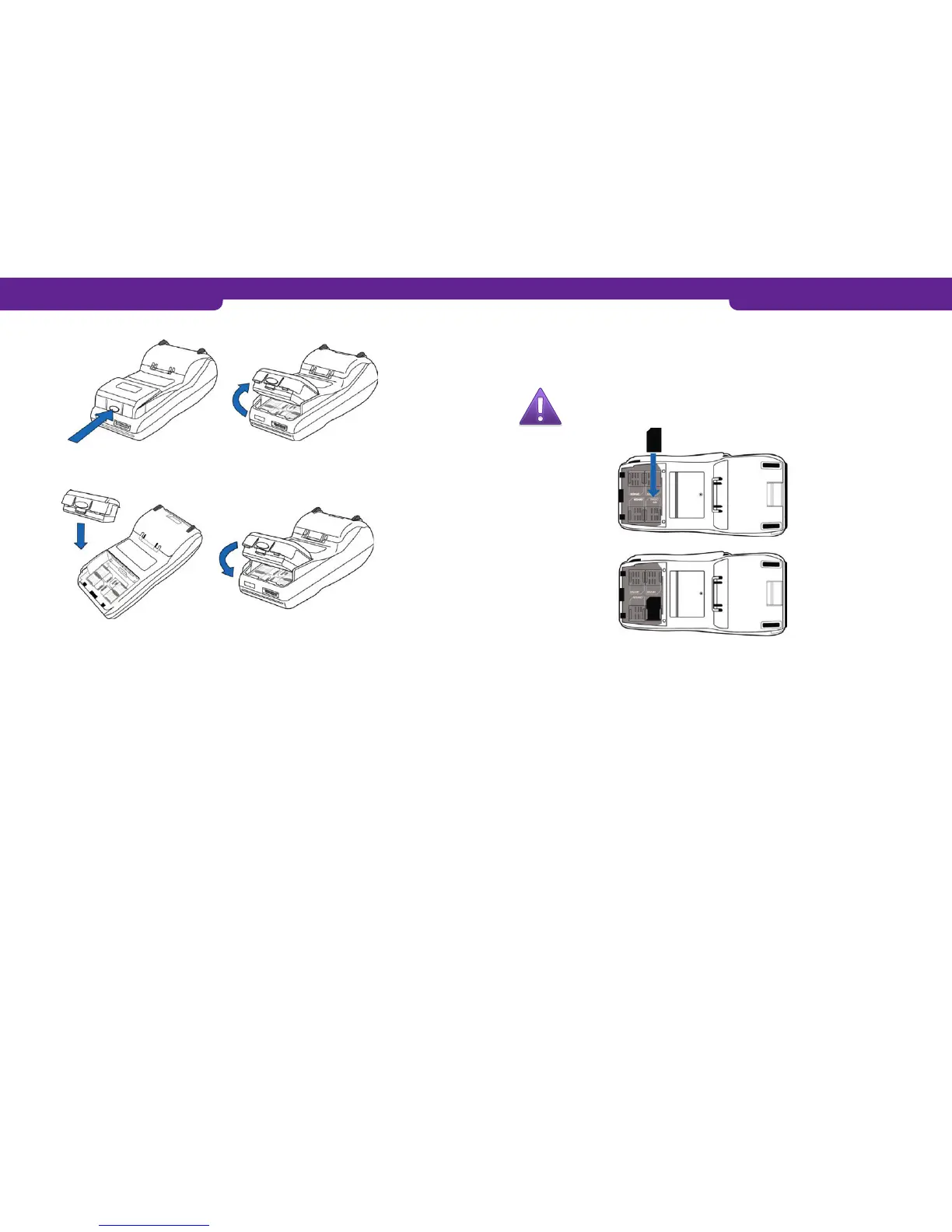
To remove the battery, press the button on the battery. This releases the battery.
To insert the battery, put it in position and press down until it snaps into place.
• The SIM card slot is located under the battery of the payment terminal.
• Place the card in the SIM card slot with the chip facing down and the truncated
corner of the chip card in the appropriate place.
1.7 How to test the connection
• When you switch on the payment terminal for the first time, the following text appears on
the display: KIELTOLUETTELO PUUTTUU, HALUATKO PÄIVITTÄÄ KIELTOLUETTELON?
Blacklist missing update blacklist yes/=enter/no=cancel
• When you press Enter, the terminal established a connection.
• The display says CONNECTING PLEASE WAIT.
• When the connection has been established, the display says SUCCESS.
• First LÄHETYS and then VASTAANOTTO appears on the payment terminal’s display.
A running number is displayed.
• The payment terminal retrieves MAKSUPÄÄTEPALAUTE Host parameters, AID and
BIN tables, EMV keys and blacklist.
• After this, the payment terminal is ready for use.
If the connection is not working, see section 7 for instructions.
You can also test the connection as follows:
1. Press LILA1 and Enter.
2. Select SEND BATCH.
• In normal use, the battery should be recharged whenever the charge is 20 % or lower.
• When the payment terminal is in the start display and is not connected to a power
supply, the text B:99 is displayed at the bottom of the display. This indicates the
charge of the battery in percentages. When the battery is being recharged, the
percentage is not shown.
• When the payment terminal is connected to a power supply, it automatically starts
to recharge the battery.
• The LED light next to the display blinks orange, when the battery is being re-
charged.
• The light turns green when the battery is full.
• When the battery is nearly empty, the light is red.
• You can always keep the payment terminal connected to a power supply, as this
has no effect on battery life.
• Ideally, let the payment terminal recharge at night. The battery is then full when the
working day begins, and automatic batch transmission can be performed at night.
8 9



 To Next Page