2. DAY-TO-DAY USE
2. DAY-TO-DAY USE
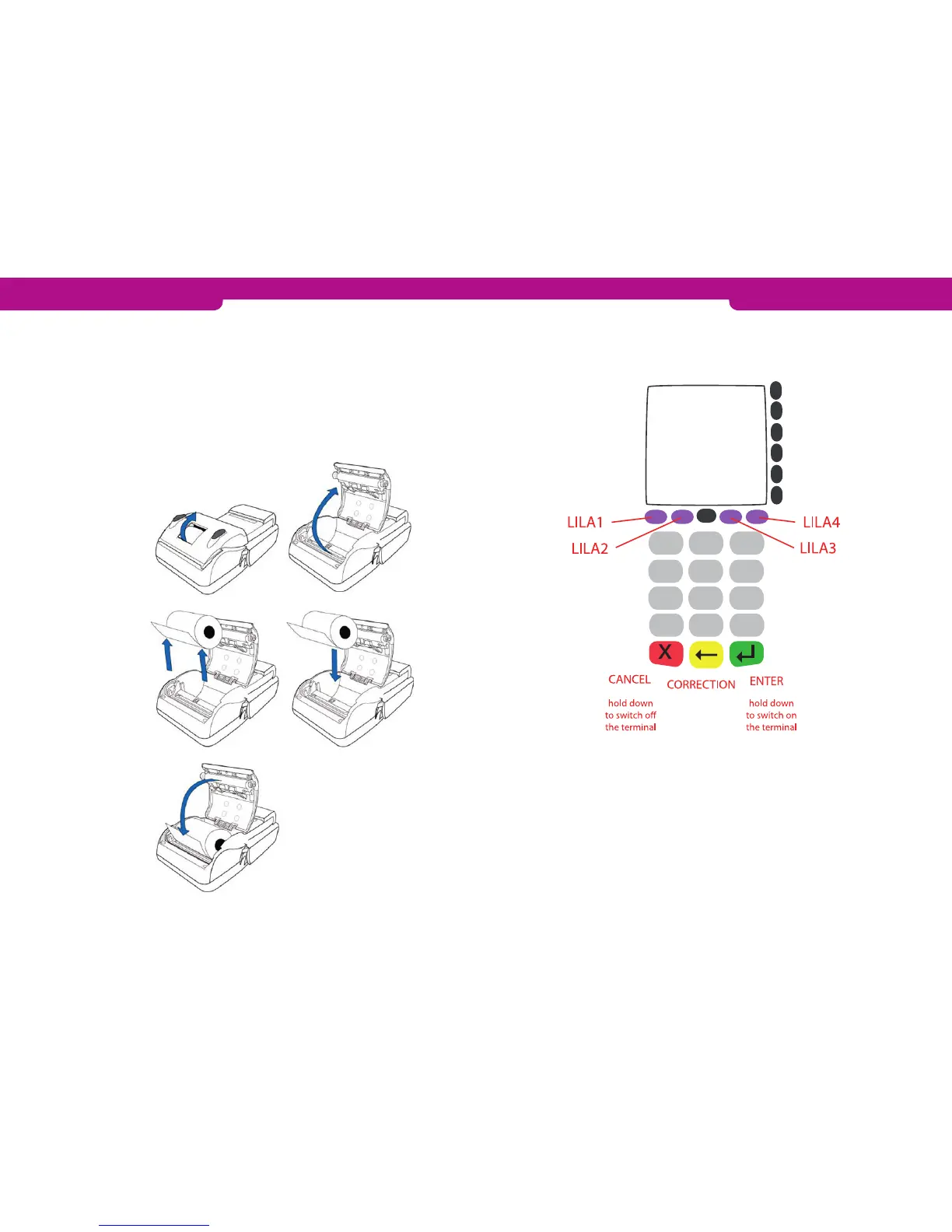
2.1.2 Keypad
2.1.1 How to replace the paper roll
1. Pull the release latch upwards to unlock the cover of the paper compartment.
2. Open the cover.
3. Remove the old paper roll from the paper compartment.
4. Place a new paper roll in the compartment. Make sure the paper feeds from the
underside of the roll towards the front of the terminal.
5. Insert the edge of the paper into the tear bar slot and close the paper compartment
cover.
6. The payment terminal now displays the text PAPER INSERTED PLEASE PRESS
ANY KEY. Press Enter.
3
1
2
4
5
6
7
8
9
0
*
#
ALPHA
F1
F0
F2
F3
F4
F5
2.1.3 How to navigate through the menus
• To navigate through the menus, use the LILA1 and LILA2 keys.
• To confirm your selection, press Enter.
• To go back to the previous menu, press Cancel. To return to the start display, press
the Cancel key repeatedly.
• In the menus, press keys F0 to F5 to make a selection.
• When you want to go to the Transactions or Parameters menu, the payment termi-
nal prompts you to press Enter.
10 11



 To Next Page