1. GETTING STARTED
1. GETTING STARTED
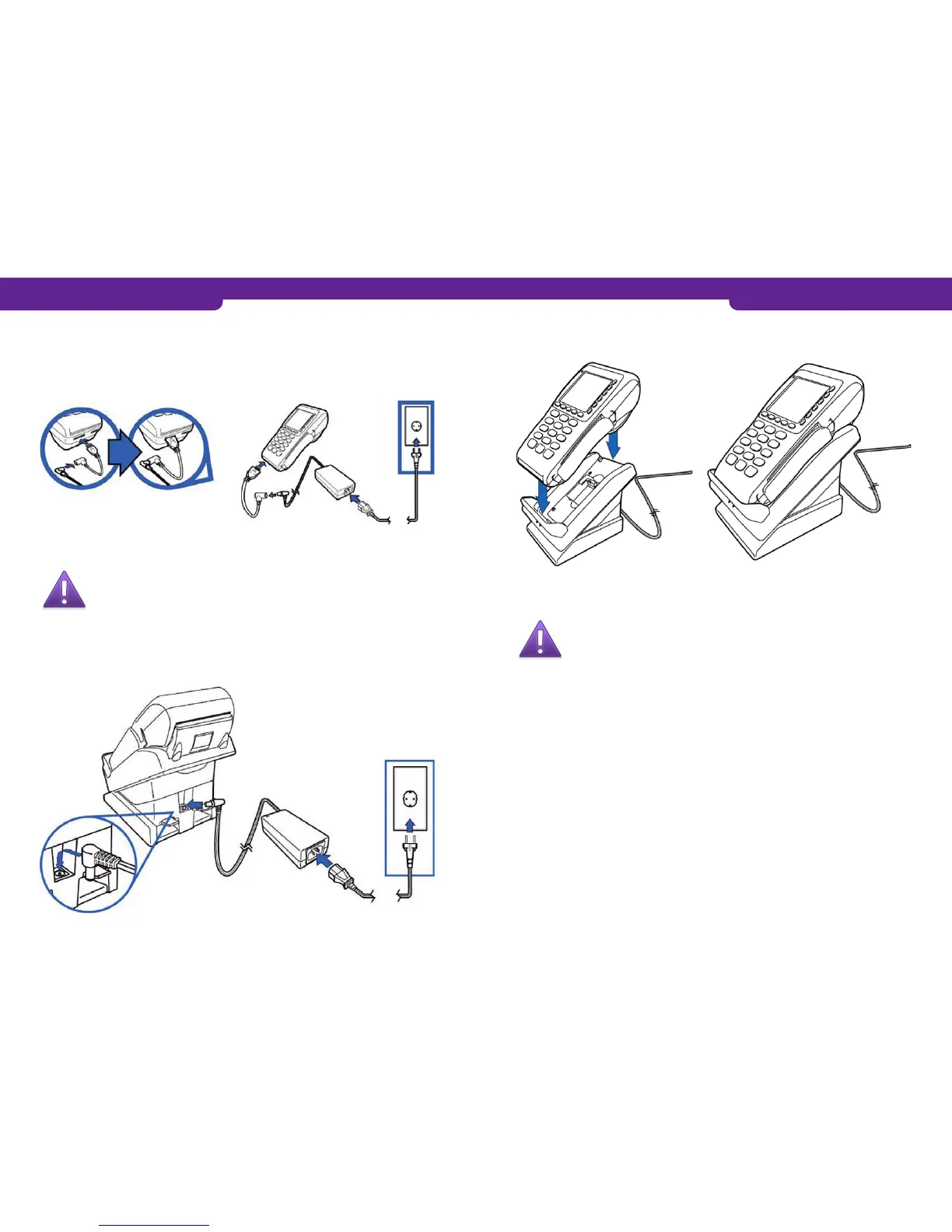
1.3 How to connect the cords
1. Plug the adapter to the power cord and the power cord to the transformer and put
the plug in a socket.
Connect the adapter to the slot on the left at the bottom of the terminal.
1.4 How to connect the charging dock
Note: The charging dock is a supplementary device not included
in the standard delivery.
Connect the power cord to the charging dock as shown in the picture. Connect the
power cord to the transformer and put the plug in a socket.
Place the payment terminal onto the charging dock.
1.5 Battery
Note: The battery must be calibrated before you start using the
payment terminal.
Plug the power cord to the terminal or place the terminal onto the charging dock.
1. Press keys F2 and F4 simultaneously.
• The following text appears on the display: SYSTEM MODE ENTRY PASSWORD.
2. Enter the password: 1 ALPHA ALPHA 6 6 8 3 1 and press Enter.
• The following text appears on the display: SYS MODE MENU 1.
3. Press LILA2 three times.
4. Select BATTERY STATUS F0.
5. Select BATT CONDITIONER F4.
• Note: If BATT CONDITIONER is not found in the menu, the battery need
not be calibrated.
• The payment terminal starts to charge the battery, and a line is moving on
the display.
• It takes about 16 to 20 hours to charge the battery full.
• When the battery is full, the text FULL CHARGE appears on the display.
6. Press the (red) Cancel button, until you see the text:
• SYS MODE MENU 1.
7. Select RESTART F0.
• The payment terminal is restarted and the start display is opened.
6 7



 To Next Page