LabQuest
®
App
16
o
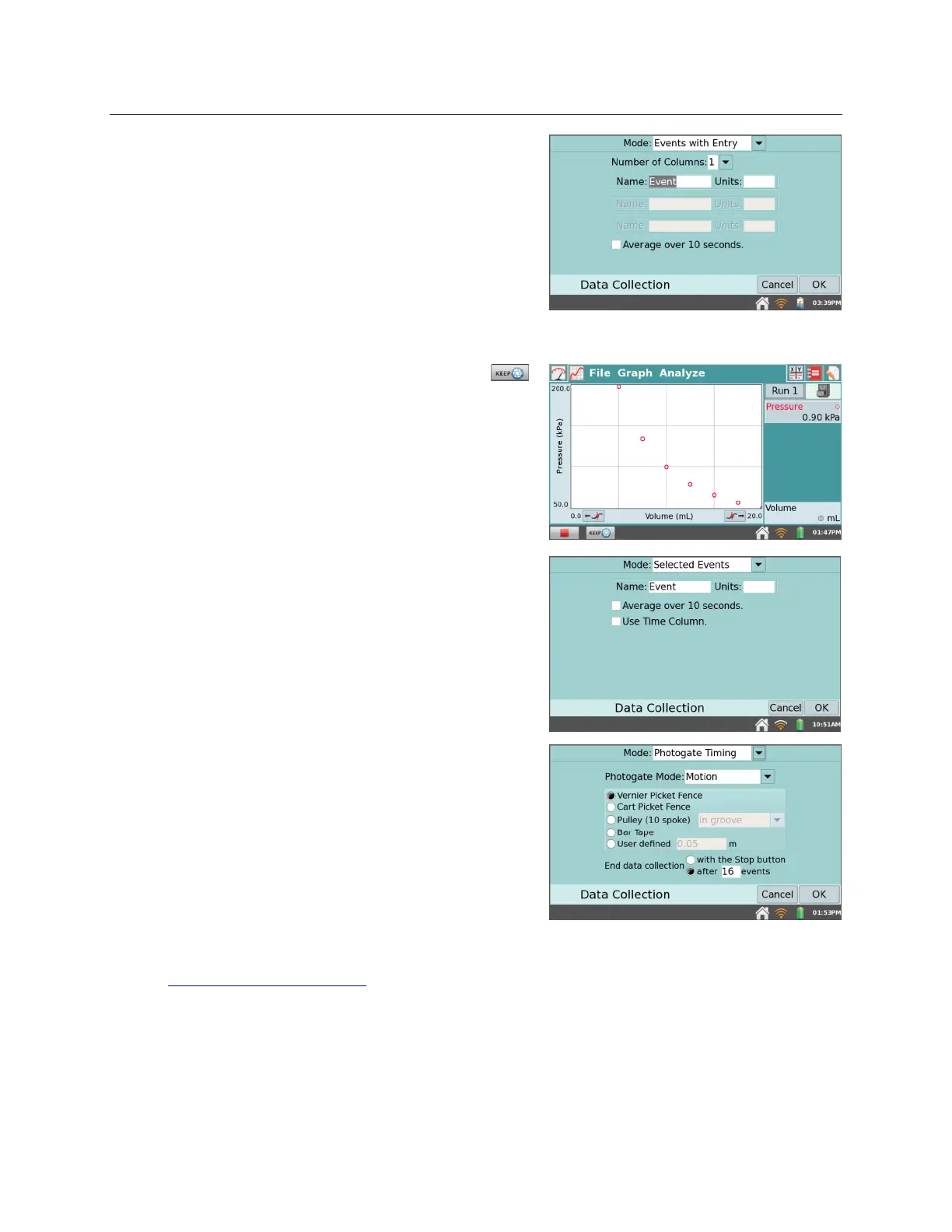
Mode: Events with Entry
– Sometimes
experiments depend on a quantity other than
time. For example, a Boyle’s law experiment,
investigates the pressure as a function of the
volume of gas. In Events with Entry mode, no
time information is recorded.
Enter a name and units for each independent
variable. You also have an option to average
data over ten seconds and report the averaged
reading.
In Events with Entry mode, a Keep button
appears during data collection. Tap Keep to
record the sensor value (e.g., gas pressure in the
Boyle’s law experiment). In response, LabQuest
prompts you to enter a value for the
independent variable (e.g., gas volume in the
Boyle’s law experiment). Sensor data are
plotted against the independent variable, as
shown in the screenshot to the right.
o
Mode: Selected Events
– Selected Events mode
is similar to Events with Entry, except that
entries of 1, 2, 3... are automatically recorded as
the independent variable. To record time
information in place of an entry value, select the
check box for Use Time Column.
o
Mode: Photogate Timing
– Photogates require a
different set of timing options. When a
photogate is detected, LabQuest enters the
Photogate Timing mode.
You have two options for ending data collection
in this mode: tap Stop, or end collection after a
defined number of events. A block/unblock pair
counts as two events.
Choose the proper Photogate Mode for your
experiment. For more information, see
www.vernier.com/til/3329


 To Next Page