Additional Apps on LabQuest
®
2
48
Camera App
From the Home screen, tap Accessories, and then tap
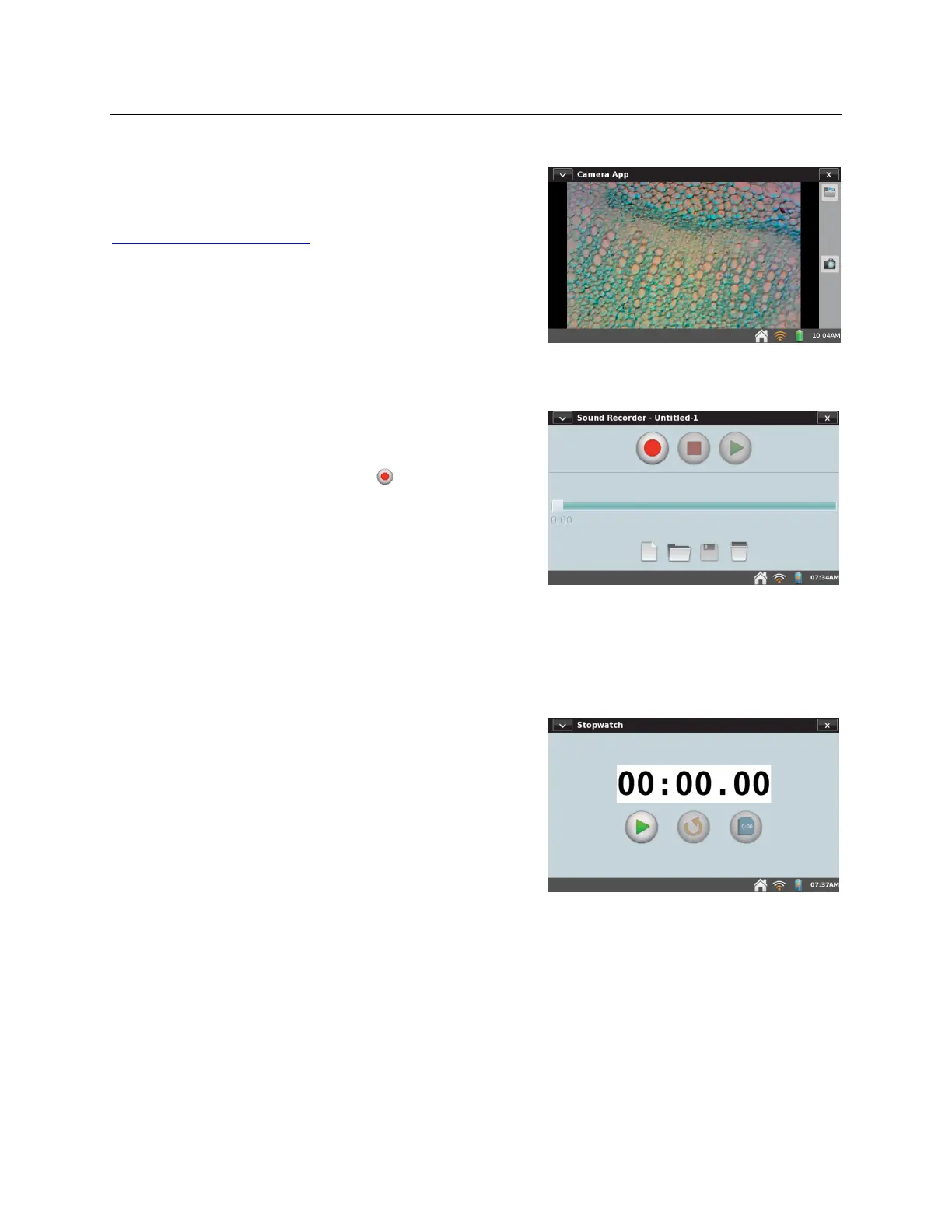
Camera App to launch this app. The Camera App
works with digital (USB) cameras. See
www.vernier.com/til/3659 for more information
regarding supported digital cameras. Use the Camera
App to view a live image feed from the camera as well
as capture images for later viewing.
Sound Recorder
From the Home screen, tap Accessories, and then tap
Sound Recorder to launch this app. The sound recorder
captures short audio clips, typically for voice notes. To
record a clip, tap the record button . To stop, tap the
square red stop button. Play the clip back using the
green play button. Tap the disk button to save the clip,
which can later be opened using the open file folder
icon. The blank page icon clears out any current audio
clip.
TIP! Use Sound Recorder to quickly make audio notes
on experiments.
Stopwatch
From the Home screen, tap Accessories, and then tap
Stopwatch to launch this app. The Stopwatch is a
simple timer. Tap the start button to begin timing; tap it
again to stop. Subsequent taps will continue to start and
stop the timer. Tap the reset button to return the timer
to zero. The copy button will place the current time on
the clipboard for pasting into the Notes screen, the
calculator, or a manual column cell.


 To Next Page