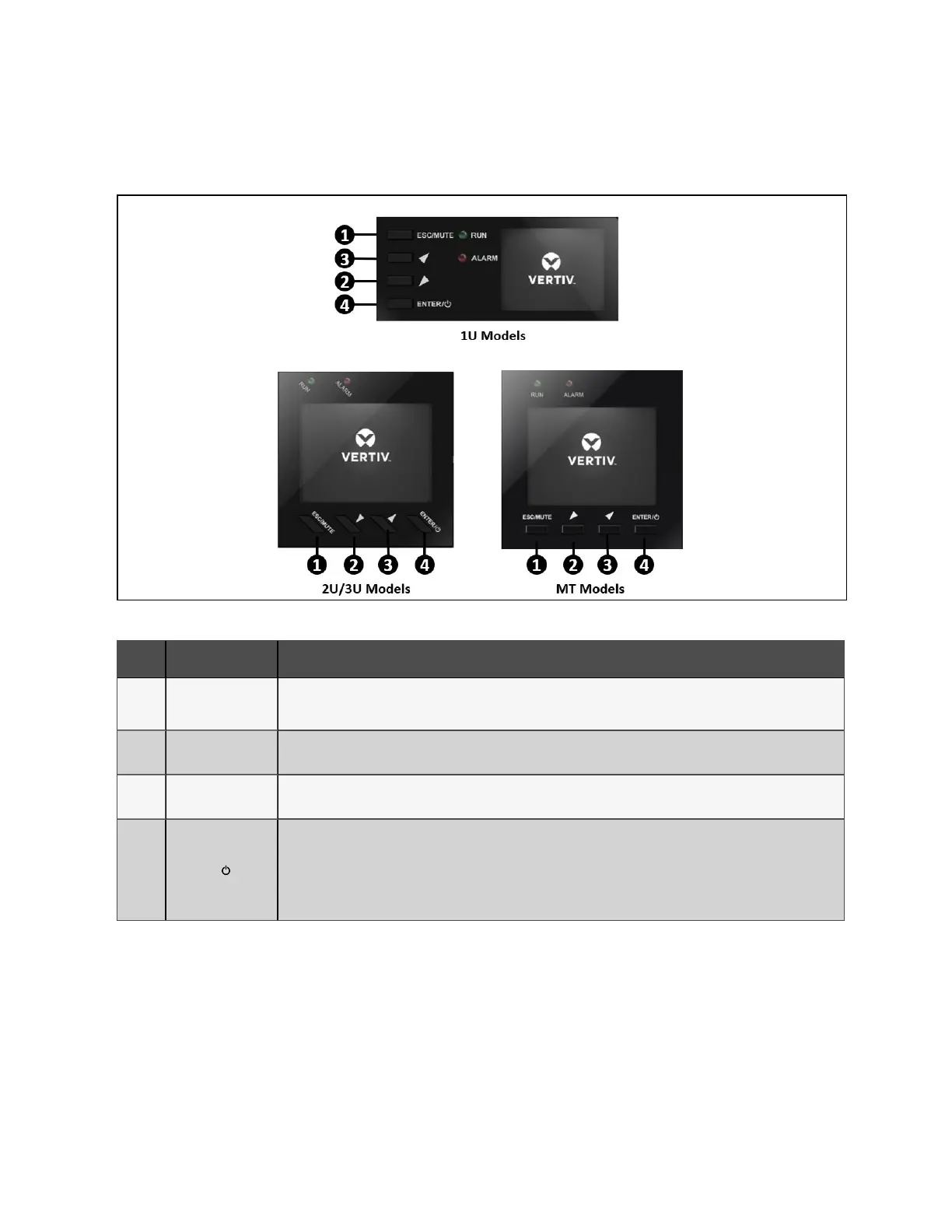
4.1.9 Controls
Figure 4.1 Display and Buttons on the front panel
ITEM FUNCTION DESCRIPTION
1 ESC/MUTE
Mute the alarm: Press and hold this button for at least 2 seconds to mute an active alarm.
Esc Key: Press this button to exit from menu or cancel the setting.
2 DOWN/LEFT
Press this button to select the lower or left item in the menu, next page in the screen, or decrease the
number in the setting.
3 UP/RIGHT
Press this button to select the upper or right item in the menu, previous page in the screen, or increase
the number in setting.
4 ENTER /
Enter: Press this button to enter the main menu from the flow screen, or use this button to select an
item when not in the flow screen.
Turn on/off the UPS: Press this button for at least 2 seconds to turn the UPS on (with confirmation
dialog if not a cold start) when the UPS is off, or turn the UPS off (with confirmation dialog) when the
UPS is on.
Table 4.1 Control-button descriptions
NOTE: Press any button quickly to wake the display.
4 Operations
16
Liebert® EDGE Installer/User Guide









 To Next Page