6. Navigate through the menu to Settings > Battery > Replace Battery and confirm battery
replacement.
NOTE: Default Settings password is 111111
7. Properly dispose of old batteries at an appropriate recycling center or return them to Vertiv in
the packing material for the replacement batteries.
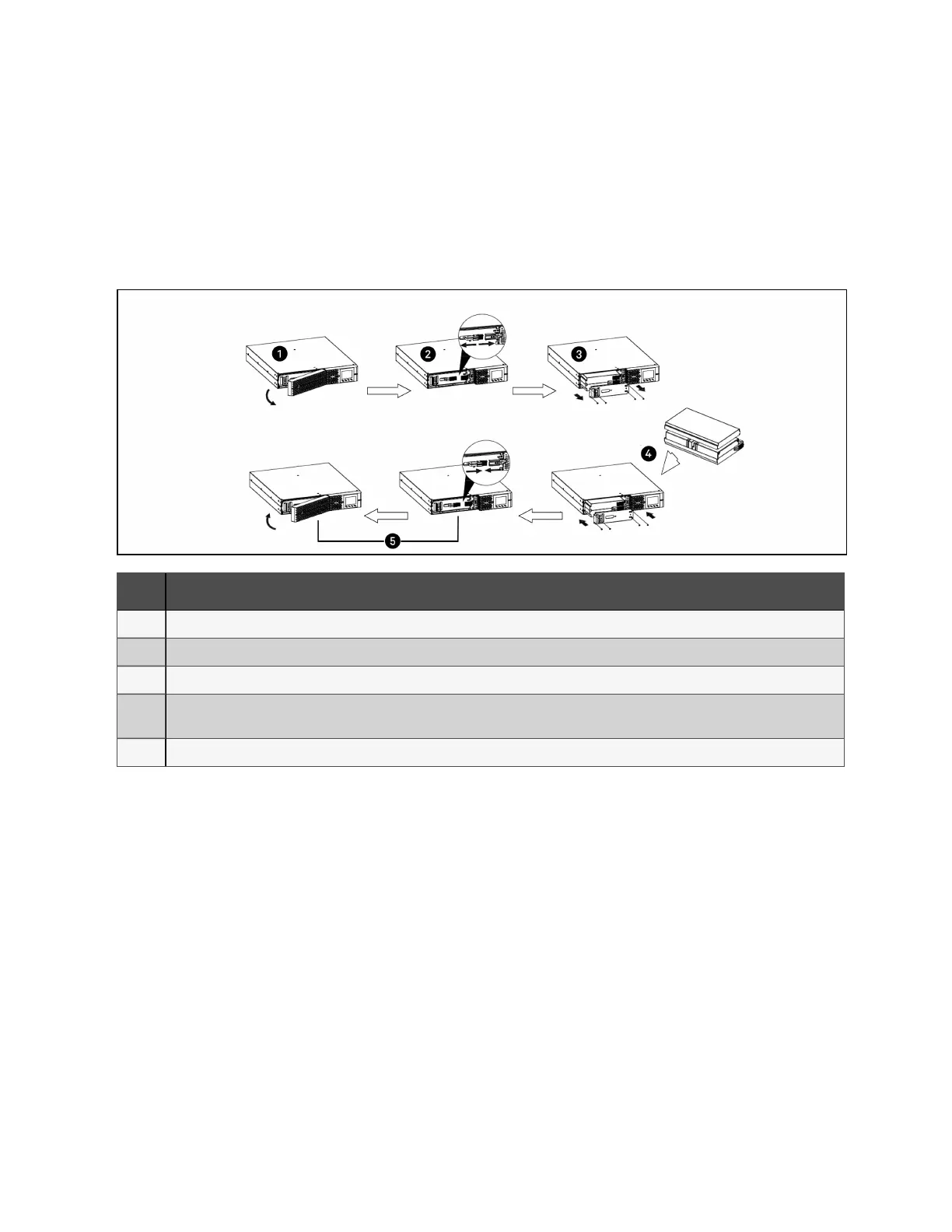
Figure 5.1 Removing the battery box from 1U, 2U, and 3U units to replace batteries
ITEM DESCRIPTION
1 Remove the front panel from the UPS.
2 Disconnect the battery connector by squeezing the ends and pulling the two pieces apart.
3 Remove the screws holding the metalbattery cover plate. Pull the battery kit out.
4
Orient the connector and the new battery in the same way as the original battery, then slide them into the UPS. Reinstall the
metal battery cover.
5 Reconnect the battery connectors. Snap the front bezel back on.
To replace the batteries on MT models:
1. Place the unit on its left side and remove the 6 screws and the metal battery cover plate.
2. Slide out the existing battery kit and disconnect the two halves of the battery connector.
3. Orient the connector and the new battery in the same way as the original battery, connect the
two halves of the battery connector, and slide into UPS.
4. Replace the metal plate and secure with the 6 screws.
5. Navigate through the menu to Settings > Battery > Replace Battery and confirm battery
replacement.
NOTE: Default Settings password is 111111
6. Properly dispose of the old batteries at an appropriate recycling facility or return them to
Vertiv in the packing material from the new batteries.
5 Maintenance and Battery Replacement
40
Liebert® EDGE Installer/User Guide









 To Next Page