Chapter 3 Web Interface of RDU501
RDU501 Intelligent Monitoring Unit User Manual
2.
Modify signal
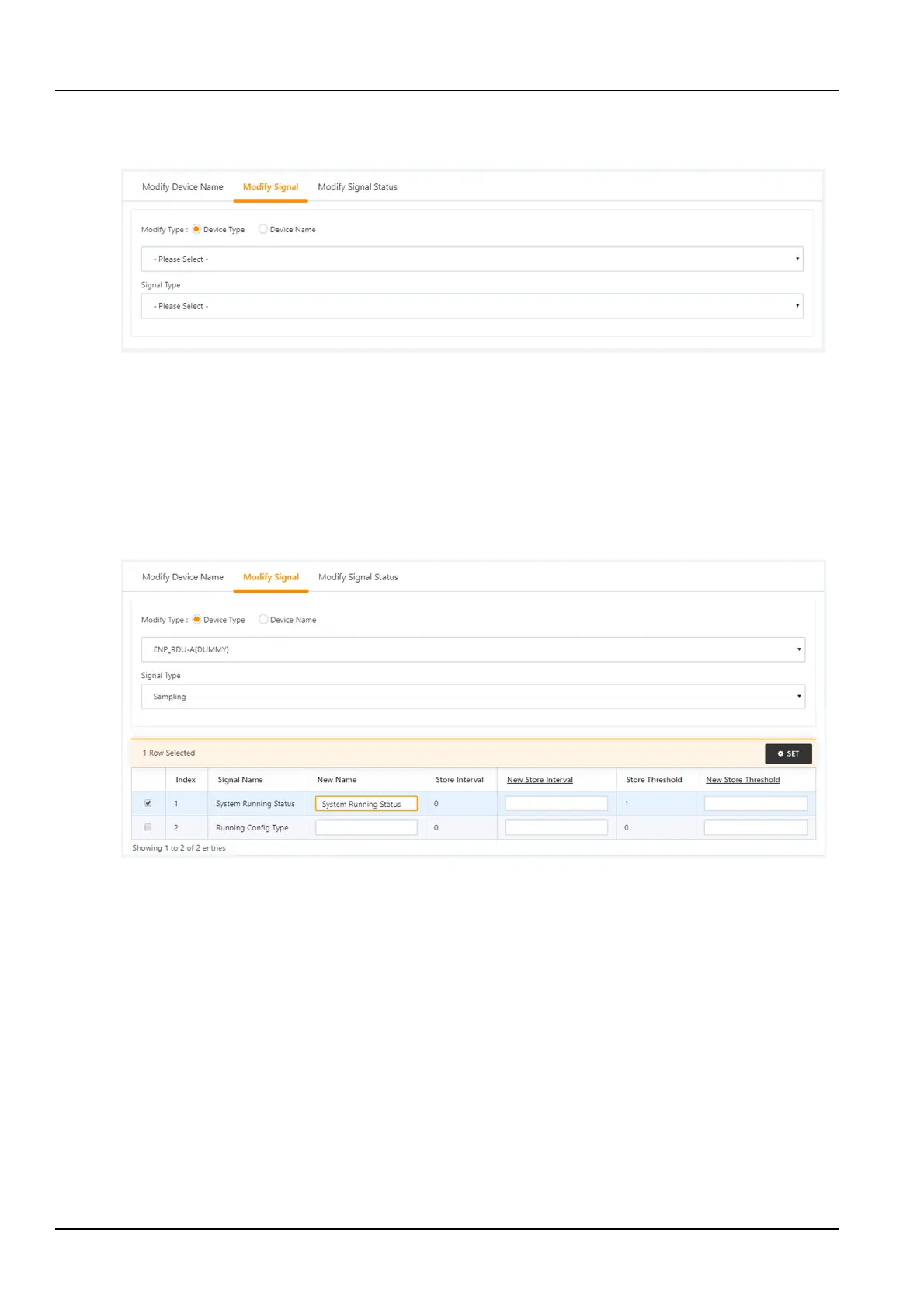
Click Modify Signal to pop up the page shown in Figure 3-114.
Figure 3-114 Modify signal
In the page shown in Figure 3-114, the user can modify the signal name, the storage period of the acquisition signal,
the storage threshold of the acquisition signal, the signal unit of the set signal, and the alarm level of the alarm signal
according to the device type or device name. Select the Device Type/Device and Signal Type, enter the new signal
information, and click the Settings button to make the batch settings.
1)
Modify the signal name
Select the Device Type/Device Name check box, select a device type/device in the drop-down box, select a signal in
the signal type, a corresponding signal list will appear, enter a new signal name in the input box, and the upper right
corner will appear, as shown in Figure 3-115. After clicking the Set button, the signal name is updated successfully.
Figure 3-115 Modify signal name
2)
Modify the storage cycle/storage threshold
Select the Device Type check box, select a device type in the drop-down box, and then select the acquisition signal
in the signal type drop-down box, the signal list shown in Figure 3-116 appears, you can enter the storage
cycle/storage threshold in a row. Click the Set button to make one or more changes.



 To Next Page