EasyManua.ls Logo

Vetaphone iPM200-5 - Menu Structure User

Default Icon
52 pages
Print Icon
To Next Page IconTo Next Page
To Previous Page IconTo Previous Page
Loading...
iPM 200 generator module
® Vetaphone March 2021 3401201GB
Page 26 of 52
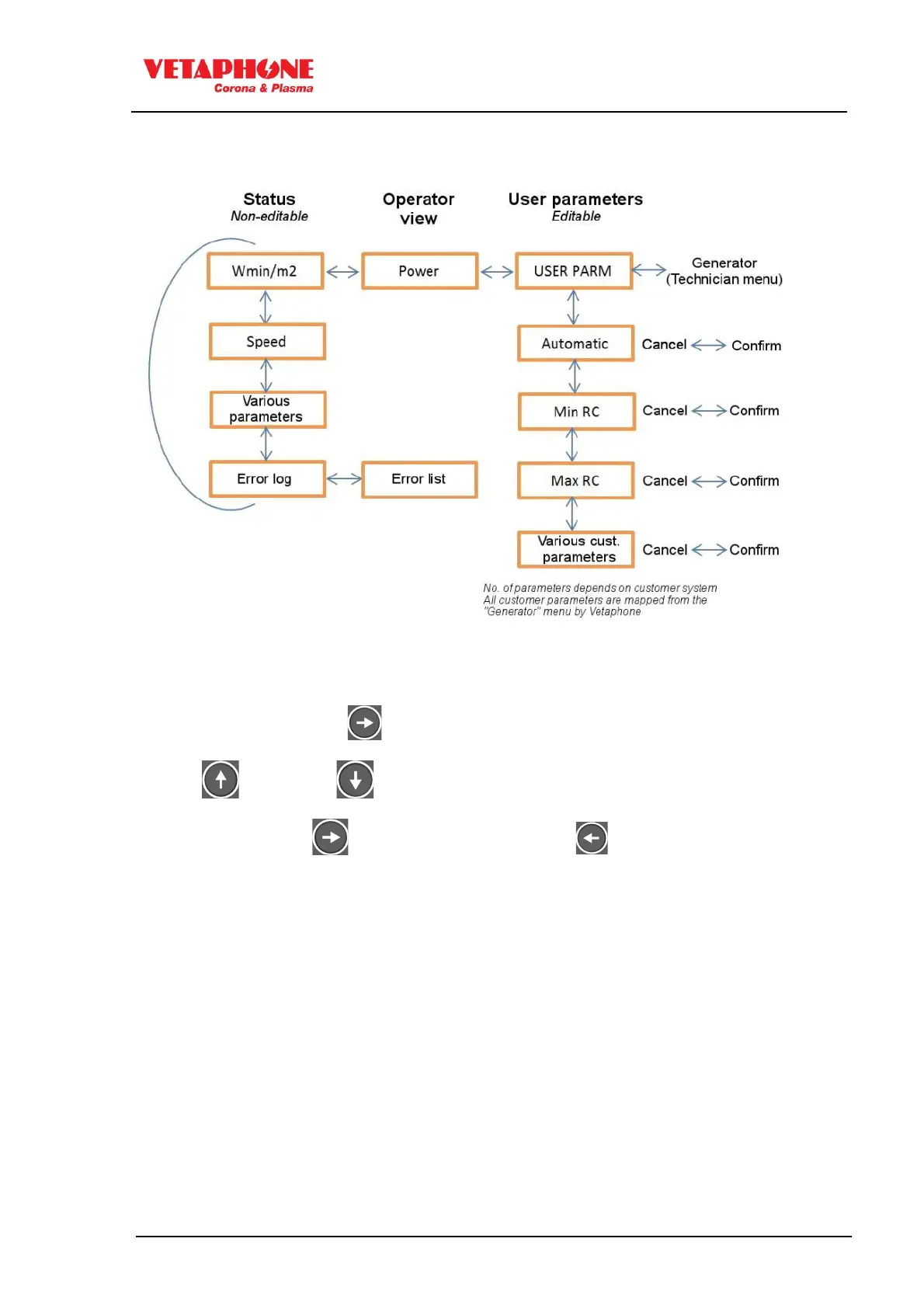
7.2.5 Menu structure user
The menu structure is as shown in the below picture.
In the Status menu the parameters can NOT be changed and are for status show purpose
only. The user may scroll through the menu with the UP and DOWN arrow.
In the Operator view the power parameter (Watt or Wmin/m²) is shown, depending on
system setup
In the User parameters the user can scroll UP or DOWN through the submenus.
To change a parameter press (right arrow) once and the value will start to blink.
Use the (up arrow) or (down arrow) to change the value.
Confirm by pressing the (right arrow). Alternatively press (left arrow) to cancel the
changed value.