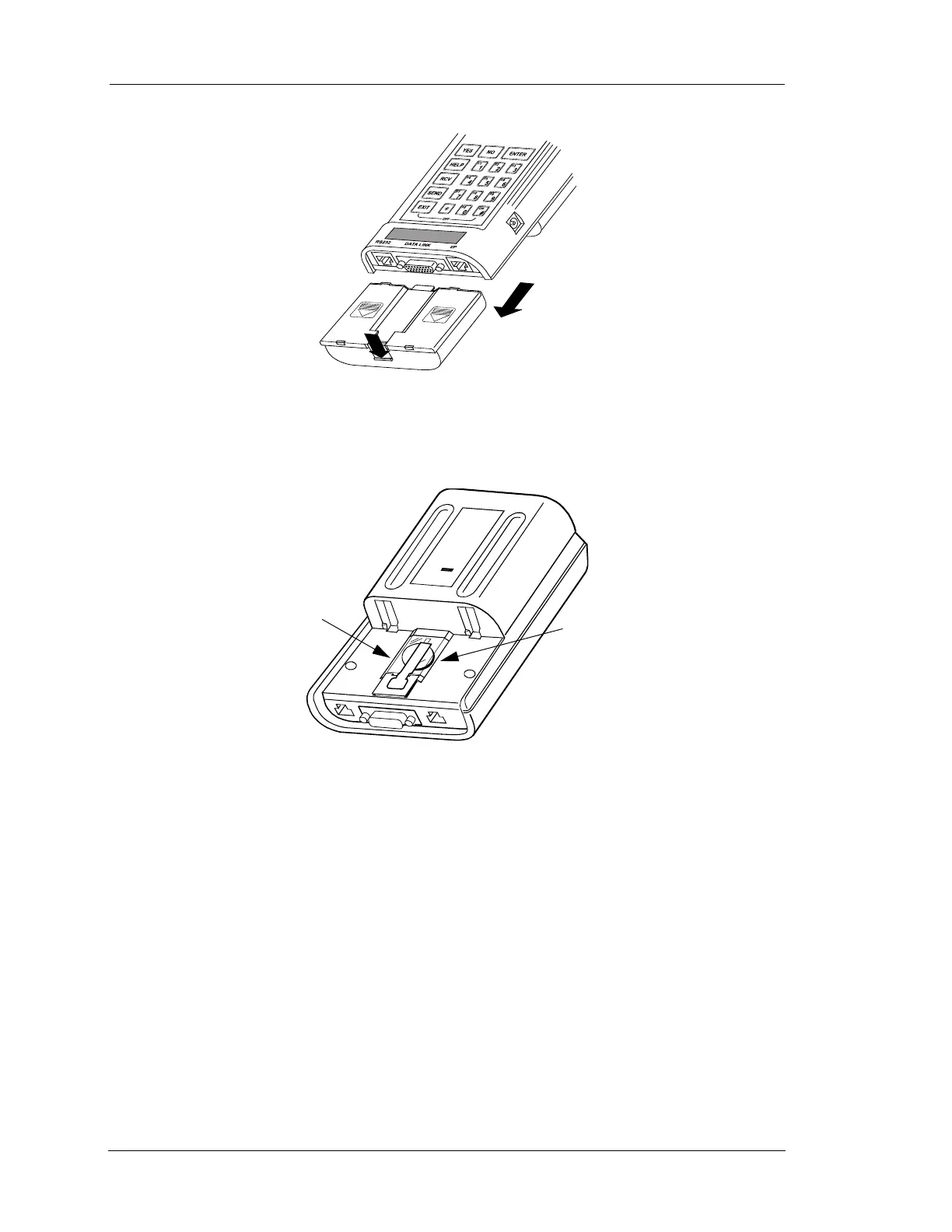
Activating the Battery Backed Memory
Page 4-2 Mastertech 3100 Operator’s Manual
3. See Figure 4-3 to remove the plastic strip covering the Lithium battery on the back of the tester.
4. When the plastic strip is removed, slide the battery pack onto the tester with the tab at the top in the slot
on the tester. The battery pack should lock into place. For further information, see Chapter 8.
5. See Chapter 5 to install a program card in the Mastertech.
6. Press the o key to turn the tester on. If the tester displays “ATTENTION! TESTER BATTERY
VOLTAGE IS LOW,” see Chapter 8 to charge the batteries.
7. The program card operator's manual explains how to setup the tester's internal functions. Some of the
internal functions are listed below.
• CLOCK/CALENDAR
• SELECT BAUD RATE
• SELECT PRINTER
• UNIT CONVERSION
FIGURE 4-2. Activating Lithium Battery
Slide Battery Pack
Toward Bottom of
Tester
NiCad Battery Pack
Press Tab Down
FIGURE 4-3. Removing Strip on Lithium Battery
Lithium
Battery
Remove
Plastic
Strip


 To Next Page