OSSC Pro Quick Start Guide VideoGamePerfection.com
Troubleshooting
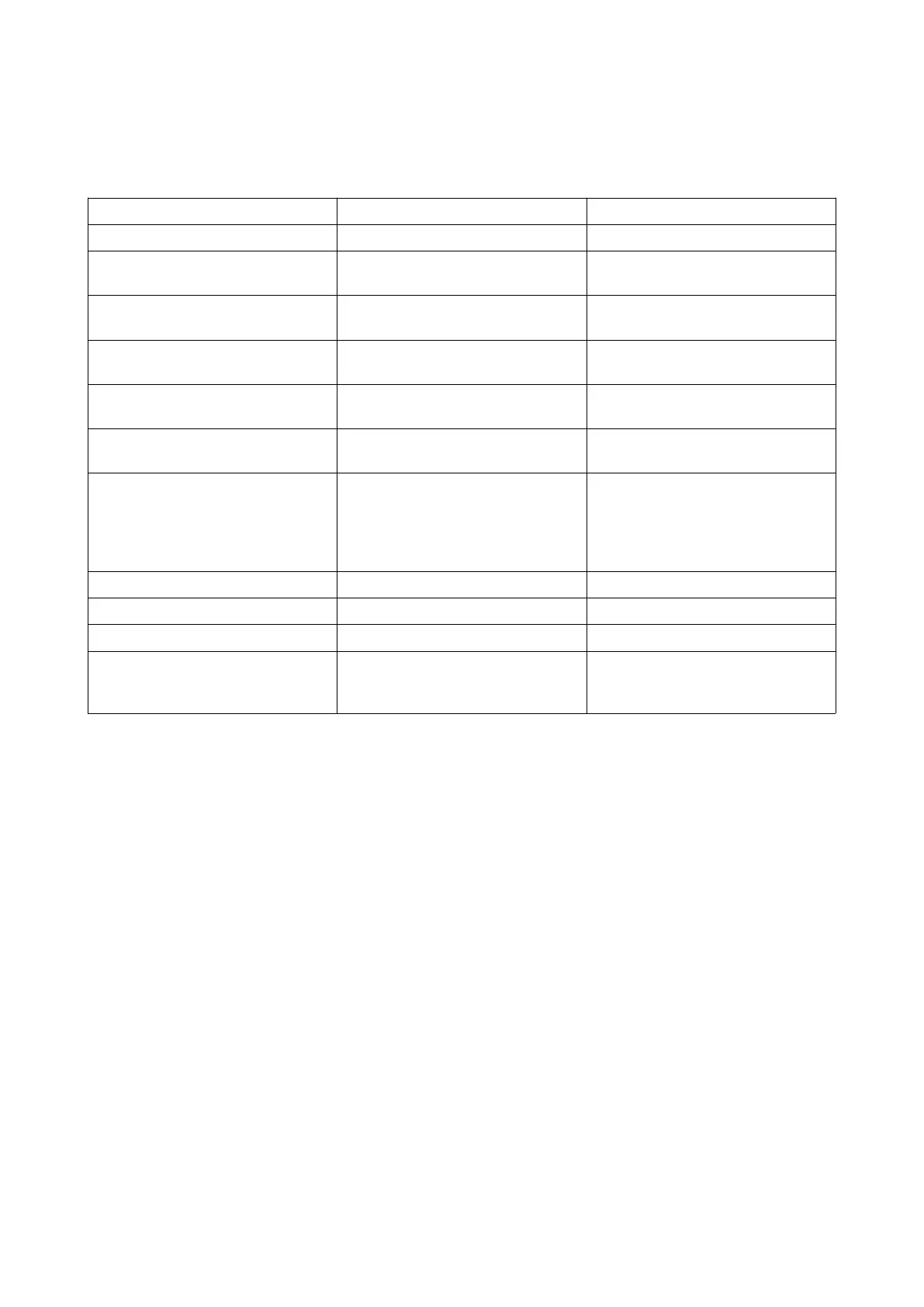
Symptom Possible Cause Solution
Image has a vertical flicker/shimmer
effect
Interlace source connected Set deinterlace mode to motion
adaptive, see page 15.
Horizontal jitter/wobble on image Fine tuning required Try adjusting low pass filter settings.
See the wiki for recommendations
Missing pixels in the image Wrong optimal mode selected Use generic 4:3 or Generic 16:9 mode
instead
No audio Display incompatibility Use a different display or choose a
different output mode
No audio Sample mode incompatible Change the Sampling format under
“Audio options” to 24bit/48kHz
No image Sync mode set wrong Press the source button again to
change sync mode. Most common
sync type is RGBs for SCART, YPbPr
for component and RGBHV for
DSub15/VGA
No image Incompatible output mode selected Switch to a compatible mode.
No image HDMI/DVI handshake failed Power cycle the OSSC Pro
Black screen and NO SYNC message Source not powered on Check power to source device
Black screen and NO SYNC message Source not outputting RGBs or
YPbPr
Make sure your source device outputs
RGB and your SCART cable is wired
for RGB.
Page 18


 To Next Page