OSSC Pro Quick Start Guide VideoGamePerfection.com
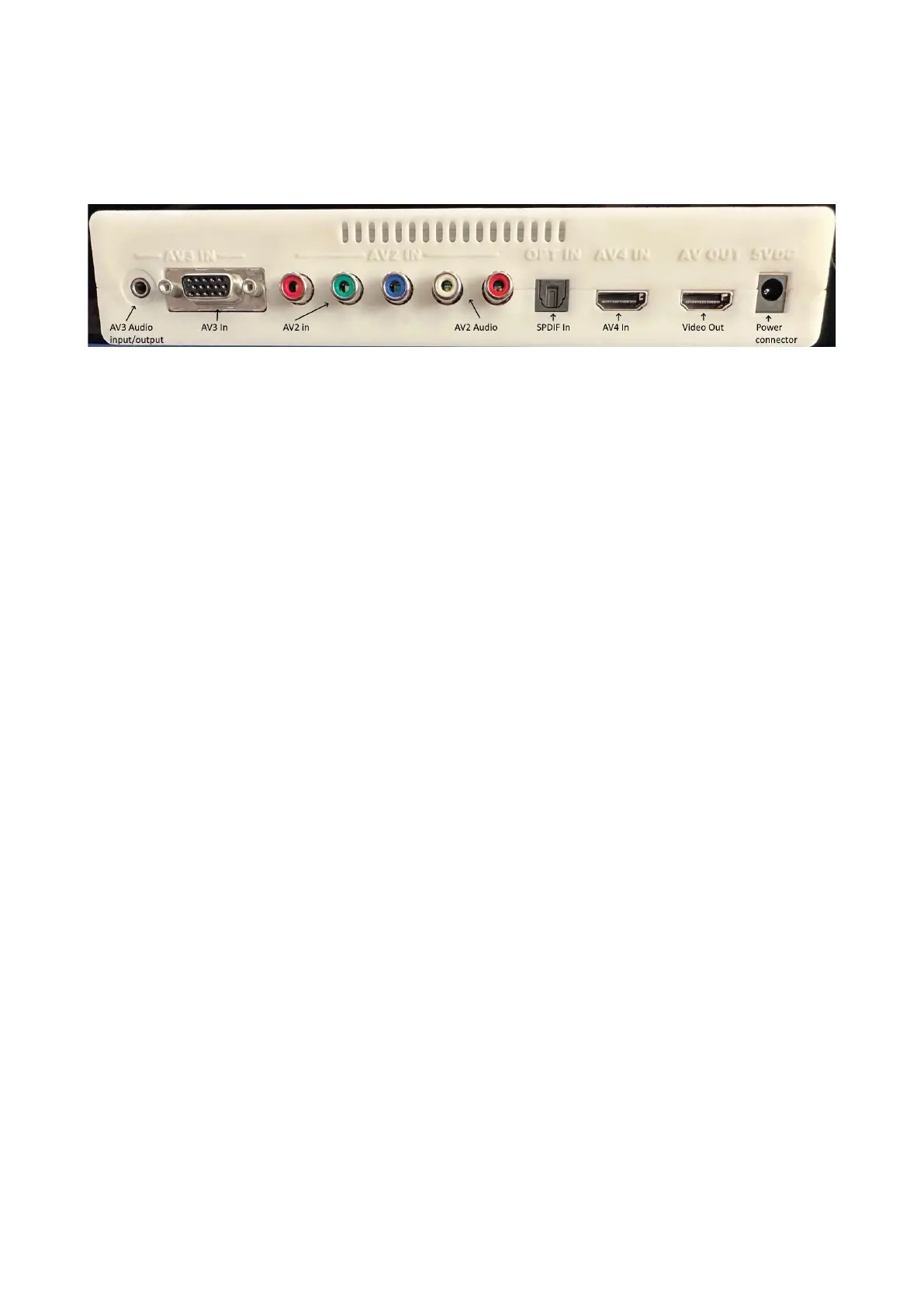
Connectors (Back)
AV3 Audio input/output connector – This connector can be set to be an audio input (assignable to
AV1, AV2 or AV3) or as an audio output/break out from AV1 SCART.
AV3 In – Standard D-Sub15 (VGA) connector. You can connect sources such as the Sega
Dreamcast or a retro gaming PC.
AV2 In – Connect component video or RGB with sync on green sources to this input.
AV2 Audio - Connect any analogue audio source to these two RCA connectors. This
audio input can be assigned to any video input.
SPDIF Input – For connecting high quality digital audio input from compatible consoles or
devices. This audio input can also be assigned to any video input.
AV4 In – Connect a standard digital video source to this port. DVI sources will require an adapter.
Video Out – Connect a standard high definition digital cable to this port and then connect the other
end of the cable to your television or monitor.
Power Connector – Connect a 5 volt, 2.1 x 5.5mm positive tip power supply unit (PSU) supplying
at least 2.5 amps of current. Note that use of the OSSC Classic power supply is not recommended
as it does not provide sufficient amps for the OSSC Pro.
Page 6


 To Next Page