OSSC Pro Quick Start Guide VideoGamePerfection.com
Getting to know your OSSC Pro
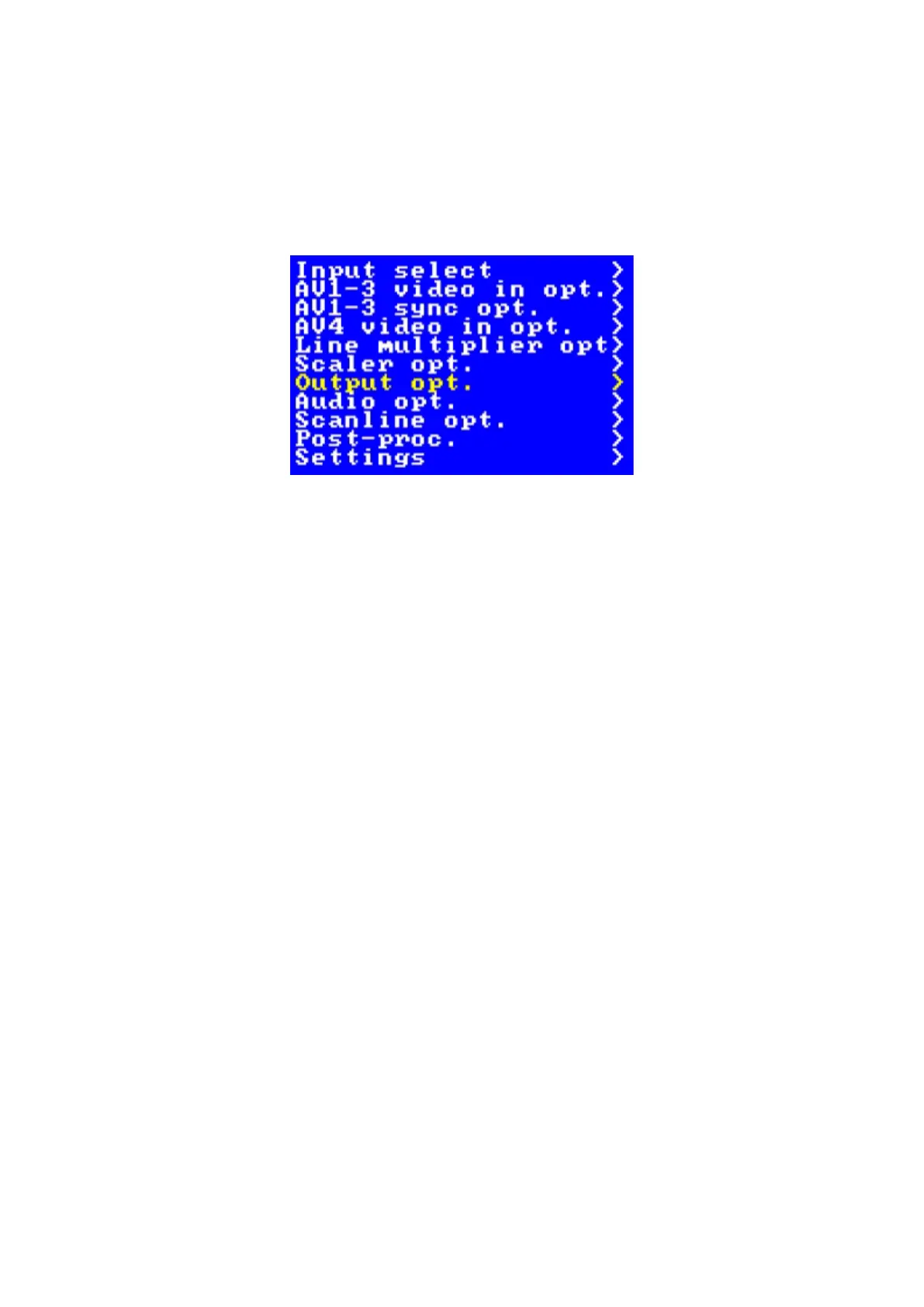
All settings for the OSSC Pro are configured using the on-screen menu. To call up the menu at any
time, press the Menu button on the remote. The root or top level menu is shown below.
You can return to the top level menu at any time by pressing the “Return” button on the remote
(multiple presses may be required).
The menu is also shown on the front OLED display, though navigating the menu on your
TV/monitor is usually easier and more convenient as more information can be displayed.
One scaler, three modes
The OSSC Pro has three operating modes.
• Pure line multiplier
• Adaptive line multiplier
• Scaler
Pure and adaptive line multiplication modes offer a lag free scaling solution for retro video
consoles, while the scaler mode offers more flexible output options, at the expense of some input
lag.
We recommend users choose either adaptive line multiplication mode or scaler mode. Adaptive line
multiplication offers many more options over the old, pure line multiplication that also featured on
the classic OSSC. Theoretically, the pure line multiplication mode has slightly less input lag than
the adaptive mode, but in practise this difference is so small that it is imperceptible. Refer to the
following table for a summary of all the modes and their advantages and disadvantages.
Page 10


 To Next Page