Operation
55
Setting
Conditioner plate
Basic setting of the
conditioner plate
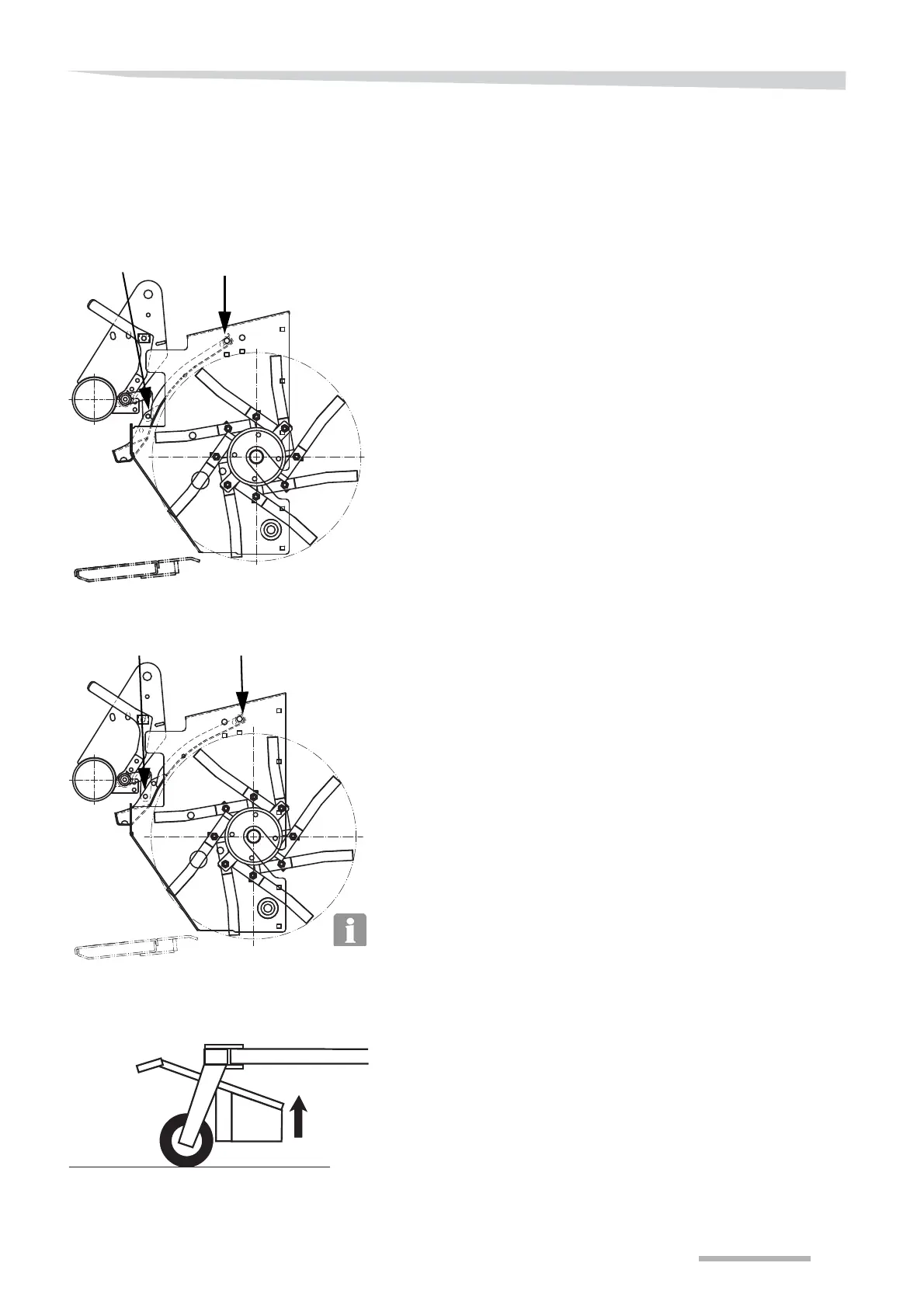
The conditioner plate has 2 basic settings:
Pos. 1:
This setting is recommended for light crops, e.g.: from normal, clean
grass crops to grass crops with moderate amounts of leaves. In this
position, the intake is made with the first part of the conditioner plate
and the rotor slightly open and gives optimal conditioning of light
crops.
This setting should be used for light crops, e.g.: from clean grass crops
to grass crops with moderate amounts of leaves.
Pos. 2:
This setting is recommended if problems occur relating to blocking of
the rotor and the flow of the crop through the machine with heavy crop.
In this position, the intake is made with the first part of the conditioner
plate and the rotor more open and gives better and smoother passage
of heavy crop through the machine.
This setting should be used for heavy crops, e.g.: from grass crops
with moderate amounts of leaves to lush and leafy spring crops.
The conditioner plate is factory-fitted in position 2.
To move the conditioner plate to pos. 1, carry out the following:
Activate the tractor hydraulics and raise the machine's cutterbar
fully.



 To Next Page