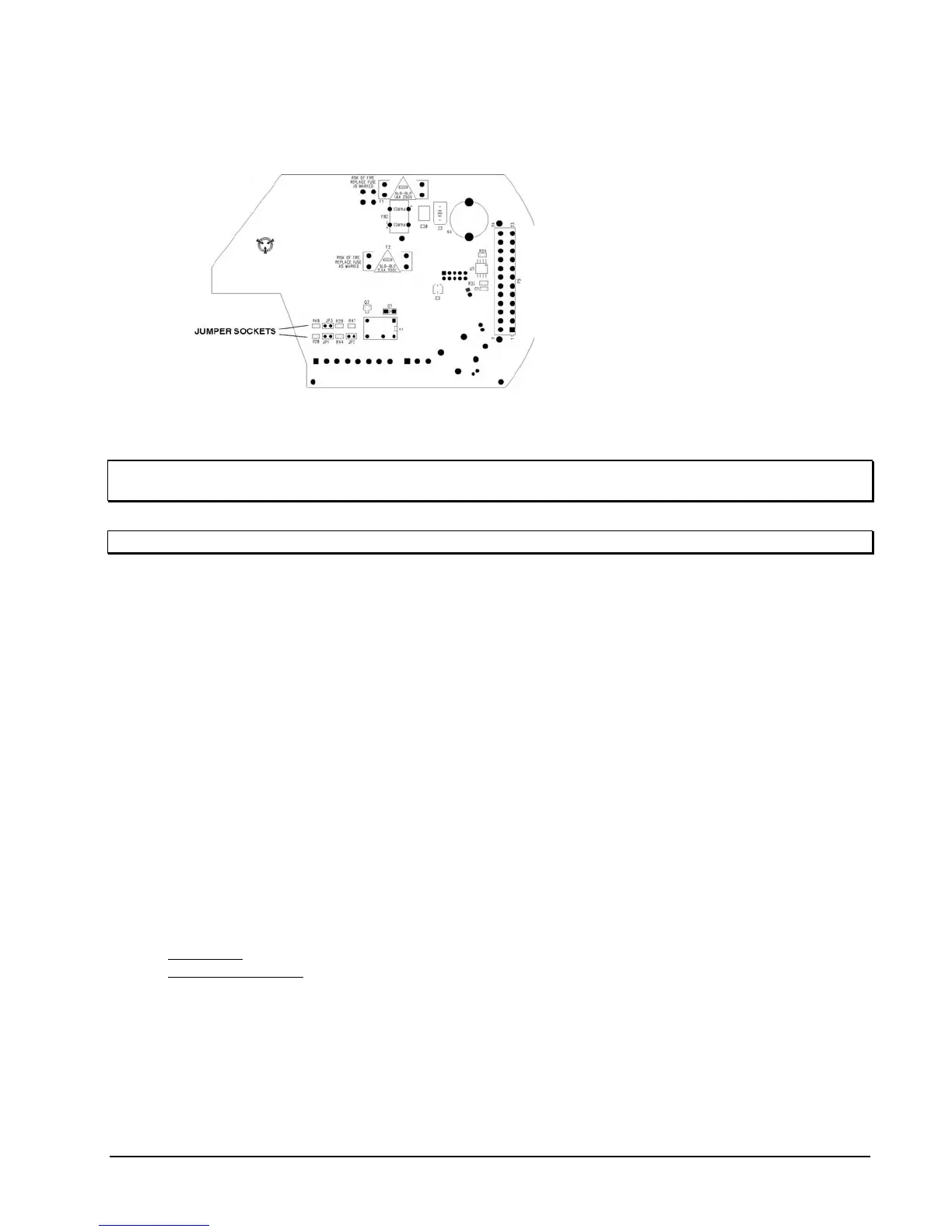
Setting the End-of-Line Jumpers JP1, JP2 & JP3 for RS-485 Protocol
Operation
Figure 24
End-of-Line Jumper Location
This section defines setting the
end-of-line jumpers JP1, JP2 and
JP3. The jumper sockets are
located on the underside of the
customer interface board, as
shown in Figure 24.
NOTE: DIP Switch 2 (SW2) switch 4 must be set to the ON (RS-485) position for proper daisy chain
operation. The end-of-line jumpers do not affect RS-422 mode.
NOTE: 32 units maximum can be daisy chained at a maximum distance of 5000 ft (1524 m) end-to-end.
The 3 jumpers are installed on each SurveyorVFT. There are 2 possible configurations as follows:
Jumpers Installed: For one camera dome or the last in line of a daisy chain using RS-485 protocol only.
Jumpers Uninstalled: For all intermediate camera domes in a daisy chain using RS-485 protocol only.
1. Uninstall the SurveyorVFT camera drive to access the jumper sockets. Refer to the “Uninstalling the
SurveyorVFT” section of this manual.
2. Verify that all 3 jumpers are installed over the 2 pins for each socket on a SurveyorVFT that is the only
unit in a daisy chain or the last in line of a daisy chain.
3. Reassemble the SurveyorVFT and proceed to the Operation section of this manual for functional testing.
Refer to the Installation section of this manual.
Configuring the ViconNet (IP/LAN) Version
The following information is provided when installing the ViconNet version of the Surveyor VFT (IP dome)
only. The SurveyorVFT camera dome (IP version) is shipped with two CDs, SurveyorVFT Software (includes
VNSetup) and VN-100 Viewer. These CDs contain the software needed to setup your IP system. Be sure the
ViconNet Workstation meets the minimum requirements, is running the ViconNet application (VNSetup.exe)
and has the proper PTZ camera driver. Refer to appropriate ViconNet documentation.
The default parameters on the IP dome are:
IP address
: [1.1.1.1].
Nucleus IP address: [1.1.1.2].
The DHCP option (obtains an IP address automatically) is ON by default. To change the setup to operate in a
network using fixed IP addresses, the option "Specify IP address" should be selected (see the section” Using
the ViconNet application" that follows).
On first startup, the camera will attempt to establish connection to the Nucleus with the default address
(1.1.1.2). Connecting it to an active Nucleus is done through the VNSetup utility.
XX134-01-00 Rev 205 SurveyorVFT Camera Dome System Configuration • 41



 To Next Page