54
Calling up the service menu
Tap the following buttons:
1. and OK simultaneously for approx. 4 s, then
release.
2. Select the required menu section (e.g. "b.1" Con-
nect with software tool).
Note
Not all menu sections will be available, depending
on the system equipment level.
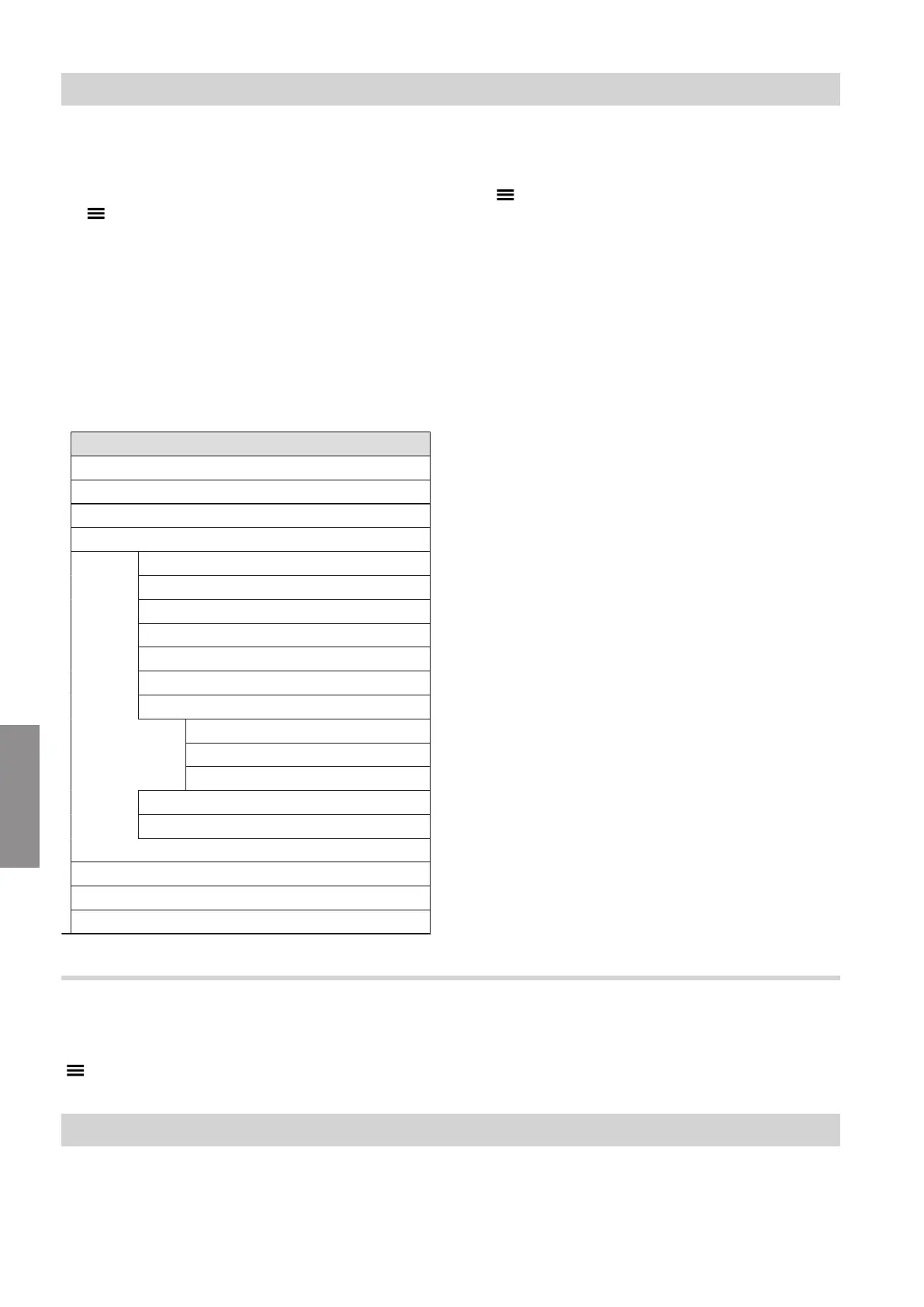
Service menu overview
Service
Er Active messages
b.1 Connect with software tool.
b.2 System configuration
b.3 Diagnostics
d.1 Outside temperature
d.2 Heat generator flow temperature
d.3 Primary pump speed %
d.4 Flue gas temperature
d.5 Burner hours run
d.6 Burner output
d.7 3-way valve position
0 = Heating
1 = Middle position (if installed)
2 = DHW
d.8 Serial number of heat generator
d.9 Heating circuit 1 flow temperature
b.4 Message history
b.5 Commissioning assistant
b.6 Start upper/lower heating output for test mode.
Note
Tap " " to return to the service menu
Exiting the service menu
Tap the following buttons:
" " several times.
Note
The system exits the service menu automatically after
30 min.
Diagnosis
Checking operating data
Operating data can be checked in various areas. See
"Diagnosis" in the service menu overview.
Diagnosis and service checks
Service menu
6179762
Diagnosis




 To Next Page