22
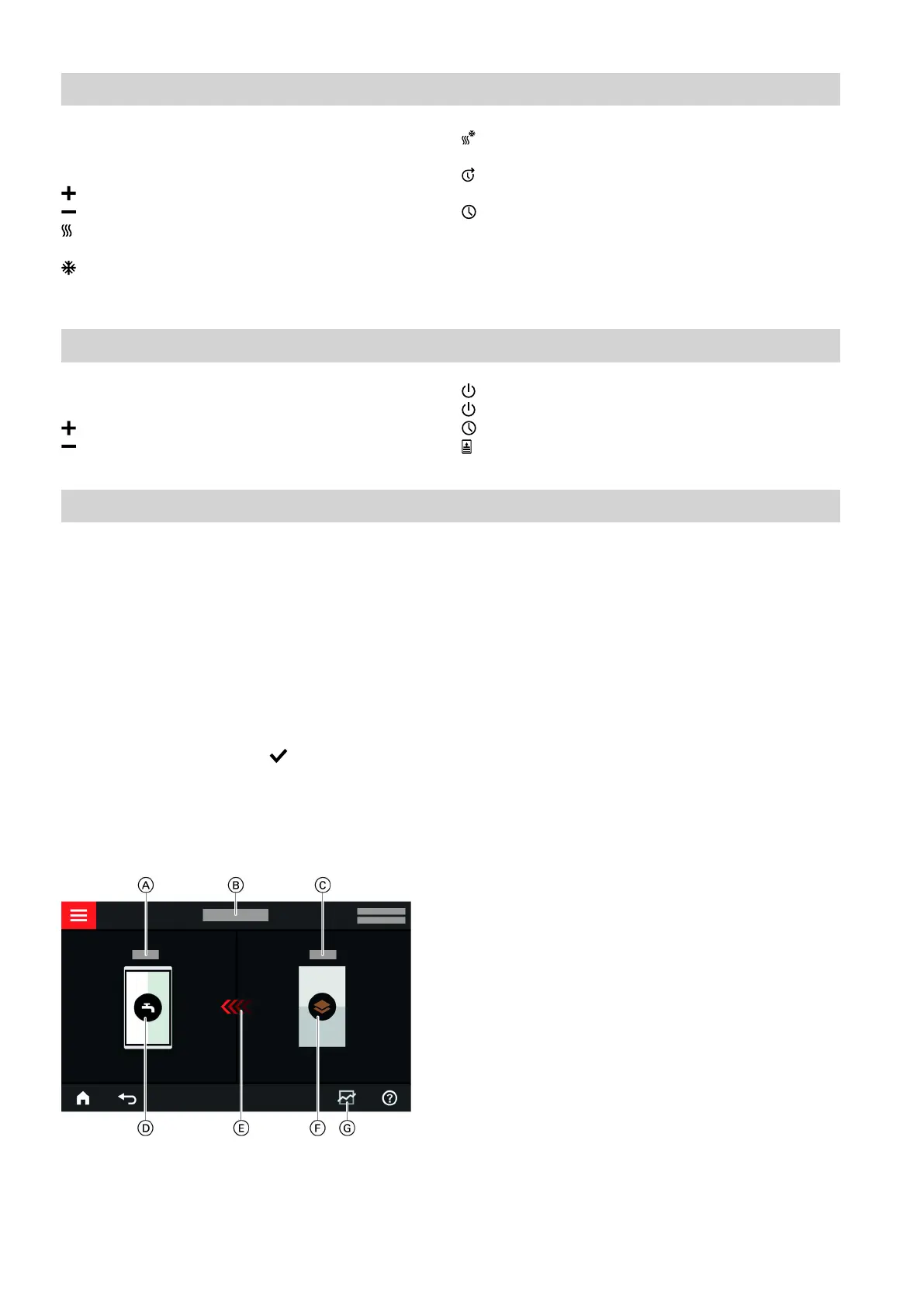
In the "Indoor environment" default display you can
carry out the room heating and room cooling settings
and checks you use most frequently:
Raises the room temperature value.
Lowers the room temperature value.
Sets the "Heating" operating program for a heat-
ing/cooling circuit.
Sets the "Cooling" operating program for a heat-
ing/cooling circuit.
Sets the "Heating/cooling" operating program for
a heating/cooling circuit.
Switches the "Extend time phase once" function
on or off.
Calls up the "Time program" for room heating/
room cooling.
The displayed temperature is the set room tempera-
ture for the current time phase, e.g. 20 °C.
"DHW" default display
In the "DHW" default display you can carry out the
DHW settings and checks you use most frequently:
Raises the DHW temperature value.
Lowers the DHW temperature value.
Sets the "DHW" to "ON".
Sets the "DHW" to "OFF".
Calls up the "Time program" for DHW heating.
Switches one-off DHW heating on or off.
"Energy cockpit" default display
The "Energy cockpit" provides you with clear infor-
mation on the energy state of your heat pump.
The various components present in the system are
shown as graphics. Some information on the compo-
nents is also provided in the default display. For more
information, tap on the currently displayed component.
What buttons and symbols are available depends on
the system version.
If you call up the energy cockpit for the first time, a
notification appears.
■
Confirm the notification with . The energy cockpit
is displayed. The notification is not shown again
when the energy cockpit is subsequently called up.
■
With "Cancel" the notification is closed. The energy
cockpit is displayed. The notification will be shown
again next time the energy cockpit is called up.
Fig. 8
A
DHW temperature
B
Energy cockpit
C
Heat pump flow temperature
D
DHW cylinder
E
Heating of the DHW cylinder by the heat pump is
enabled.
F
Heat pump
Check the heat pump operating data.
For additional information: See chapter "Checking
the heat pump operating data".
G
Energy balance
Check the power consumption of the compressor
and electrical booster heater.
For additional information: See chapter "Calling up
the energy balance".
Default displays
Default display "Indoor environment"
6171827







 To Next Page