47
WiFi operational reliability and system requirements
The appliance is equipped with an integral WiFi com-
munication module. This WiFi communication module
supports maintenance and servicing via ViGuide as
well as operation via the ViCare app.
WiFi router system requirement
■
WiFi router with activated WiFi:
The WiFi router must be protected by a sufficiently
secure WPA2 password.
The WiFi router must always have the latest firm-
ware version via updates.
Unencrypted connections between the WiFi router
and the heat generator are not permitted.
■
Internet connection with high availability:
"Flat rate" (flat rate tariff without restriction on time or
data volume)
■
Set the WiFi frequency to 2.4 GHz.
■
Dynamic IP addressing (DHCP, delivered condition)
in the network (WiFi):
Have this checked on site by an IT expert prior to
commissioning. Arrange for setup if required.
■
Set routing and security parameters in the IP net-
work (LAN).
Note
Length of password and permitted special characters
depend on the respective router.
Enable the following ports for direct outgoing con-
nections:
–
Port 80
–
Port 123
–
Port 443
–
Port 8883
Have this checked on site by an IT expert prior to
commissioning. Arrange for enabling if required.
Wireless signal range of WiFi connection
The range of wireless signals may be reduced by
walls, ceilings and interior fixtures. The following cir-
cumstances will reduce the strength of the wireless
signal and can disrupt reception:
■
On their way between transmitter and receiver, wire-
less signals are damped, e.g. by air or when pene-
trating walls.
■
Wireless signals are reflected by metallic objects,
e.g. reinforcements embedded in walls, the metal foil
in thermal insulation, and thermal glazing with metal-
lised thermal vapour deposit.
■
Wireless signals are isolated by service ducts and
lift shafts.
■
Wireless signals are disrupted by devices that also
operate with high frequency signals. Distance to
such appliances: Min. 2 m.
Examples of devices with high frequency signals:
–
Computers
–
Audio and video systems
–
Devices with active WiFi connection
–
Electronic transformers
–
Pre-ballasts
Install the heat generator as close as possible to the
WiFi router to ensure a good WiFi connection. The sig-
nal strength can be displayed on the programming
unit: See operating instructions.
Note
The WiFi signal strength can be increased with WiFi
repeaters.
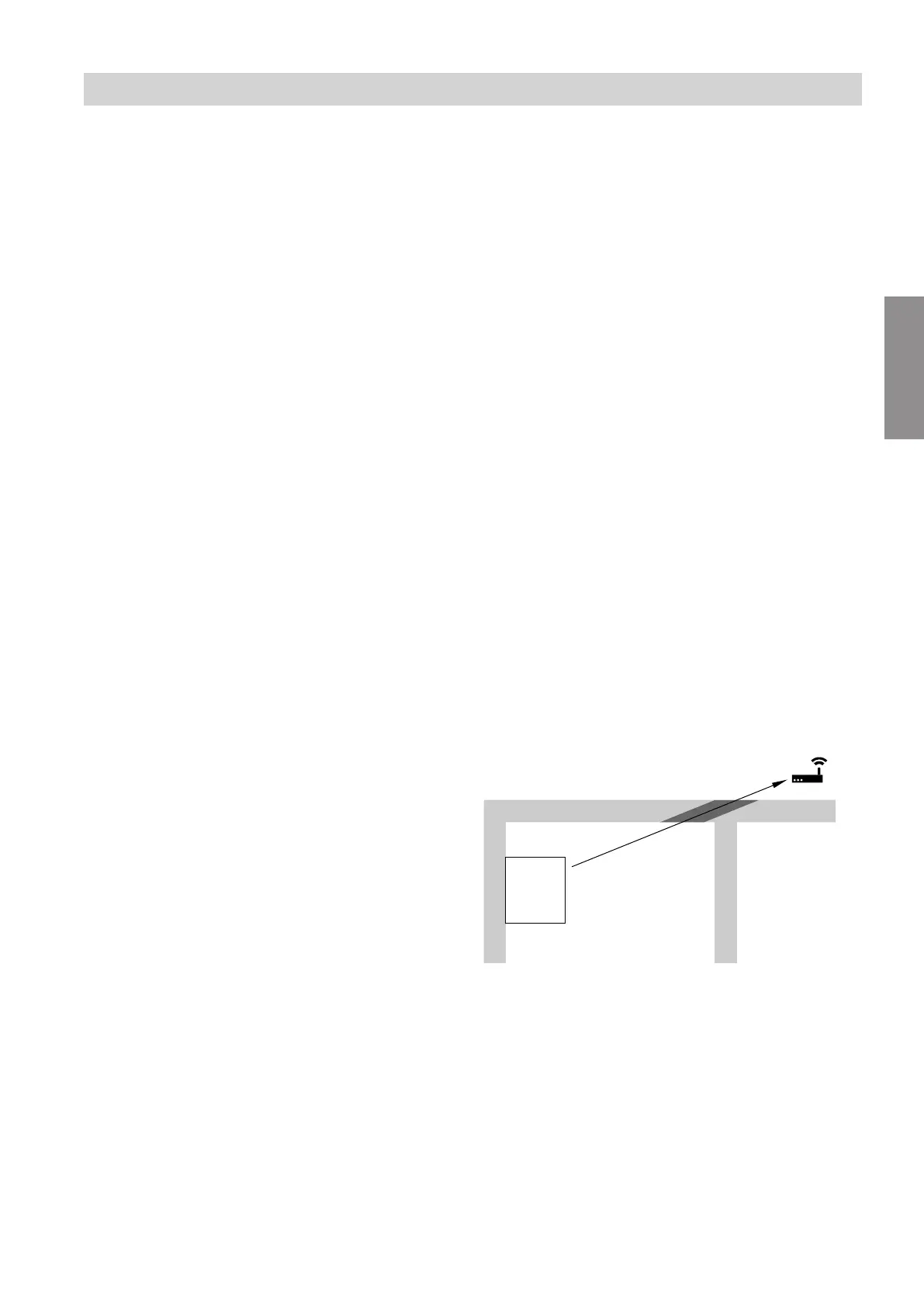
Angle of penetration
The reception quality remains best if wireless signals
hit the walls vertically.
Depending on the angle of penetration, the effective
wall thickness changes and so does the extent to
which the electromagnetic waves are damped.
Flat (unfavourable) angle of penetration
Fig. 30
A
WiFi router
B
Heat generator
C
Wall
Installing the indoor unit
Requirements for the installation room (cont.)
6222080
Installation







 To Next Page