ConguringClientSettings
Conguring Service Access Settings
127
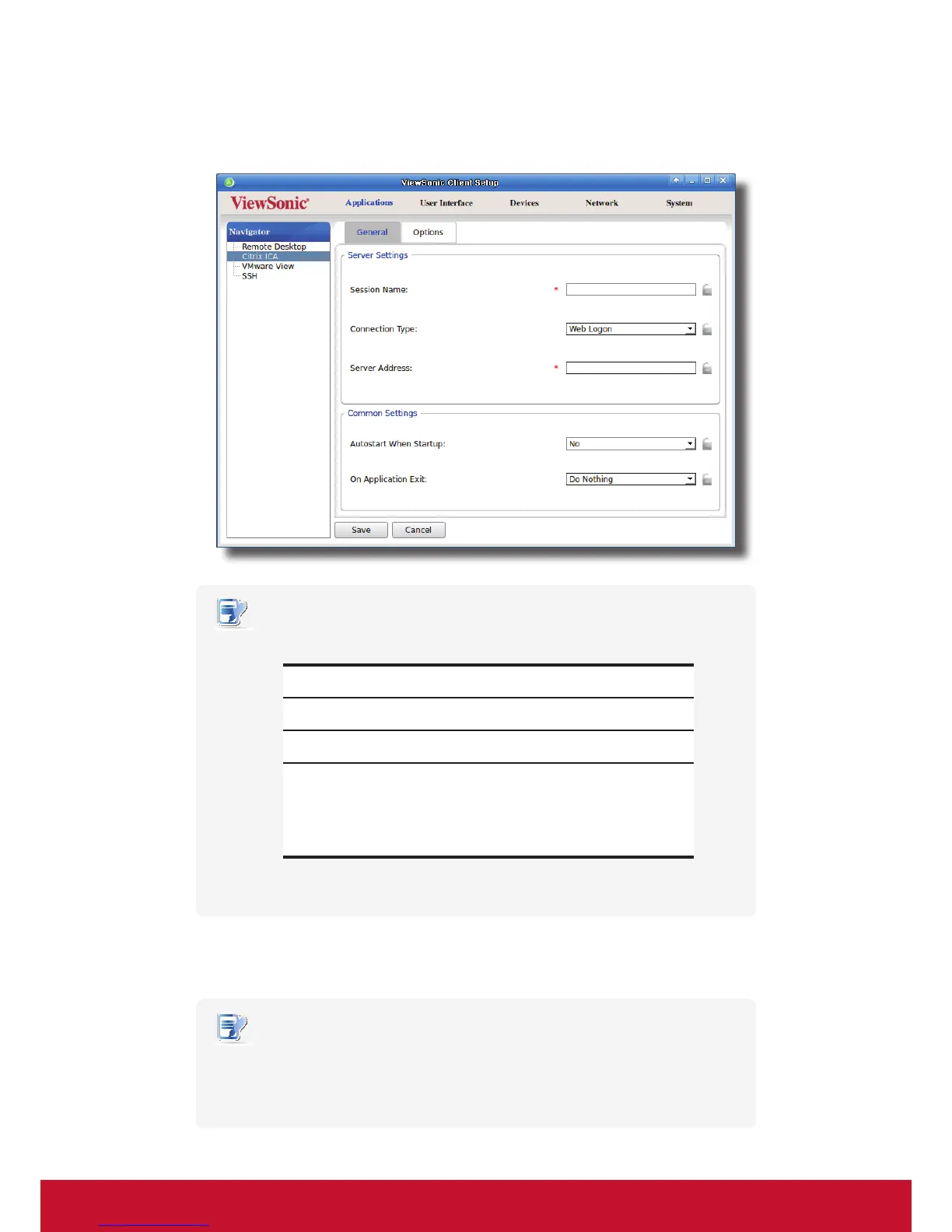
4. On General sub-tab, leave the connection type as Web Logon as default, and then type in the desired
session name and the IP address / URL / FQDN of the server through which Citrix services are accessible.
NOTE
• For newer versions of XenDesktop and XenApp, you may need to further specify
the sub-path of the server. Refer to the following table for details:
Citrix Product
Component to
Connect
Connection Address
XenApp 6.5 or
earlier
Web Interface IP / URL / FQDN
XenDesktop 5.6
or earlier
Web Interface IP / URL / FQDN
XenApp and
XenDesktop 7.5
StoreFront
IP / URL / FQDN plus sub-path
For example —
FQDN: X75.CTX.poc
Sub-path: /Citrix/StoreWeb (default)
Connection Address:
X75.CTX.poc/Citrix/StoreWeb
• FQDN is the acronym of Fully Qualied Domain Name.
5. Click Save to add this ICA connection entry. The access shortcuts are automatically created on the local
desktop and START menu.
NOTE
• Depending on your plan of service delivery and the conguration of your server(s),
you may need to congure other advanced ICA connection settings for service
access. For more information on other available settings, please refer to section
“4.6.8 Conguring Advanced ICA Connection Settings” on page 145.



 To Next Page