ConguringClientSettings
Conguring Network Settings
77
4.5.3 Conguring Wired Network Settings
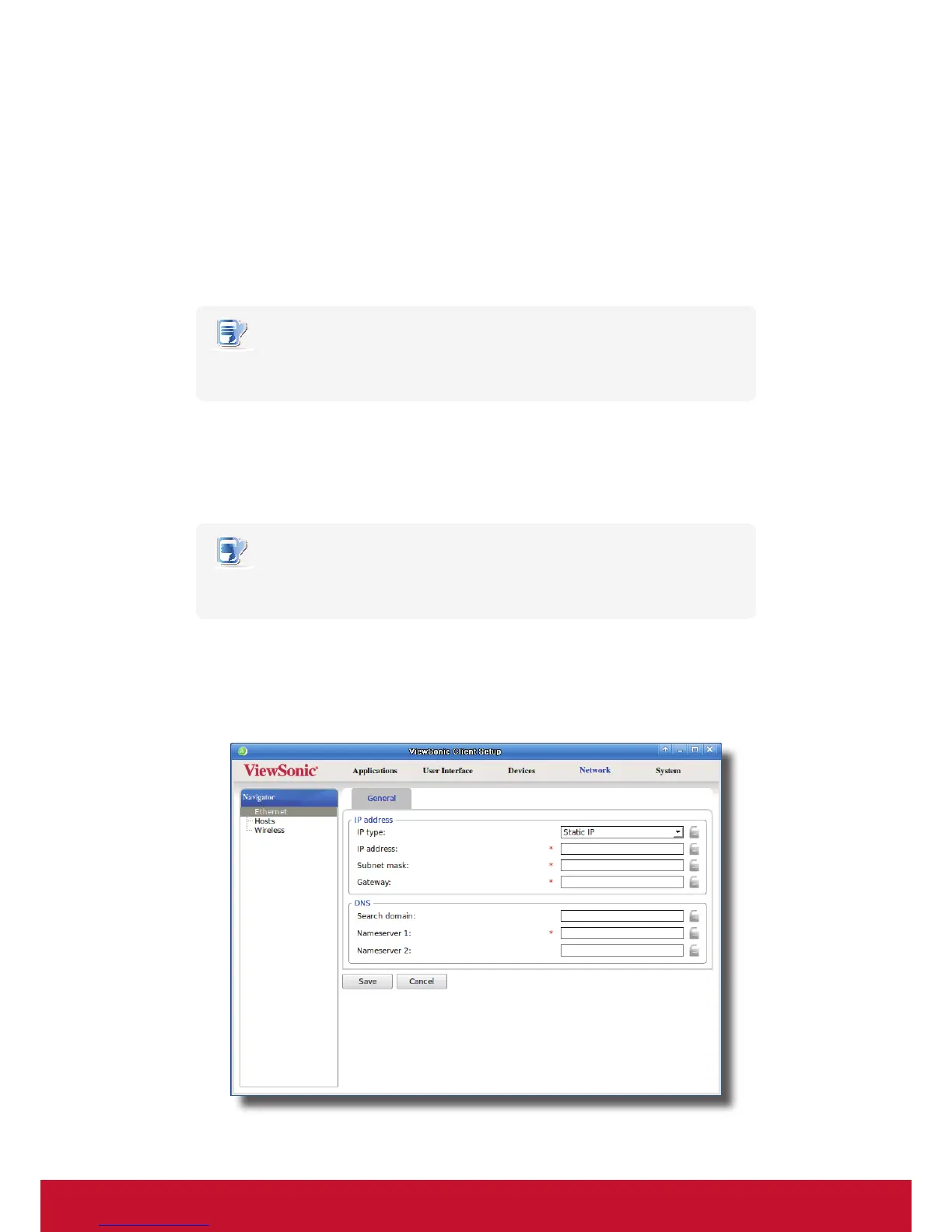
The Ethernet setting enables you to congure the wired network settings for your SC-T35 thin client.
Using a Dynamic IP Address
To use a dynamic IP address, please do the following:
1. On ViewSonic Client Setup, click Network > Ethernet.
2. Under the IP address section, click the drop-down menu to select DHCP for the IP type eld.
NOTE
• If DHCP is selected, the DHCP server over the network will automatically assign
an IP address to your SC-T35 thin client. This is the default setting.
3. Click Save to apply.
Using a Static IP Address
To use a static IP address, please do the following:
NOTE
• It’s recommended to use a dynamic IP address for your SC-T35 thin client in a
corporate network environment.
1. On ViewSonic Client Setup, click Network > Ethernet.
2. Under the IP address section, click the drop-down menu to select Static IP for the IP type eld.
3. The IP address, Subnet mask, and Gateway elds appear in the IP address section.



 To Next Page