VIKING TECHNICAL SUPPORT 1.800.908.0884
34
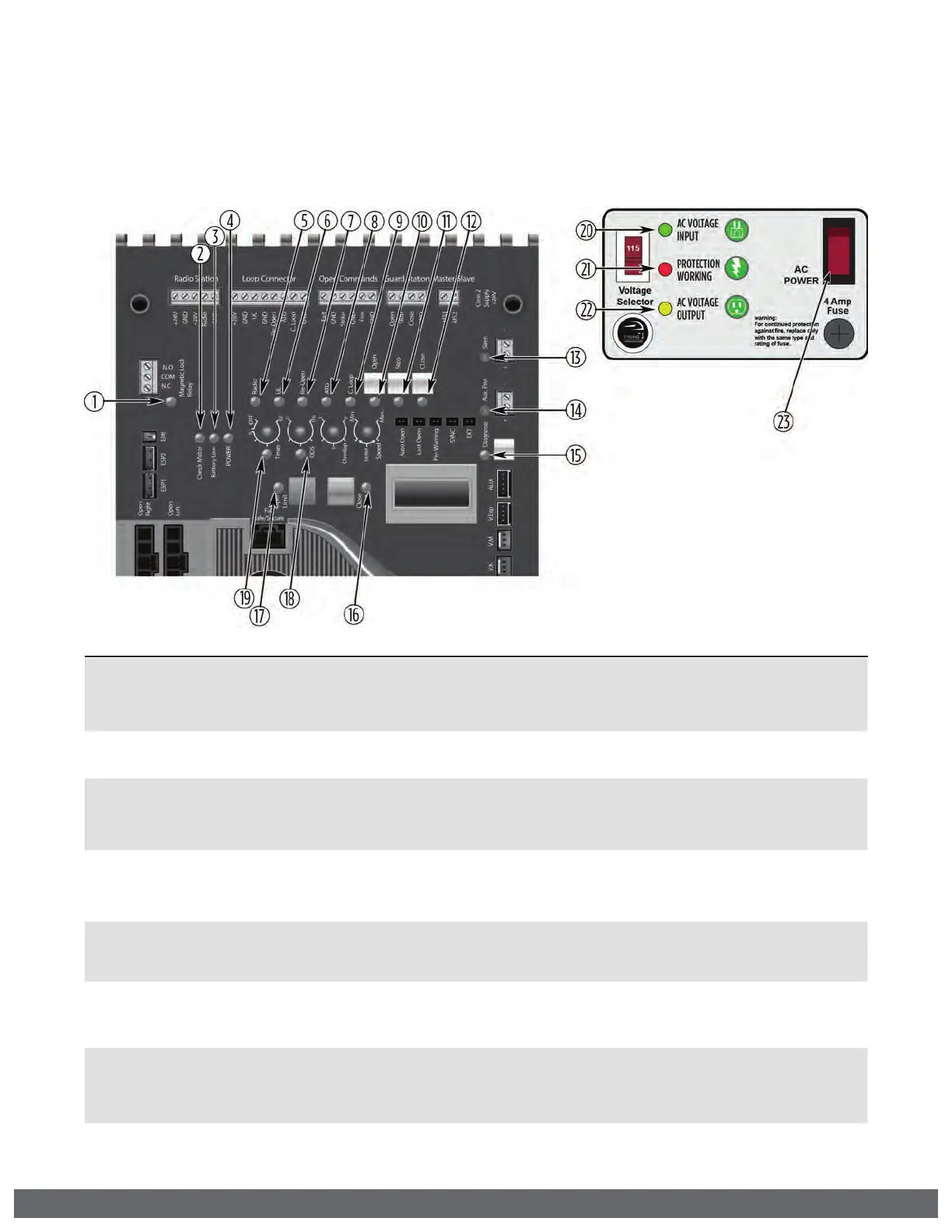
LED References
In addition to the LCD Display, the Control Board LEDs monitor the various circuits of
the Control Board. Use the table below to identify the corresponding “TS Ref#” and
refer to page 34-40 for further troubleshooting.
TROUBLESHOOTING
# LED Status Meaning
Page 40
TS Ref#(s)
1 “Magnetic
Lock Relay”
OFF At Closed Limit and Magnetic Lock Relay state is closed across “COM” &
“N.C.”. (pg 32). Gate should be at the Close Limit.
SOLID Not at Closed Limit and Magnetic Lock Relay state is closed across “COM” &
“N.O.”. (pg 32). Gate should not be at the Close Limit
2 “Check Motor” OFF Normal Condition.
SOLID The Control Board is sending power to the motor but the circuit is open.
7, 8
3 “Battery Low” OFF Normal Condition.
SOLID Batteries are low. Check power supply to the operator. (pg 16-17).
1, 2, 3
FLASHING Batteries critically low. Check power supply to the operator. (pg 16-17).
1, 2, 3
4 “POWER” SOLID Normal Condition.
FLASHING Operator is running on batteries only (pg 16-17).
1, 2
OFF No power to Control Board.
1, 2, 4, 5
5 “Radio” OFF Normal Condition.
SOLID Control Board is receiving an input from a device connected to the
Radio terminal (pg 26, 28).
9, 10
6 “UL” OFF Normal Condition.
SOLID Control Board is receiving an input from a device connected to the UL
terminal or when more than one device is connected (pg 6-7, 18, 26).
9, 10, 16,
20
7 “Re-Open” OFF Normal Condition.
SOLID Control Board is receiving an input from a device connected to the
Re-Open terminal or when more than one device is connected (pg 6-7,
18, 26, 30).
9, 10, 16,
20
8 “ATG” OFF Normal Condition.
SOLID Control Board is receiving an input from a device connected to the ATG
terminal (pg 26).
9, 10



 To Next Page