© 2010 Viking Preferred Service
32
Diagnostics
Mode B Functions (continued)
Freezer Temperature Offset Calibration
The default setting for the freezer thermistor on a new unit depends on the type of Side-by-Side unit. A 42”
and 48”dispenser model is indicator 3 while a 42” and 48”non-dispenser model is indicator 4. A replacement
Low Voltage Board comes set with a default of 5. If the settings are incorrect, it will need to be changed for
proper operation.
The chart below shows the proper offset settings for the various Side-by-Side models for the Freezer
Thermistor.
Indicator
12
34
5 6 7 8 Coldest
Offset
+8 +6
+4 +2
0-2-4-6 -8
48”D
42”D
48”
42”
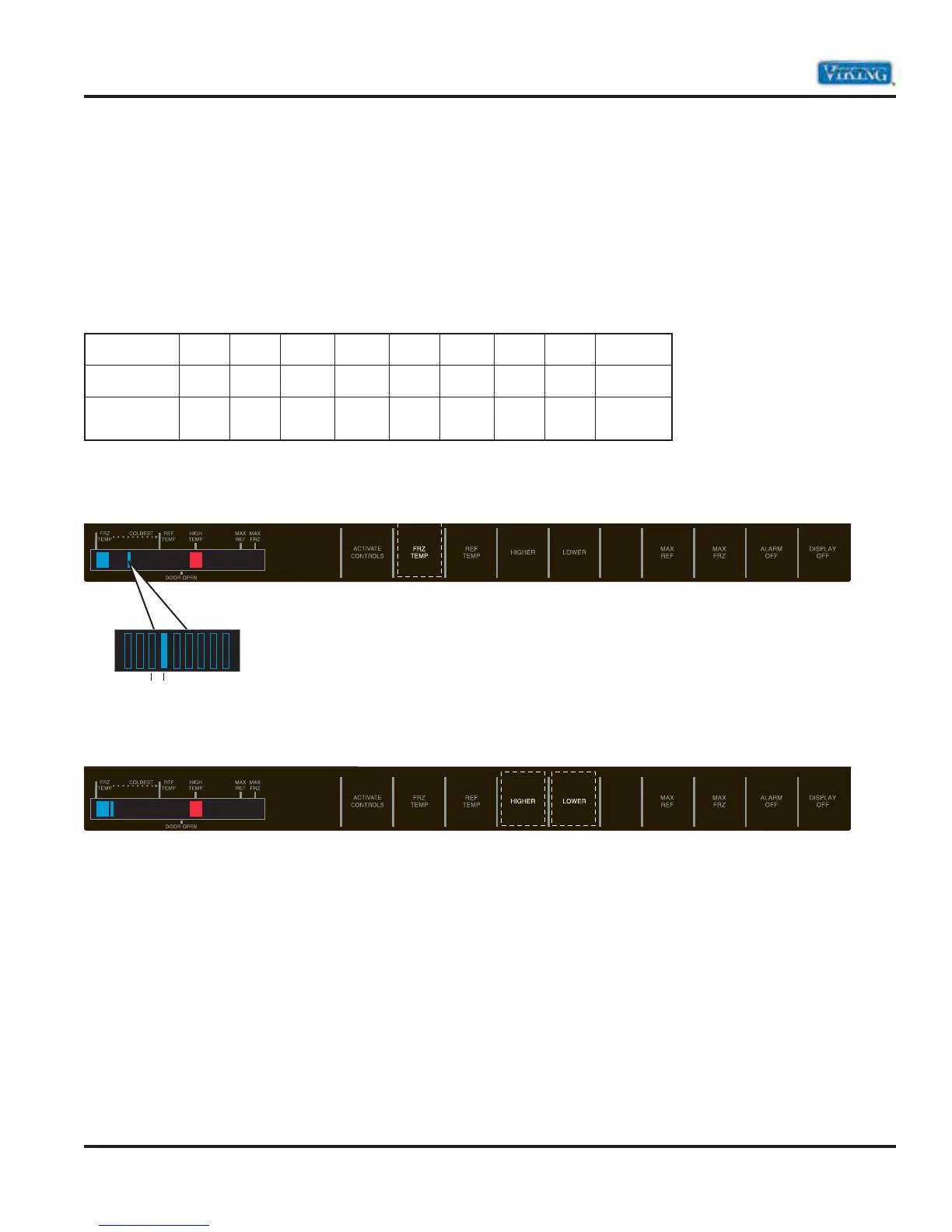
In Service Mode B, the Frz temp light will be illuminated. Depending on the type of Side-by-Side; bar 3 or 4
will be illuminated. The High Temp and the blue LED to the left of the Max Ref indicator will be illuminated.
If the proper offset setting for the model being serviced is not correct, use the Higher or Lower pad to set the
proper Freezer Offset as shown in the chart above.
43



 To Next Page