ASSEMBLY OF THE BIKE
12
3.3. Removing and Installing Lithium-ion Battery
⚠ WARNING!
Press and hold the power button on the battery for about 3 seconds until the LED light blinks before removing or installing
the battery on the bike. Refer to the detailed information on the warning label attached to the battery.
3.3.1.
Installing the battery on the bike
1.
Secure the bike and have the operator stand on the right
side of the bike in the opposite direction of the battery lock.
2.
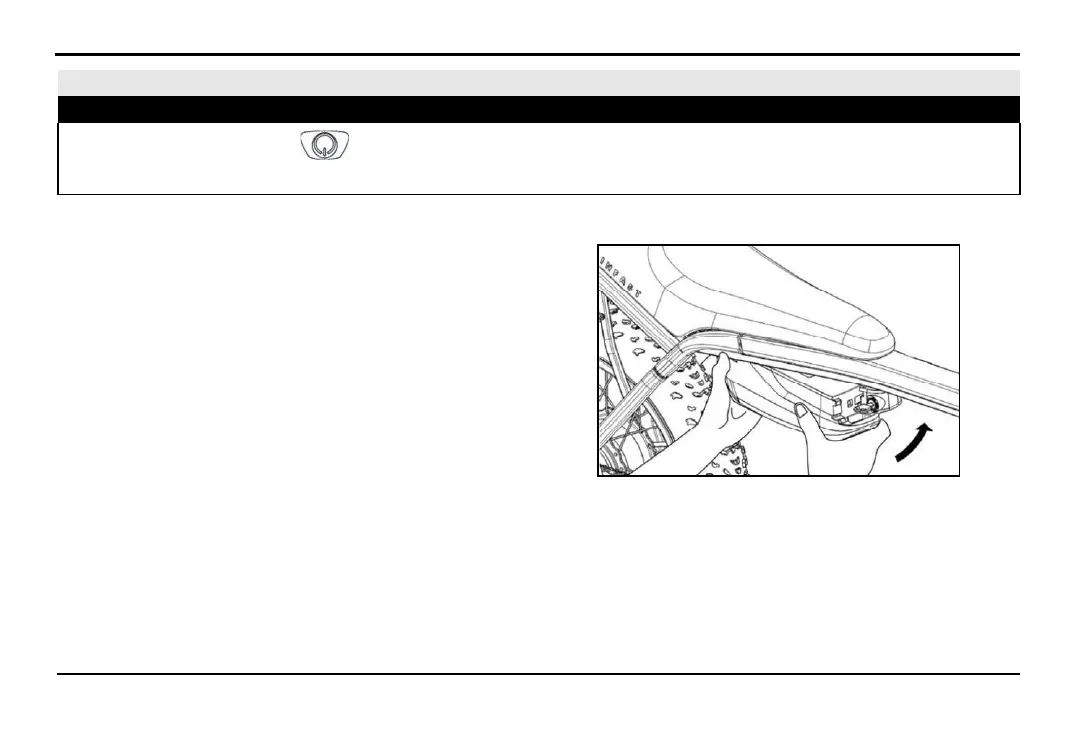
Hold the battery pack with both hands and insert the battery
tail into the slot.
3.
Align the grooves and slots on the battery pack with those
on the lock.
4.
Use your left hand to support the lower part of the battery
pack, and use your right hand to push the battery head into
the locking mechanism in the direction of the arrow from
the outside in. When you hear the "click" sound, it indicates
that the battery is fully engaged.



 To Next Page