33
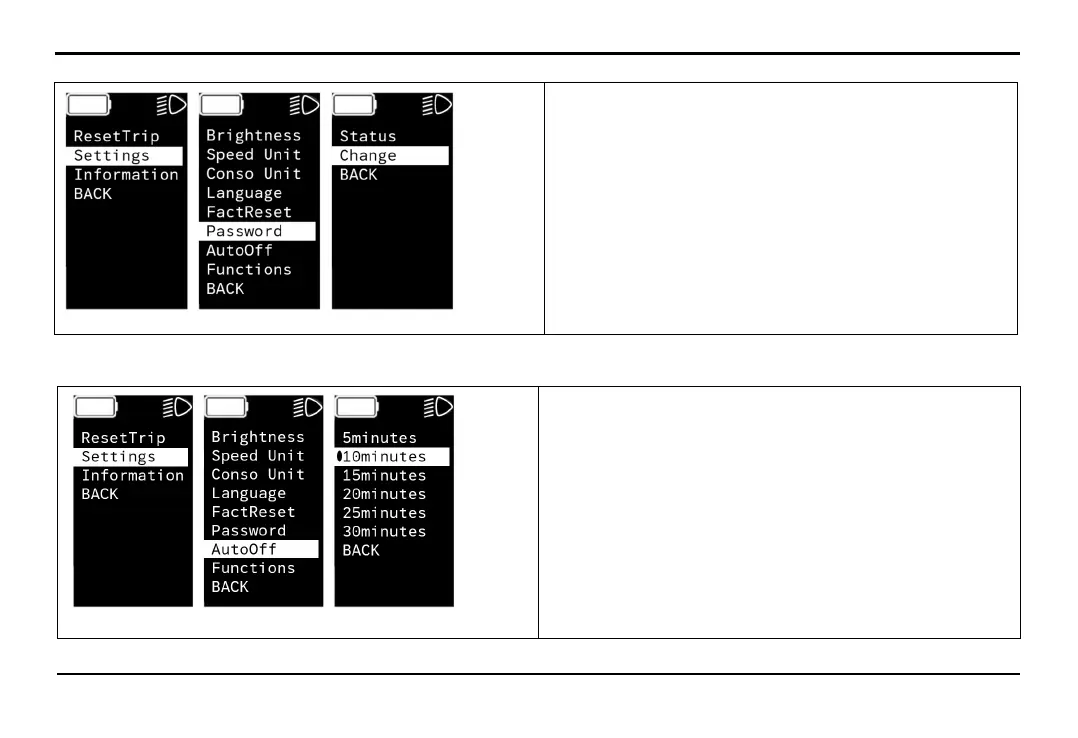
Select Settings -> Password -> Change to change the screen password.
EXPLORE THE BIKE'S FEATURES
+ Change: Input new password
Note: You must enter the old password before entering
the new password
Select Settings -> AutoOff to set to automatically turn off the HMI screen.
+ 5 minutes: Turns off after 5 minutes
+ 10 minutes: Turns off after 10 minutes
+ 15 minutes: Turns off after 15 minutes
+ 20 minutes: Turns off after 20 minutes
+ 25 minutes: Turns off after 25 minutes
+ 30 minutes: Turns off after 30 minutes
+ BACK: Return to the previous screen



 To Next Page