34
© 2005 directed electronics, inc.
aauuxxiilliiaarryy oouuttppuuttss ((ooppttiioonnss))
This system also supplies outputs that can control convenience
options such as remote control trunk release and window automa-
tion. Consult your dealer for available options for your system.
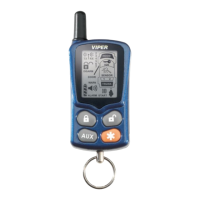
Channel 2 Trunk release: When connected, pressing for 1.5
seconds will remotely release the vehicle trunk lid.
Channel 3 auxiliary output: When connected, pressing and
will immediately activate this output to control an
additional convenience option.
Channel 4 auxiliary output: When connected, pressing and
will immediately activate this output to control an
additional convenience option.
Channel 5 auxiliary output: When connected, pressing and
will immediately activate this output to control an
additional convenience option.
Channel 6 auxiliary output: When connected, pressing and
will immediately activate this output to control an
additional convenience option.
The remote will respond with a page notification consisting of
one long beep and for 4-seconds displays the channel number on
the LCD screen. This occurs at the remote after the system has
received the command to activate any of the Auxiliary outputs.



 To Next Page