VX90 - User Manual
31
VI.1 - Accessing the Configuration Settings
To open the Settings Menu:
- Select the Settings Menu button.
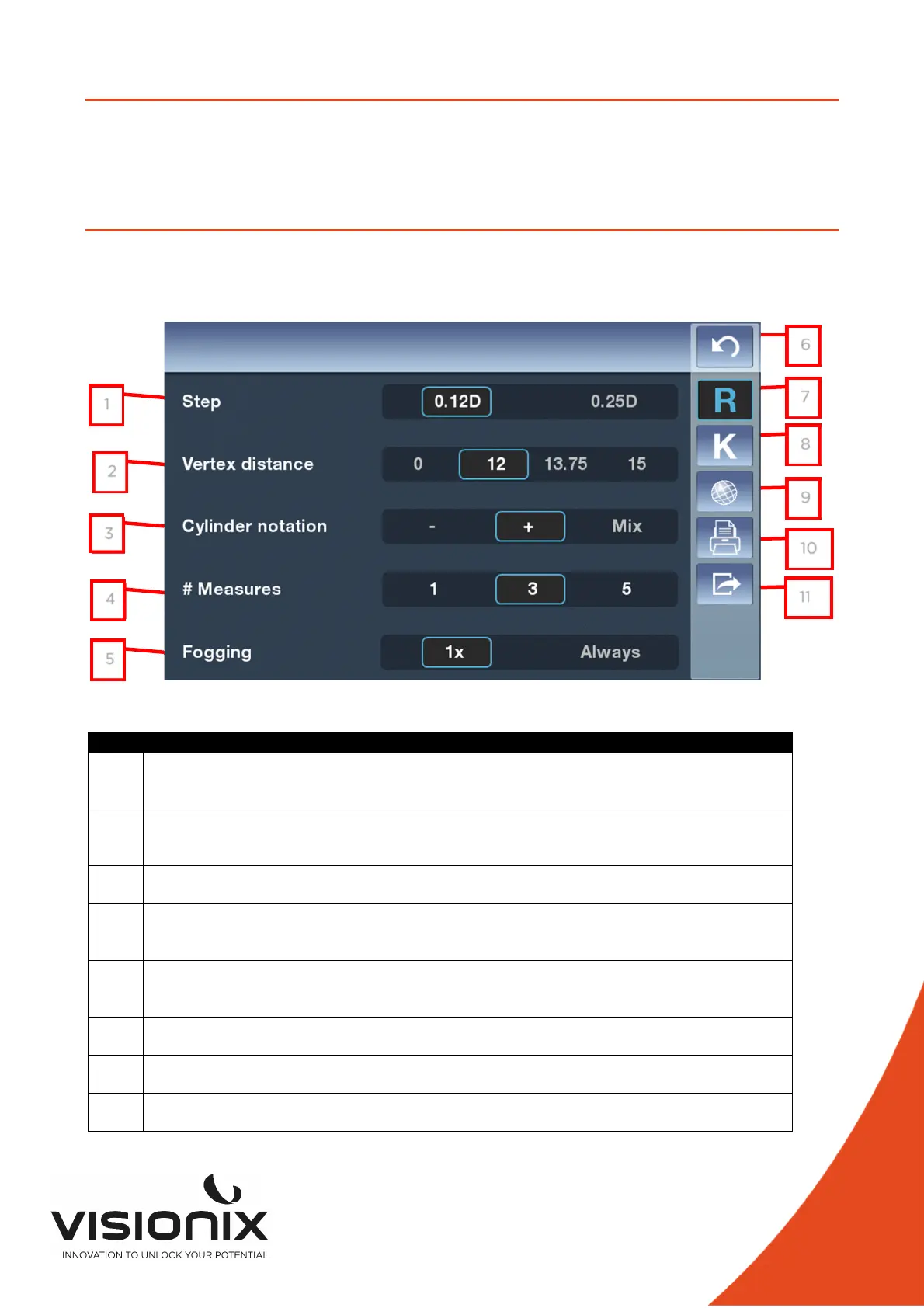
VI.2 - Overview of the Configuration Screen
The Configuration screen gives you access to the VX90's settings and system maintenance
functions.
2.a) Main Screen and Refraction Settings
N° Description
1 Step
To choose the step of the measurement, two choice possible 0.12 Diopter or 0.25
Diopter
2 Vertex Distance
Touch this button to modify the step of the VD, four choices possible (0, 12, 13.75,
15)
3 Cylinder Notation
To choose the sign of the cylinder, plus, minus or automatic
4 # Measures
To choose the numbers of measure in one diagnostic (for each eye and for each
value)
5 Fogging
To choose, if the Fogging is doing at the first measure or all measure when you
have selected # Measures > 0
6 Return
To return at the main screen
7 Refraction settings
To set the taking of the refraction measurement
8 Keratometry Settings
To set the taking of the Keratometry measurement
1
2
3
4
5
6
7
8
9
10
11



 To Next Page