VX90 - User Manual
32
9 Device Settings
To change the settings of the device
10 Print Settings
To set the printing
11 Export Settings
To set all information to export data to an external device
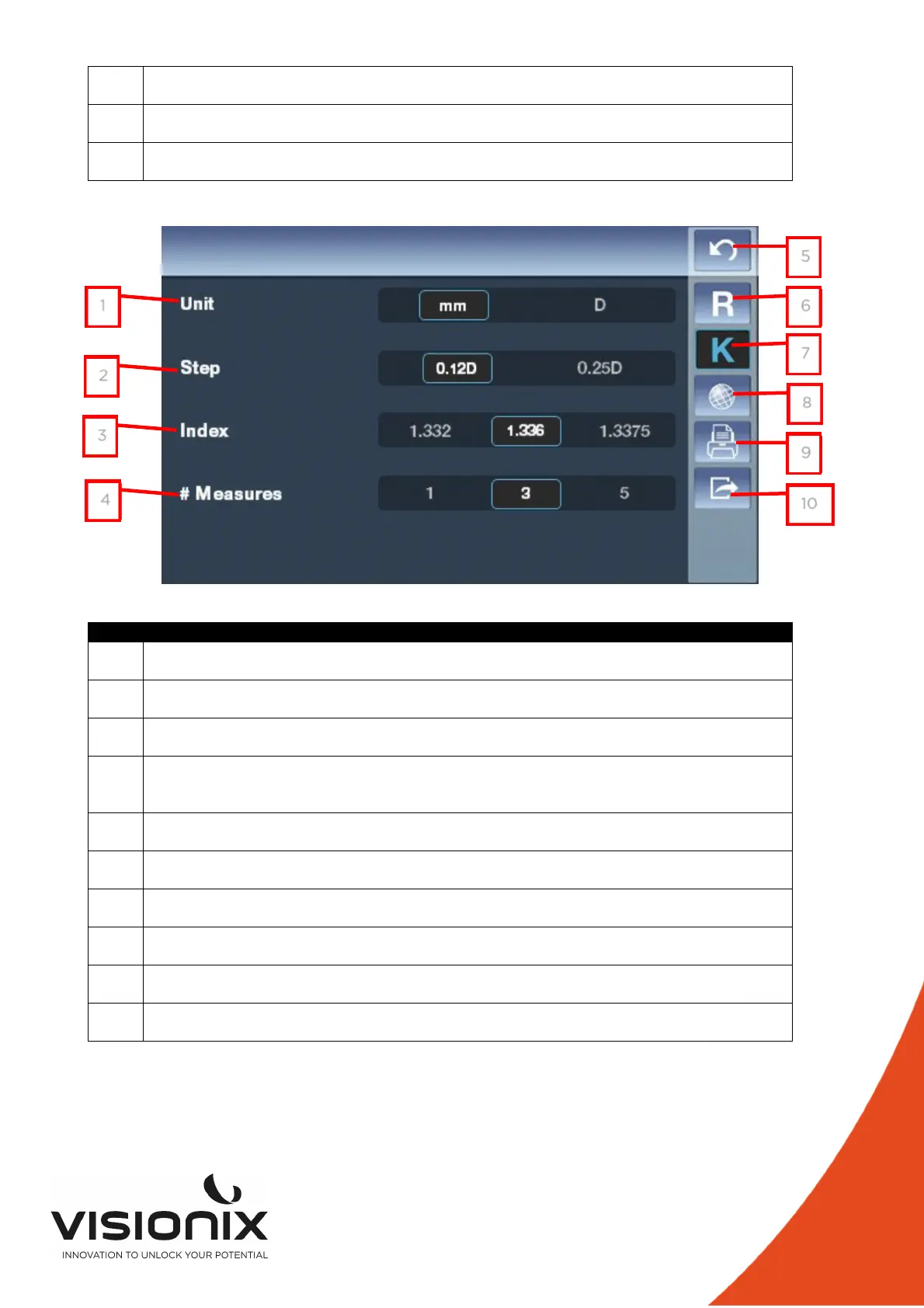
2.b) Keratometry Settings
N° Description
1 Unit
To choose if you want the keratometry in Diopter or in Millimeters
2 Step
To modify the step of the measure ( 0.12 Diopter Or 0.25 Diopter)
3 Index
To choose the step of measurement ( 1.332, 1.336, 1.3375)
4 # Measures
To choose the numbers of measure in one diagnostic (for each eye and for each
value)
5 Return
To return at the main screen
6 Refraction settings
To set the taking of the refraction measurement
7 Keratometry Settings
To set the taking of the Keratometry measurement
8 Device Settings
To change the settings of the device
9 Print Settings
To set the printing
10 Export Settings
To set all information to export data to an external device
1
2
3
4
5
6
7
8
9
10



 To Next Page