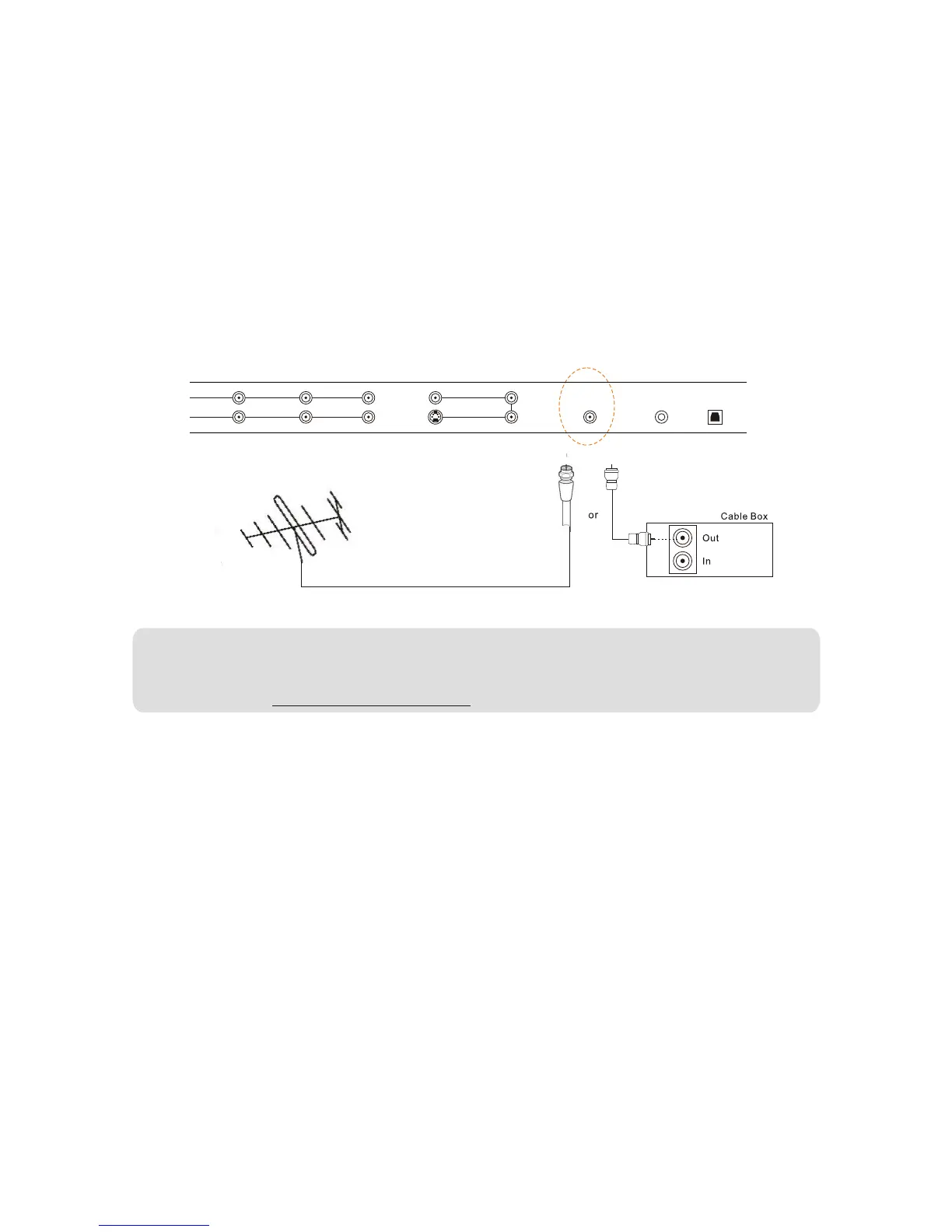
2.5 -Connecting Coaxial (RF)
There are several options for connecting your antenna(or cable for TV) to your new 32''HDTV-directly to the
TV or through your VCR. Based on your home theater configuration, you can decide which option is the right
one for you.
2.5.1-Using Your Antenna or Cable for TV
1.Turn off the power to your LCD TV.
2.Connect the coaxial (RF) connector from your Antenna or Cable to the AIR IN or CABLE IN connector in
the rear of your LCD TV.
3.Turn on the power to your LCD TV.
4.Select TV using the INPUT button on the front of the LCD TV or directly by pressing the TV button on the
Remote Control
Note:
a)Digital broadcasts are not available in all areas.
b)Make sure the antenna is correctly grounded.
c)For professional antenna installation, please contact VISIONQUEST Electronics at 1-877-851-2528 or
visit our website at WWW.VISIONQUESTCE.COM.
WWW.VISIONQUESTCE.COM
26


 To Next Page