4
1 Quick Installation / Setup
1.1 Key Features
USB 3.2 Gen 2 Data Transfer up to 10 Gbps
KVM - (Keyboard & Mouse) Sharing & Display Switch
LED Indicator
Power On/Off Switch
1 x KVM Switch // KVM **Host switch by Hot Key (111 / 211 / 222 / 122)
2 x DP Ports 4K @ 60Hz, 1 x HDMI - 4K/ 60Hz (When host system supports DP 1.4)
Supports Dual Power Delivery – PD 3.0, up to 100W Per System
1.2 Box Contents
1 x VT4900 USB-C KVM Docking Station
2 x USB-C to C Full Pin Cables
1 x Power Adapter -230W (20V/11.5A)
1 x Quick Start Guide
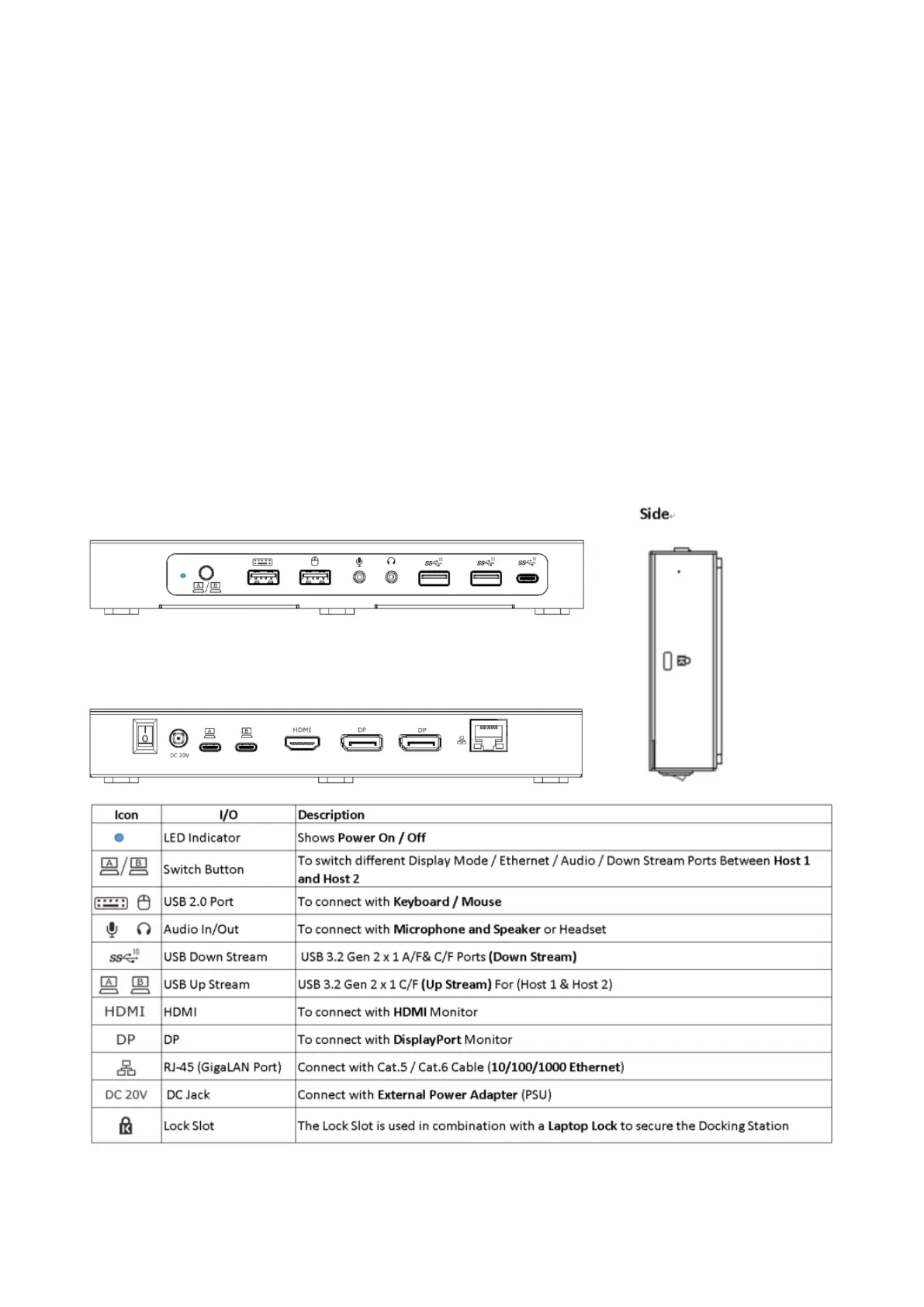
1.3 I/O Description
Front Panel
Rear Panel



 To Next Page