6
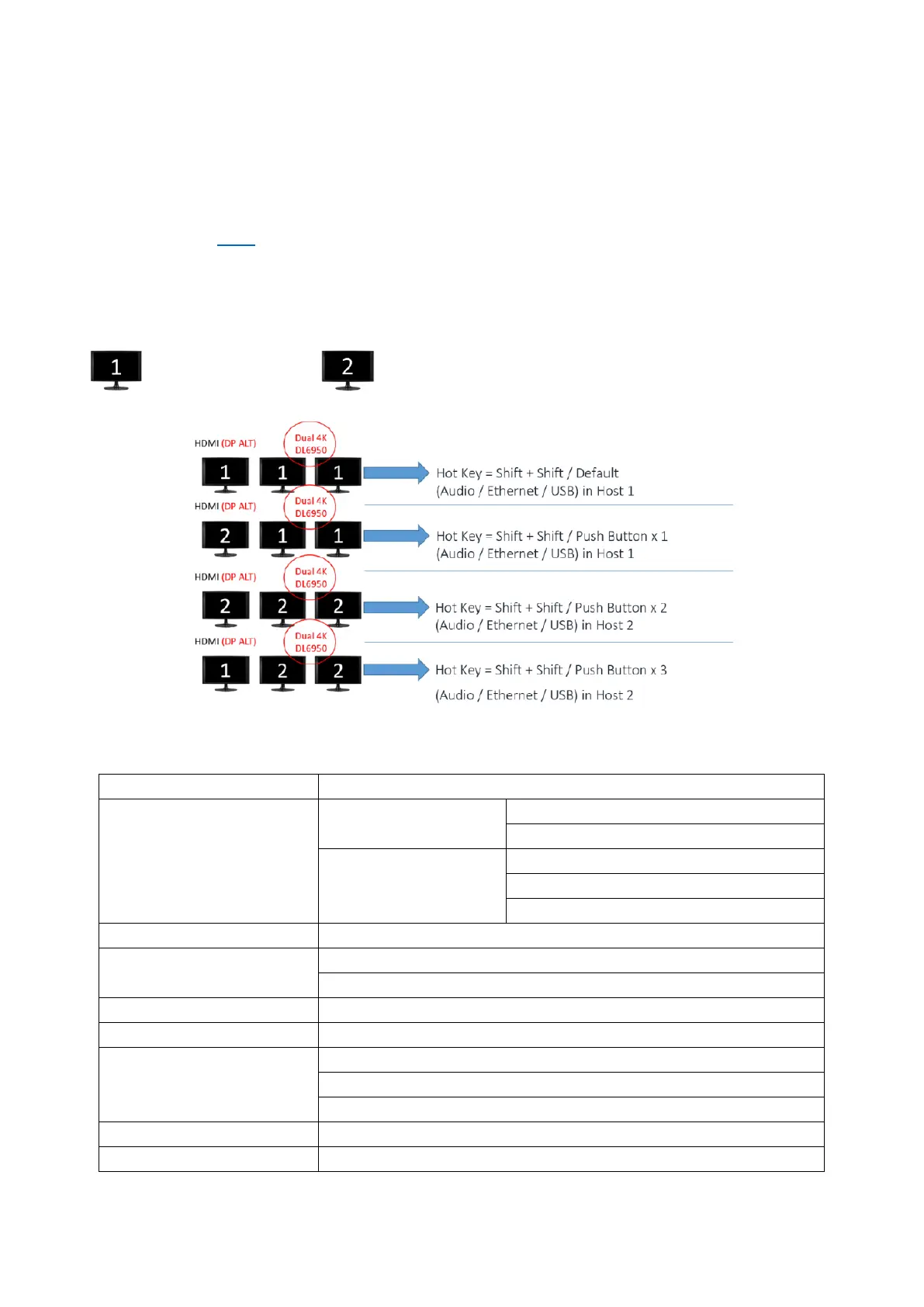
1.5 Host (Display) Switch Mode
- Switch by Button
Press once = Switch to next display mode
- Switch by Utility
As of version 3.2.5 Select “Switch UFP” = Switch to next display mode
- Switch by Hot Key
Press “Shift” (Default) two times = Switch to next display mode
-----------------------------------------------------------------------------------------------------------------------------------
= Display from Host 1 / = Display from Host 2
1.6 Specifications
Interfaces
Upstream:
USB 3.2 Gen 2 USB Type-C Cable (1M/5A) x2
USB Type-C × 2 (3.2 Gen 2 x1)
Downstream:
USB 3.2 Gen 2 Type-A ×2 / USB 2.0 Type-A x2
USB 3.2 Gen 2 Type-C x1 | Audio x2 (In and Out)
HDMI ×1 / DP x2
Max. Resolutions
HDMI : 4096 x 2160 / 60Hz (when supported by host and display)
DP: 4096 x 2160 / 60Hz
Windows 10 and later, Mac OS X 10.10.2 and later
Environmental
Operating temperature: 0°C~60°C
Storage temperature: -20°C~60°C
Weight 676g



 To Next Page