Vitrek V4 – Electrical Safety Tester USER MANUAL
9
Do not use the instrument in a place where a strong magnetic or electric field exists, as they may distort
the measurements.
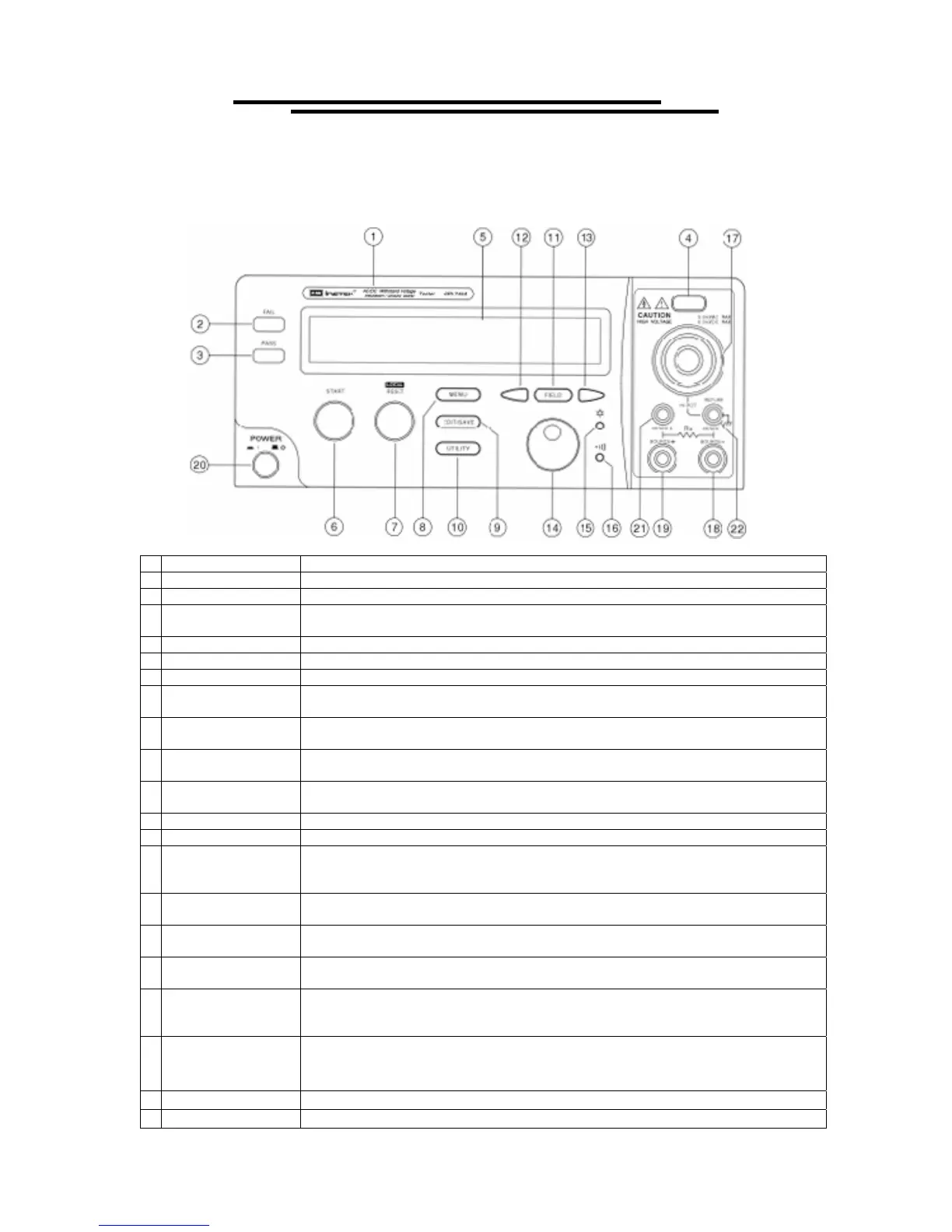
4. PANEL INTRODUCTION
4-1. Front Panel
1 Model Number Model number and description
2 FAIL Indicator LED The red LED indicates failure of test procedure
3 PASS Indicator LED The green LED indicates pass of test procedure
4 CAUTION Indicator
LED
During test the red LED will flash to indicate dangerous.
5 Main Display LCD The LCD displays all message about test procedure.
6 START Button Press the green button to start a test procedure.
7 RESET Button Press the red button to reset/stop a test procedure.
8 MENU Key
When you press the MENU key, the status becomes MENU and you can browse all
groups.
9 EDIT/SAVE Key
When you press the EDIT/SAVE key, the status EDIT is active and you can edit this
step or setup. Press the EDIT/SAVE key again will save this step or setup.
10 UTILITY Key
When you press the UTILITY key, the status UTILITY is active and you can view all
the utility setups.
11 FIELD Key
When you edit the test step, press the FIELD key to change the active parameter of
stop.
12 Left Arrow Key Press the arrow key to adjust knob’s resolution.
13 Right Arrow Key Press the arrow key to adjust knob’s resolution.
14 Knob
If status EDIT is active, turn the knob to increase or decrease the value of active
parameter.
If status MENU is active, turn the knob to increase or decrease active Step.
15 LCD Backlight
Adjustment
Turn the VR to adjust the LED backlight of LCD.
16 Buzzer Volume
Adjustment
Turn the VR to adjust the buzzer volume.
17 High Voltage Output
Seat
High voltage output terminal.
18 SOURCE-Terminal
(only for Ground
Bond Test)
High current terminal for Ground Bond test.
19 SOURCE+ Terminal
(only for Ground
Bond Test)
High current terminal for Ground Bond test.
20 Power Switch Press the power switch to turn on the tester.
21 SENSE+ Terminal Voltage Terminal for Ground Bond test.
Test Equipment Depot - 800.517.8431 - 99 Washington Street Melrose, MA 02176
FAX 781.665.0780 - TestEquipmentDepot.com



 To Next Page