D
D
D
L
L
L
P
P
P
P
P
P
r
r
r
o
o
o
j
j
j
e
e
e
c
c
c
t
t
t
o
o
o
r
r
r
—
—
—
U
U
U
s
s
s
e
e
e
r
r
r
’
’
’
s
s
s
M
M
M
a
a
a
n
n
n
u
u
u
a
a
a
l
l
l
Adjusting the Projector Level
Take note of the following when setting up the projector:
• The projector table or stand should be level and sturdy.
• Position the projector so that it is perpendicular to the screen.
• Ensure the cables are in a safe location. You could trip over them.
1.
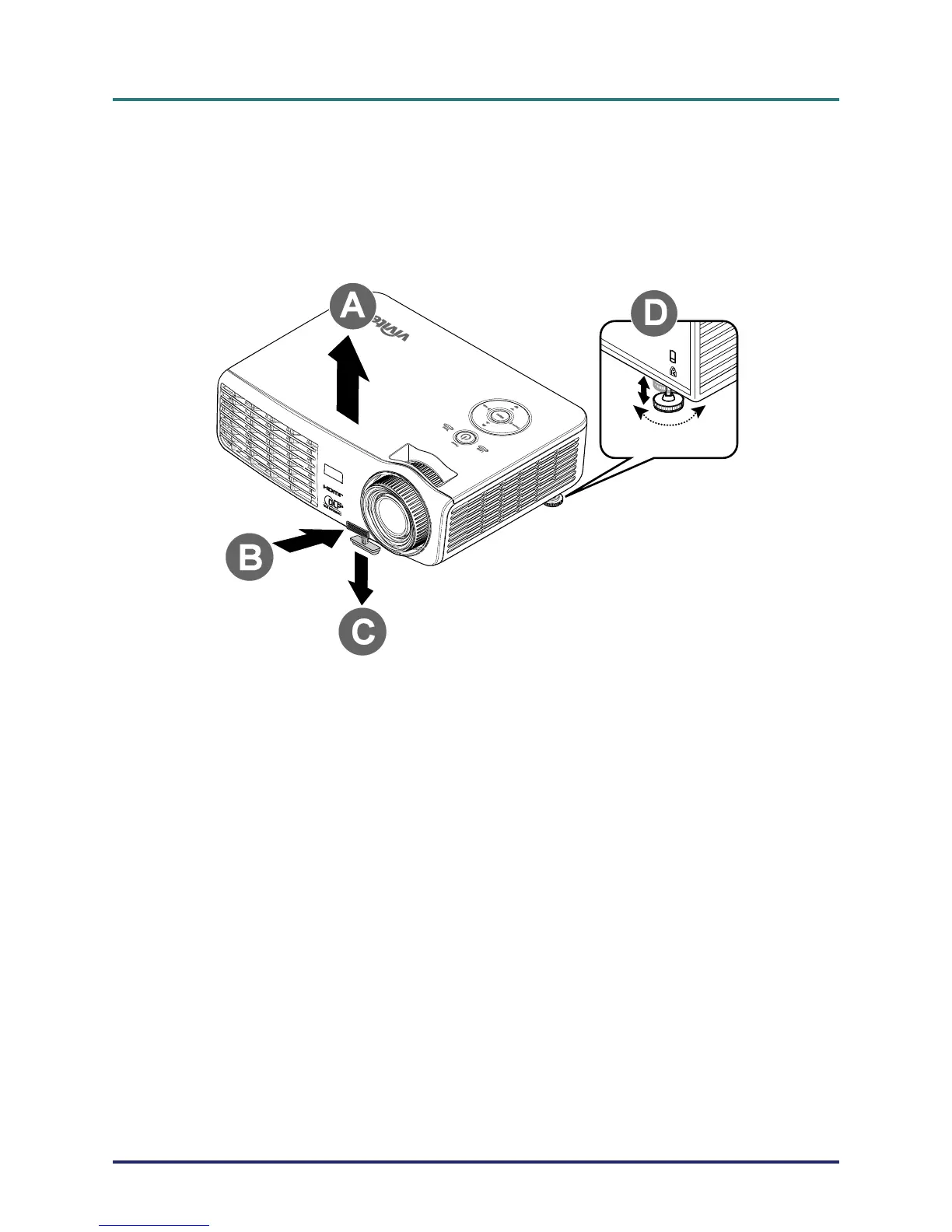
To raise the level of the projector, lift the projector [A] and press the height-
adjuster button [B].
The height adjuster drops down [C].
2.
To lower the level of the projector, press the height-adjuster button and push
down on the top of the projector.
3.
To adjust the angle of the picture, turn the tilt-adjuster [D] right or left until
the
desired angle has been achieved.
– 14 –



 To Next Page