D
D
D
L
L
L
P
P
P
P
P
P
r
r
r
o
o
o
j
j
j
e
e
e
c
c
c
t
t
t
o
o
o
r
r
r
—
—
—
U
U
U
s
s
s
e
e
e
r
r
r
’
’
’
s
s
s
M
M
M
a
a
a
n
n
n
u
u
u
a
a
a
l
l
l
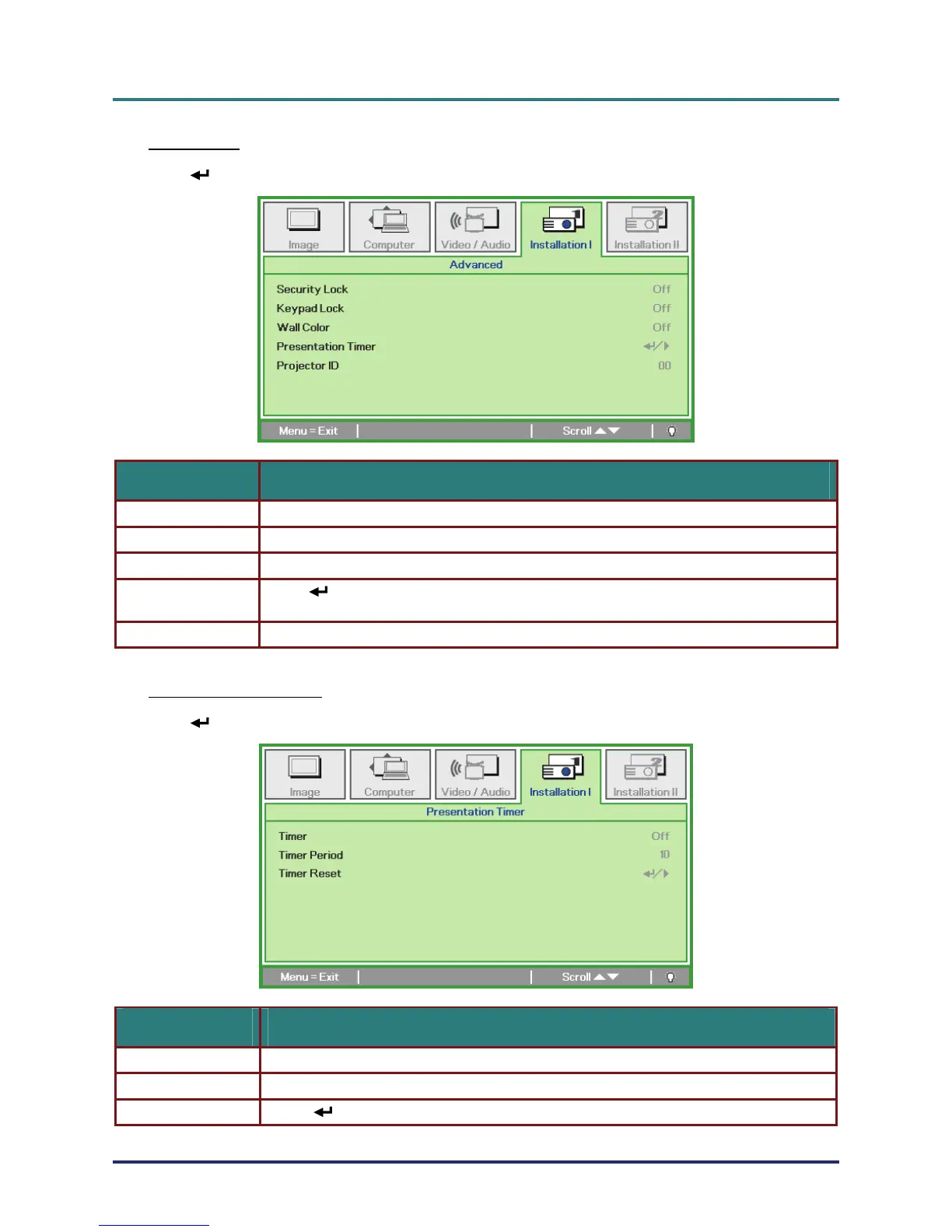
Advanced
Press (Enter) / ► to enter the Advanced sub menu.
ITEM DESCRIPTION
Security Lock Press the cursor ◄► button to enable or disable security lock function.
Keypad Lock Press the cursor ◄► button to enable or disable keypad lock function.
Wall Color Press the cursor ◄► button to select different wall color setting.
Presentation Timer
Press
(Enter) / ► to enter the Presentation menu. See Presentation Timer on page
28.
Projector ID
Press the cursor ◄► button to adjust Projector ID
Presentation Timer
Press (Enter) / ► to enter the Presentation Timer sub menu.
ITEM DESCRIPTION
Timer Press the cursor ◄► button to enable or disable presentation timer function.
Timer Period Press the cursor ◄► button to adjust the display timer period.
Timer Reset Press (Enter) / ► to reset presentation timer counter.
– 28 –



 To Next Page