D
D
D
L
L
L
P
P
P
P
P
P
r
r
r
o
o
o
j
j
j
e
e
e
c
c
c
t
t
t
o
o
o
r
r
r
–
–
–
U
U
U
s
s
s
e
e
e
r
r
r
’
’
’
s
s
s
M
M
M
a
a
a
n
n
n
u
u
u
a
a
a
l
l
l
Resetting the Lamp
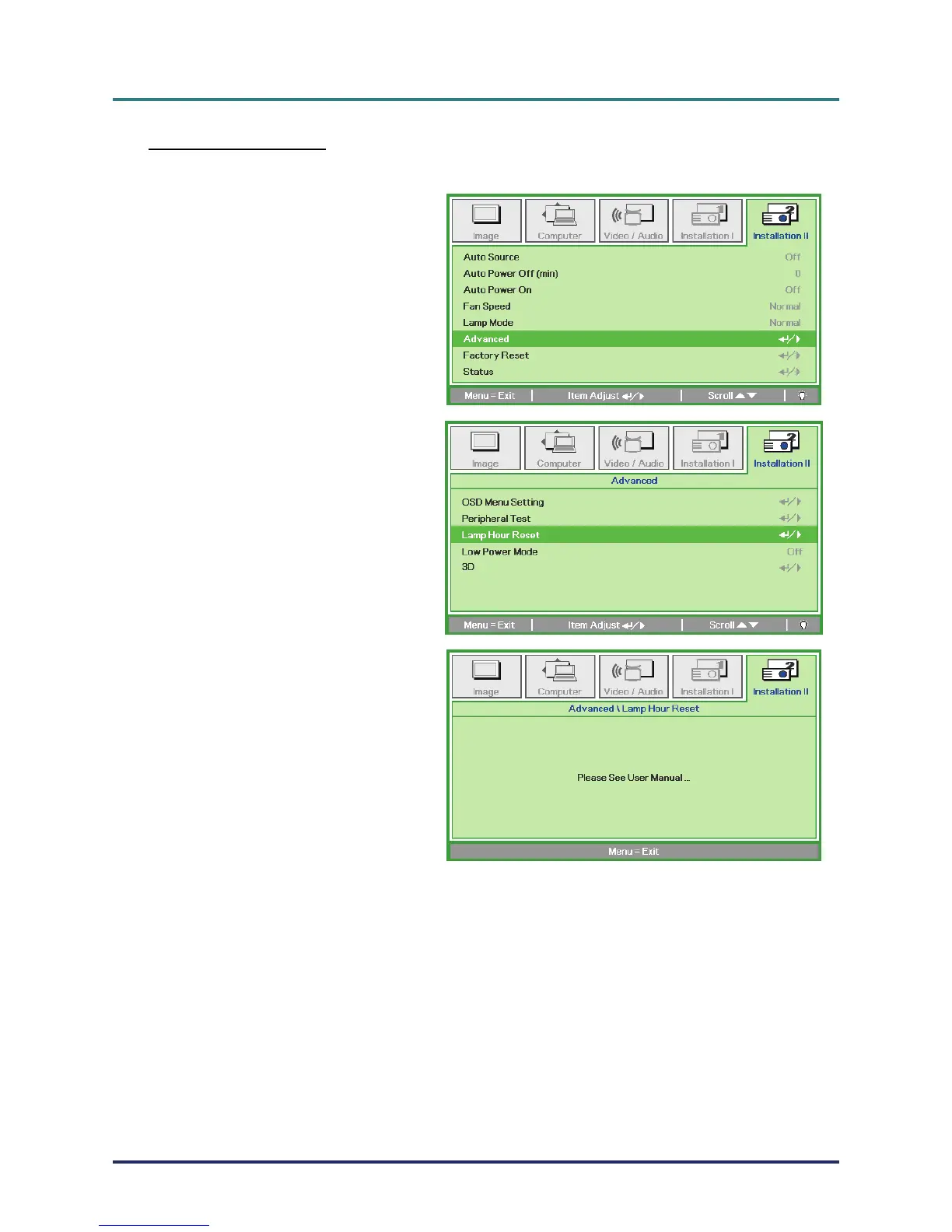
After replacing the lamp, you should reset the lamp hour counter to zero. Refer to the following:
1.
Press the MENU button to open
the OSD menu.
2.
Press the cursor ◄► button to
move to the Installation II menu.
Press the cursor button to move
down to Advanced.
3.
Press the cursor ▼▲ button to
move down to Lamp Hour Reset.
4.
Press the cursor ► or Enter but-
ton.
A message screen appears.
5.
Press ▼▲◄► buttons to reset
the lamp hour.
6.
Press the MENU button to get
back to Installation II.
– 37 –



 To Next Page