30
5
E3D320VX/E3D420VX/E3D470VX
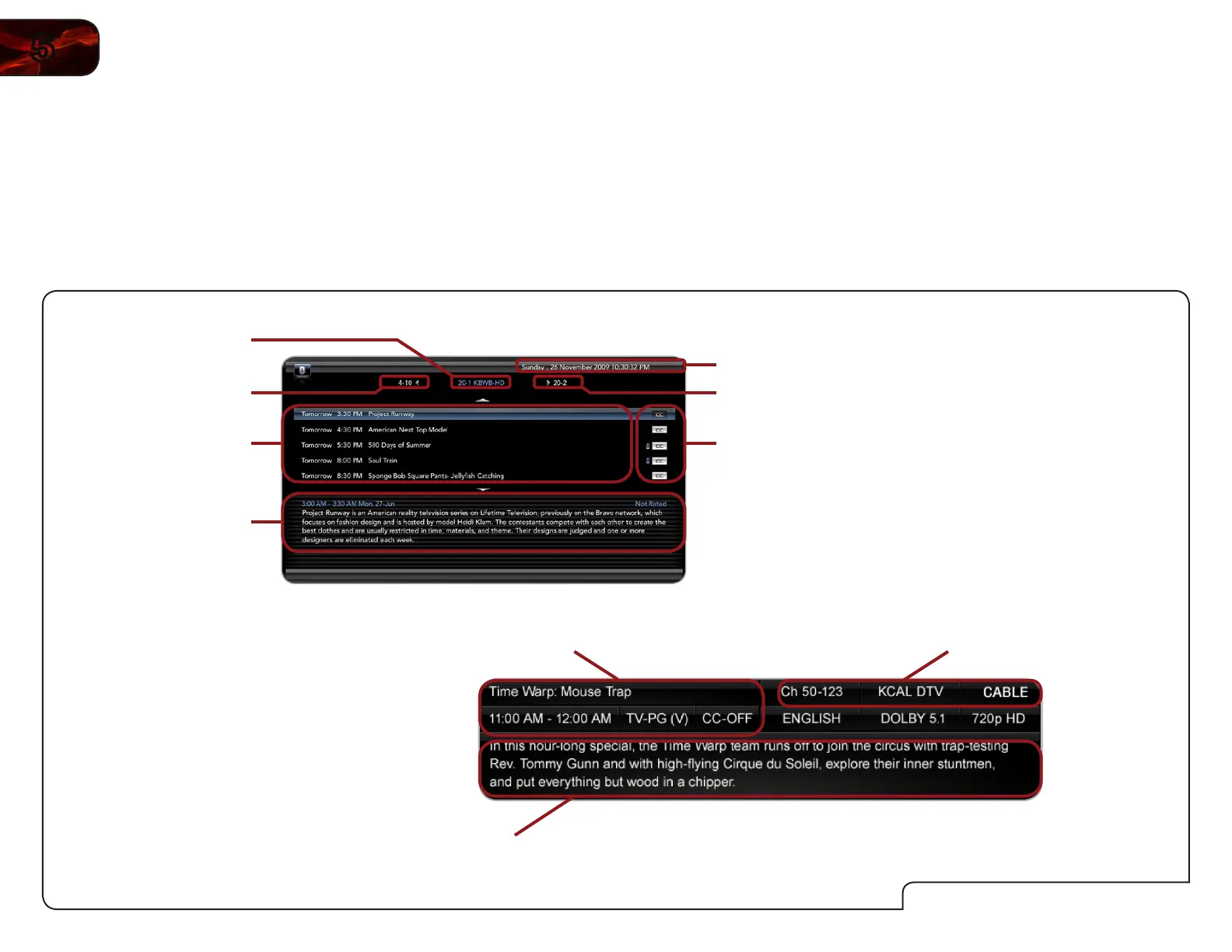
Using the Digital Episode Guide
Your TV features an on-screen digital episode guide. This guide displays program
information broadcast by over-the-air digital television stations as well as the
current time and date.
To use the digital episode guide, press the GUIDE button on the remote.
While viewing the digital episode guide, use the Left/Right Arrow buttons to
change the channel.
UsingtheInfoWindow
The Info Window can be displayed by pressing the INFO button on the remote:
• PresstheINFObuttononetimetodisplaychannelandinput
information.
• PresstheINFObuttontwotimestodisplaytheprogramtitleand
closedcaptioninginformation.
• PresstheINFObuttonthreetimestodisplaytheprogramdescription.
DigitalEpisodeGuide&InfoWindow
ProgramDescription
UpcomingPrograms
ClosedCaptioning/
ChannelLock
Information
Date/Time
NextChannel
PreviousChannel
CurrentChannel
ProgramDescription
ProgramTitle/CCInformation
Channel/InputInformation



 To Next Page