SETUP
1
2
5
8
0
3
4
6
7
9
ESC
SELECT
V1091529
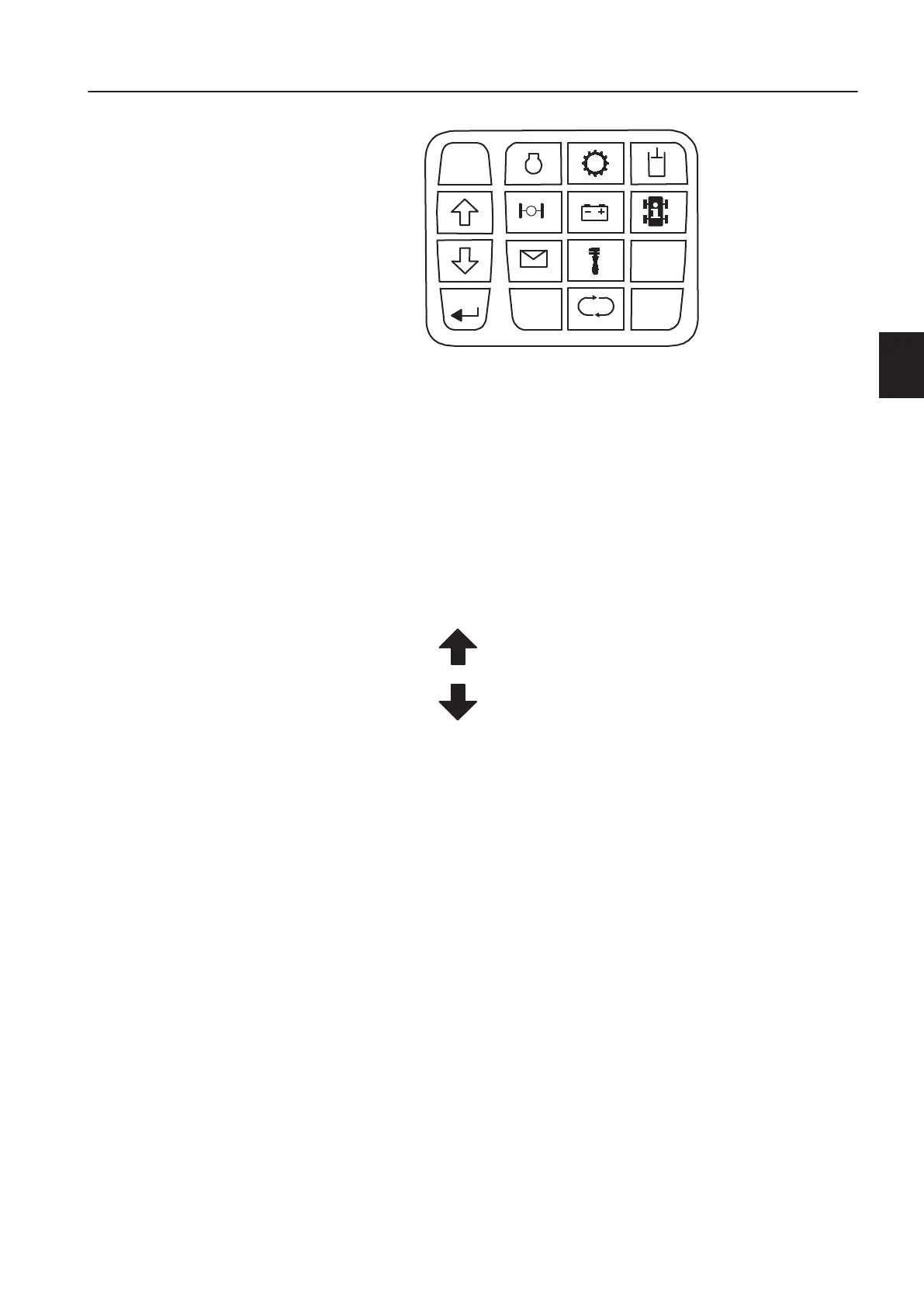
1 Engine
2 Transmission
3 Hydraulics
4 Axles/Brakes
5 Electrical system
6 Machine information
7 Vehicle messages
8 Service
9 Settings
0 Cycle information
ESC The key is used to go back to the previous display
figure and to acknowledge alarms.
Key to scroll up in menu.
Key to scroll down in menu.
SELECT Key to select.
Also used to get more information when an
information or control message is shown on the
operating information display unit.
0, 1...9 When entering numerical values, for example,
when setting date or entering theft protection code,
the number down on the bottom right of the keys
applies.
Display unit
When the engine is started and in normal operating mode, the
operating display is shown on the information display unit. There
are three or four versions of the operating display; operating
display 1, operating display 2, and operating display 3 are always
shown. Operating display 4 is shown if the machine is equipped
with On-Board Weighing.
To alternate between operating displays, use the arrow keys.
Operating display 1
The fields in operating display 1 show the following:
Instrument panels
Display unit
53



 To Next Page