||
03 Audio and media
03
58
Reading a text message
17
The car mirrors the connected mobile
phone's messages and only shows these
when the mobile phone is connected.
If a connected telephone receives a text mes-
sage the symbol
is shown at the top of
the screen.
1. Press TEL and then press OK/MENU in
order to access
Phone menu.
2.
Turn TUNE to
Messages and press OK/
MENU.
3. Turn TUNE to the message to be read
out and press OK/MENU.
> The message is shown on the screen.
4. Pressing OK/MENU accesses the mes-
sage menu with options to e.g. allow the
system voice to read out the message,
call the sender of the message or delete
the message.
If the main source TEL is already active then
a pop-up menu with new messages is shown
on the screen. Pressing OK/MENU shows
the selected message while the system voice
reads it out at the same time. The reading is
interrupted with EXIT.
The pop-up menu and the notification sound
can be switched off under
Phone menu
Message notifications.
NOTE
To show the connected mobile phone's
messages in the car, mirroring must be
accepted in the mobile phone when it is
connected. Depending on the mobile
phone, this can be activated by means of
the following:
•
a pop-up box or a notification is
shown and accepted in the phone.
•
accept sharing of information in the
phone's settings for the Bluetooth
®
connection to the car.
In some cases it may be a requirement
that the mobile phone is disconnected and
reconnected to the car in order for mirror-
ing to be activated.
Related information
•
Bluetooth
®
handsfree phone - audio set-
tings (p. 59)
•
Menu overview - Bluetooth
®
handsfree
(p. 88)
Bluetooth
®
handsfree phone -
overview
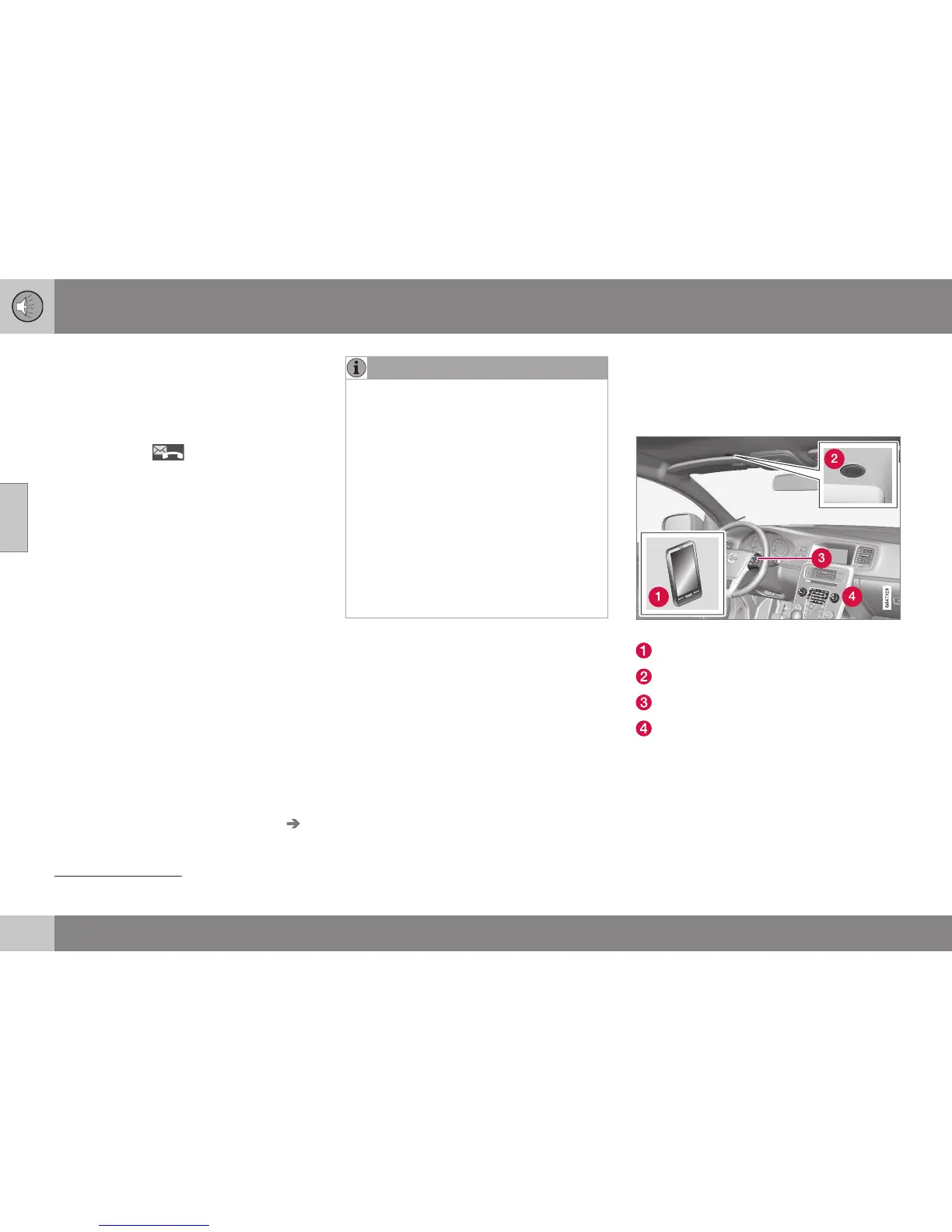
System overview for Bluetooth
®
handsfree
phone.
System overview
Mobile phone
Microphone
Steering wheel keypad
Centre console control panel
Related information
•
Audio and media - operating the system
(p. 28)
•
Connecting and disconnecting a
Bluetooth
®
device (p. 53)
17
Not supported by all mobile phones.





 To Next Page