路中的位置。
如果放大器模型被关闭,打开该选择器就会开启放大器模型的开关。
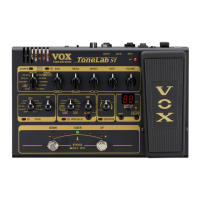
d. GAIN control
This adjusts the gain of the selected amp model. In OPTION parameter
setting mode, this control selects the cabinet model.
If the cabinet model is turned off, turning this control in OPTION
parameter setting mode will turn the cabinet model on.
d、增音控制器
它用来调节放大器模型的增益。在 OPTION 参数设置模式,该控制器选择音箱的
模型。
如果音箱模型被关闭,在 OPTION 参数设置模式下调节该控制器就会打开音箱模
型开关。
e. TREBLE, MIDDLE, BASS controls
These adjust the tone of the high, mid, and low frequency ranges. In OPTION
parameter setting mode, the TREBLE control adjusts the presence and the
MIDDLE control adjusts the noise reduction.
The way in which these controls affect the tone will depend on the amp
model you’ve selected.
NOTE: Depending on the selected amp model, there may be almost no sound
if you turn all three of these controls to the far left.
e、高中低频控制器
这些用来调节高中低频范围的音色。在 OPTION 参数设置模式下,TREBLE 用来调
节现场气氛,而 MIDDLE 用来调节噪音衰减。
这些控制器影响音色的方式取决于你所选择的放大器模型。
注意:根据所选择的放大器模型,如果你把控制器调节的太靠左,那么可能会导
致没有声音。
f. VOLUME control
This adjusts the volume of the program.
HINT: You can adjust the volume of the program even when the amp model
is turned off.
f、音量控制
该旋钮调节编程音色的音量。
提示:即使在放大器模型被关闭的情况下,你仍然可以调节音色的音量。
2. Pedal section
Here you can make settings for the pedal effects.
For details on each effect, refer to “Pedal types” (p.18).

 To Next Page
 Loading...